
Skype us at scommerce.mage or call +44(0)1483 487746

Loading...

Magento 2 Perfect Audience Tracking
Compatible with Magento 2 community and enterprise 2.3.3 - 2.4.x including cloud edition
Magento 2 Perfect Audience Tracking extension lets you create Facebook and web retargeting campaigns quickly that bring back your lost customers and get you more sales. This Magento 2 plugin integrates your Perfect Audience code across your Magento 2 website so you can get started without editing code.
- Bring back lost web visitors with Facebook ads on Facebook, banner ads across the web
- Integrate the perfect audience tracking with your Magento store
- Easy to install and manageable through configurations
- Retarget lost customers

Free Support
up to 60 days

Free Upgrades
up to 1 year

Fully open source
Product Description
Magento 2 Perfect Audience Page as well Conversion Tracking
Compatible with Magento 2 community and enterprise 2.3.3 - 2.4.x including cloud edition
This module allows you to add Perfect Audience Tag Tracking on your Magento 2 webstore. This is the easiest way to retarget lost customers across Facebook. Perfect Audience is a retargeting platform that lets marketers effortlessly bring back lost web visitors with Facebook ads on Facebook, banner ads across the web, and ads on Twitter. It helps to get more sales and conversions by using their audience data to target ads with pinpoint precision. The extension helps to integrate the perfect audience tracking with your magento store. Its easy to install and mangeable through configurartions.
Here are the main features of this module-:
- It allows you to implement Perfect Audience Page tracking tag on your site
- It gives you easy access to manage all the related configurations from admin panel
- It integrates the conversion tracking effortlessly and accurately without need to modify any template
- It allows you to track individual products in Perfect Audience which can be further used for Dynamic Remarketing
- It works with all the latest Magento 2 Enterprise and Community versions
- It fully supports multistore
- This module can be completely disabled whenever required via system configuration in admin
Same version of Magento 1 module can be bought using the following link https://www.scommerce-mage.co.uk/magento-perfect-audience-tracking.html
Compatible with Magento 2 community and enterprise 2.3.3 - 2.4.x including cloud edition
We offer 60 days of free support and 12 months of free upgrade for any standard Magento site when you buy this extension. You can also get our installation service for a small fee. If you want more benefits, you can purchase our 12 months of free premium support and free lifetime upgrade package. Please contact us if you need any assistance or customization for this extension. We will reply to you within 48 hours. We may also offer you a special deal or a free solution if we like your idea.
** Please refer to our FAQ or T&C section for running our extensions on multiple domains or sub-domains
FAQ
Q. How can I get license key for my development website?
A. Please use the same license as live site provided with the order confirmation email on the staging site and ensure you have the latest version of scommerce/core installed i.e 2.0.9.
Once added go to Stores>Configuration>Scommerce Configuration>Core and click on verify. Once verified the license will start working on your staging site.
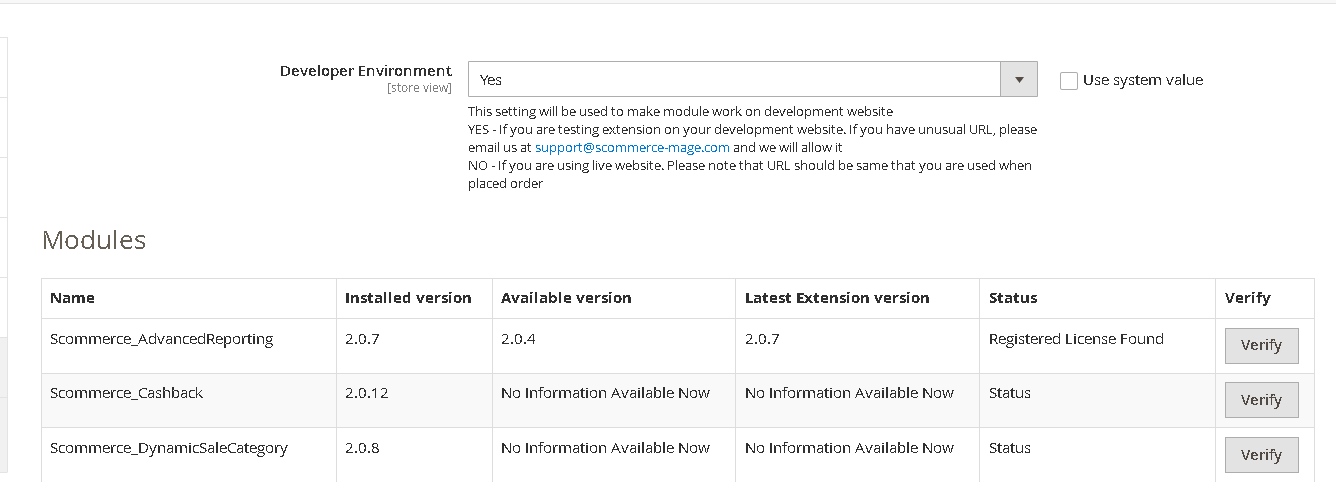
Once added go to Stores>Configuration>Scommerce Configuration>Core and click on verify. Once verified the license will start working on your staging site.
Q. Can I test the extension before buying?
A. Unfortunately we can't provide you extension for testing purposes but we have demo available for most of our extensions and happy to provide full refund if the extension doesn't work
Q. Can I request for customisation on your extensions?
A. Yes we do provide all sort of customisation for our clients at the reasonable rates. And if we believe the customisation will help our product then we also provide great discount on the customisation
Q. I have multiple websites/stores, each with a unique domain. Do I need a separate license key for each live domain?
A. Yes, each live domain requires its own license key. Our license keys are URL specific and each live domain, subdomain, subfolder requires a separate key. If you’re running multiple websites from the same Magento instance, we offer a 30% discount when purchasing license keys for two or more domains in a single order. To receive a coupon code, please contact us at support@scommerce-mage.com.
Q. How can I upgrade my extension to the latest version?
A. The upgrade process depends on your platform and how the extension was installed:
For Magento 2 (Installed via Composer)
If your extension is within the free upgrade period (12 months from the purchase date), you can update directly via the command line. Simply run the composer require command for the specific module to fetch and install the latest available version. If you are outside the free upgrade period, you will need to buy an upgrade using the link below.
For Magento 1 or Magento 2 (Installed manually via app/code)
If your extension is within the free upgrade period (12 months from the purchase date), you can simply download the latest available version by logging into our website and navigating to My Account > My Downloadable Products. If you are outside the free upgrade period, you will need to buy an upgrade using the link below.
Purchase an Upgrade:
https://www.scommerce-mage.com/magento-extension-installation-service.html
Important Note for Manual Upgrades: Before uploading the latest version, we highly recommend deleting all existing files and folders of our extension from your website. We may have deprecated or removed certain files in the update, and keeping the old ones could cause conflicts on your website.
Q.Where can I download the extension files?
A. Please login into your account on our website and go to the download link under my account section to download the extension package.
Q.Can you provide a key that works for our development (NOT PRODUCTION) environment which will work on a dynamic URL, for example, 12334.gitpod.com and 4567.gitpod.com?
A. Unfortunately it is not possible to generate license keys based on the dynamic URLs.
License keys need to be generated per domain or subdomain whether it is production or non-production.
Q. How can I manually uninstall your module?
A. Please follow the below steps -:
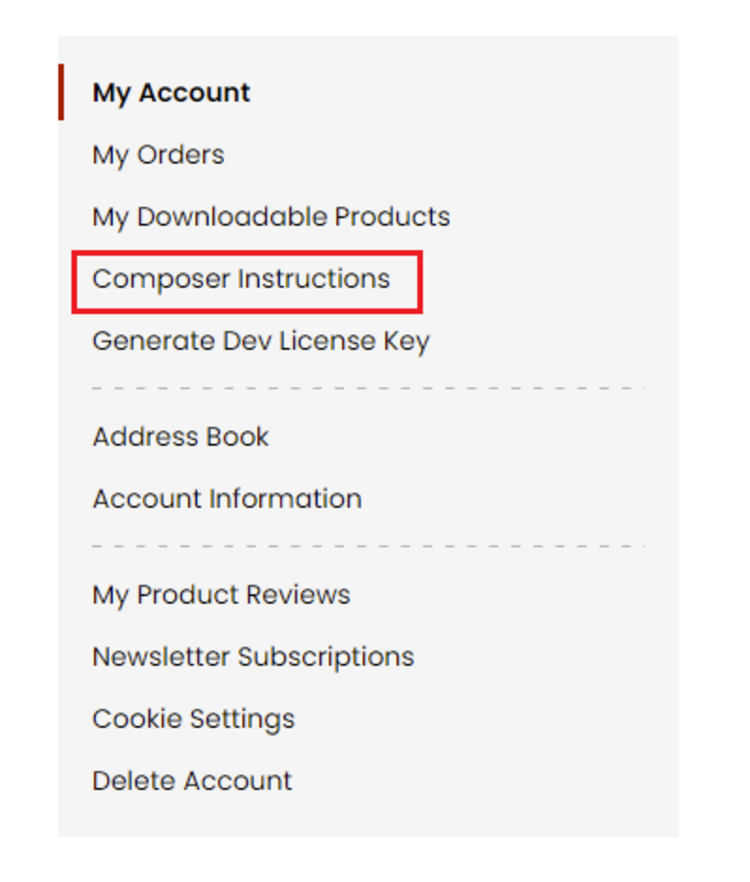
Step 1: Navigate to our store and login to your account. Then go to the My Account Section, on the left menu click on Composer Instructions.
 Step 2: Next, run the config commands shown on the top of the page then click on the extension that you want to install. A composer require command will be revealed in the dropdown menu. Run the command then clear caches to complete the installation.
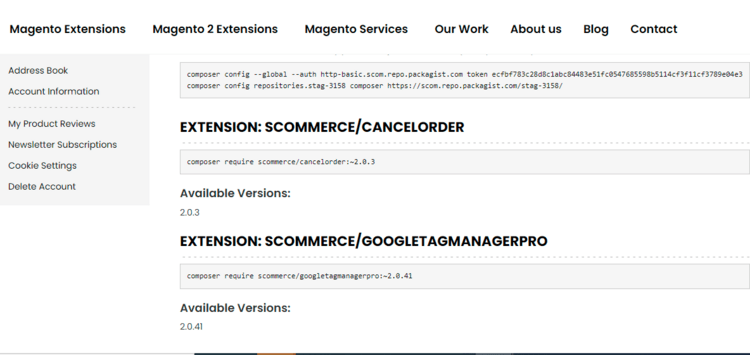
Step 2: Next, run the config commands shown on the top of the page then click on the extension that you want to install. A composer require command will be revealed in the dropdown menu. Run the command then clear caches to complete the installation.
Q. Do you support SPA (Single Page Application) / PWA (Progressive Web Application) / AMP ?
A. Unfortunately, we don’t support SPA or PWA or AMP but we may be supporting them in future depending upon the demand.
Change Log
Version 2.0.3
2022-10-17 13:07:16
Added PHP 8 Support
Version 2.0.2
2021-08-16 11:25:13
Added PHP 7.4 support
Version 2.0.1
2020-05-26 11:23:07
Added PHP 7.3 support and made it compatible with latest version of Magento 2.3.4
Version 2.0.0
2020-04-02 11:43:41
Fixed minor issues
Show More
Show Less
Write A Review
Fields marked with * are required