
Skype us at scommerce.mage or call +44(0)1483 487746

Loading...

Magento 2 Abandoned Basket Email
Compatible with Magento 2 community and enterprise 2.3.3 - 2.4.x including cloud edition
Maximise your ROI and reclaim lost revenue with the Magento 2 Abandoned Basket Email Extension, a high-performance recovery tool that automatically tracks unfinished checkouts for both guest and logged-in users. This extension deploys a strategic sequence of up to three automated reminder emails featuring escalating discount incentives and secure one-click basket restoration links to convert hesitant shoppers into loyal customers. Engineered for reliability, it utilizes Magento Cron and batch processing to ensure your recovery funnel runs flawlessly without impacting storefront performance.
- Automated 3-Stage Recovery: Schedule timed reminders at 24 hours, 3 days, and 7 days to keep your brand top-of-mind.
- Dynamic Discount Logic: Automatically generate and inject unique 10%, 20%, or 25% coupon codes directly from your sales rules.
- One-Click Basket Restoration: Secure links redirect customers back to their exact cart contents, including quantities and prices.
- Guest & Logged-in Support: Capture lost sales from every visitor, regardless of whether they have a registered account.
- Performance-Optimised Cron: Efficient batch processing ensures smooth email delivery without slowing down your server.
- Full Admin Granularity: Independently enable stages, customise time delays, and manage email templates from the Magento backend.

Free Support
up to 60 days

Free Upgrades
up to 1 year

Fully open source
Product Description
Magento 2 Abandoned Basket Email Recovery
Compatible with Magento 2 community and enterprise 2.3.3 - 2.4.x including cloud edition
In the competitive UK e-commerce landscape, nearly 70% of shopping baskets are abandoned before the final checkout. This represents a massive opportunity for revenue recovery. The Magento 2 Abandoned Basket Email Extension provides a robust, automated framework to re-engage these shoppers. By combining strategic timing with escalating financial incentives, this module acts as a 24/7 sales assistant, guiding customers back to complete their purchase and boosting your conversion rates.
This extension doesn't just send a simple nudge; it deploys a sophisticated, three-stage recovery funnel. Each stage is independently configurable, allowing you to control the exact delay (e.g., 24 hours, 3 days, or 1 week) and the level of urgency. The first email serves as a helpful reminder, while subsequent emails introduce unique, single-use discount codes (10%, 20%, and 25%) to tip the scales for price-sensitive shoppers. If a customer completes their order after any stage, the system instantly cancels all pending reminders, ensuring a professional and non-intrusive customer experience.
Built for high-volume stores, the module features an intelligent discount engine that integrates directly with Magento’s sales rules. It pulls unused codes from the coupon table and assigns them uniquely to the abandoned basket, preventing coupon abuse. To ensure the user journey is as frictionless as possible, every email includes a secure restore-basket link. When clicked, it bypasses the need for the user to rebuild their cart, taking them directly to the basket page with all items, quantities, and prices intact.
From a technical perspective, the extension is engineered for reliability and performance. Email evaluation and dispatch are executed via the Magento Cron system, using batch processing to avoid performance bottlenecks. This ensures that your storefront remains fast and responsive, even when processing thousands of recovery emails. Every event—from basket detection to discount generation—is logged in the admin panel, providing you with a clear audit trail and full transparency over your recovery performance.
Core Capabilities
- Automatic Abandonment Detection: Monitors cart activity for both guests and registered users, flagging baskets based on configurable inactivity thresholds.
- Escalating Urgency Funnel: Automatically shifts from a simple reminder to high-value discount offers across three customisable stages.
- Intelligent Discount Mapping: Assigns unique, one-time-use coupon codes (up to 25%) directly to the customer's specific basket ID.
- Seamless Basket Restoration: Direct links return users to their exact cart state, significantly reducing the friction required to complete a sale.
- Hyvä and Breeze Compatible: Developed to work flawlessly with modern, high-performance Magento frontends for a lightweight implementation.
- Batch Cron Execution: Processes recovery tasks in the background to prevent server load spikes and ensure consistent email delivery.
- Automated Queue Management: Instantly cancels all future reminders for a basket once an order has been successfully placed.
Main Features
- Guest Checkout Recovery: Captures and emails guest shoppers who have entered an email address but did not finish the transaction.
- Customisable Email Templates: Includes professional, conversion-focused drafts that can be edited via Marketing > Email Templates.
- Dynamic Template Variables: Automatically inject Customer Name, Site Name, Discount Codes, and detailed Item Tables into your emails.
- Strategic Time Delays: Define specific intervals for each of the three email stages to match your brand's communication style.
- Comprehensive Audit Logs: Track every recovery attempt, including Basket IDs, timestamps, discount codes generated, and any errors.
- Compliance and Safety: Includes automatic exclusions for empty baskets and ensures customers who receive messages in error are clearly informed.
- One-Click Unsubscribe: Fully supports standard Magento compliance mechanisms, respecting customer privacy and opt-out preferences.
Compatible with Magento 2 community and enterprise 2.3.3 - 2.4.x including cloud edition
We offer 60 days of free support and 12 months of free upgrade for any standard Magento site when you buy this extension. You can also get our installation service for a small fee. If you want more benefits, you can purchase our 12 months of free premium support and free lifetime upgrade package. Please contact us if you need any assistance or customization for this extension. We will reply to you within 48 hours. We may also offer you a special deal or a free solution if we like your idea.
** Please refer to our FAQ or T&C section for running our extensions on multiple domains or sub-domains
FAQ
Frequently Asked Questions
Q. How does the system avoid emailing customers who have already purchased?
A. The module performs a real-time check against the Magento order table before every email dispatch. If a basket has been converted into a completed order, all subsequent reminders in the recovery sequence are automatically purged from the queue.
Q. Can I change the discount percentages for each email stage?
A. Yes. While the system logic allows for 10%, 20%, and 25% discounts, these are fully configurable. You can adjust the discount values and associated sales rules within the Magento Admin to match your specific promotional strategy.
Q. Does this extension support guest shoppers?
A. Absolutely. As long as a guest user has entered their email address during the checkout process before abandoning, the system will capture that data and include them in the automated recovery funnel.
Q. Will sending these emails impact my site's performance?
A. No. The extension is engineered to run via the Magento Cron system. By processing recovery tasks in small, manageable batches in the background, it ensures there is zero impact on your customers' frontend browsing speed.
Q. What happens if a customer clicks the restore link but an item is out of stock?
A. The restore link utilizes standard Magento basket logic. It will return the customer to the basket page and provide the standard system notifications if a specific item is no longer available, ensuring a consistent user experience.
Q. Are the email templates mobile-responsive?
A. Yes. The base templates are designed to be fully responsive, ensuring they look professional and are easy to read on mobile devices, tablets, and desktops.
Q. How is compliance handled for the UK market?
A. The extension includes built-in safeguards to prevent sending emails to empty carts and supports Magento’s standard unsubscribe mechanisms. Every email also includes an apology and clarification disclaimer to handle any potential receipt in error.
Q. How can I get license key for my development website?
A. Please use the same license as live site provided with the order confirmation email on the staging site and ensure you have the latest version of scommerce/core installed i.e 2.0.9.
Once added go to Stores>Configuration>Scommerce Configuration>Core and click on verify. Once verified the license will start working on your staging site.
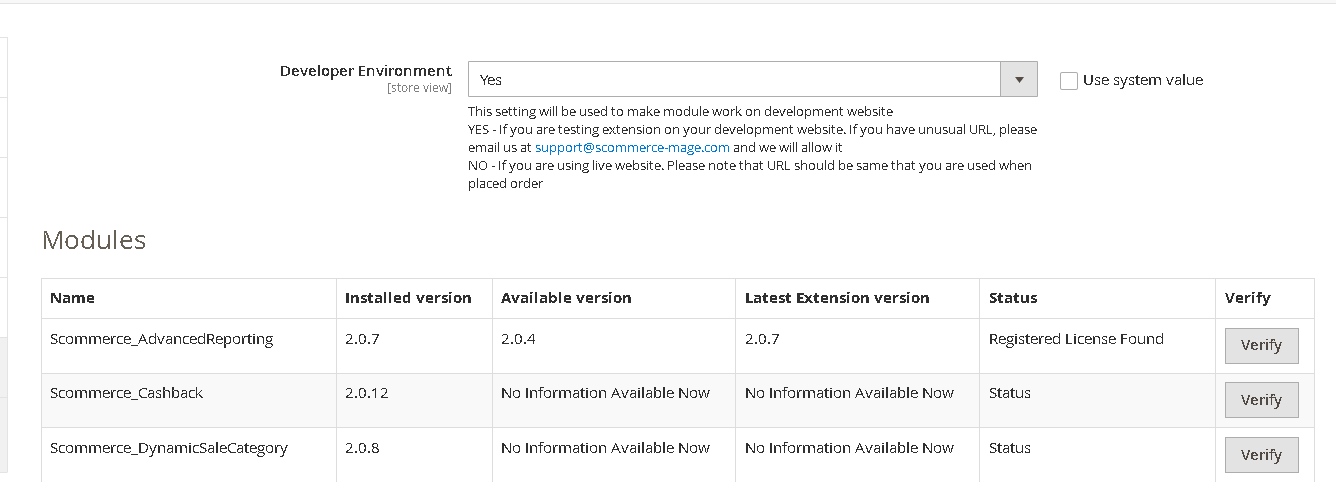
Once added go to Stores>Configuration>Scommerce Configuration>Core and click on verify. Once verified the license will start working on your staging site.
Q. Can I test the extension before buying?
A. Unfortunately we can't provide you extension for testing purposes but we have demo available for most of our extensions and happy to provide full refund if the extension doesn't work
Q. Can I request for customisation on your extensions?
A. Yes we do provide all sort of customisation for our clients at the reasonable rates. And if we believe the customisation will help our product then we also provide great discount on the customisation
Q. I have multiple websites/stores, each with a unique domain. Do I need a separate license key for each live domain?
A. Yes, each live domain requires its own license key. Our license keys are URL specific and each live domain, subdomain, subfolder requires a separate key. If you’re running multiple websites from the same Magento instance, we offer a 30% discount when purchasing license keys for two or more domains in a single order. To receive a coupon code, please contact us at support@scommerce-mage.com.
Q. How can I upgrade my extension to the latest version?
A. The upgrade process depends on your platform and how the extension was installed:
For Magento 2 (Installed via Composer)
If your extension is within the free upgrade period (12 months from the purchase date), you can update directly via the command line. Simply run the composer require command for the specific module to fetch and install the latest available version. If you are outside the free upgrade period, you will need to buy an upgrade using the link below.
For Magento 1 or Magento 2 (Installed manually via app/code)
If your extension is within the free upgrade period (12 months from the purchase date), you can simply download the latest available version by logging into our website and navigating to My Account > My Downloadable Products. If you are outside the free upgrade period, you will need to buy an upgrade using the link below.
Purchase an Upgrade:
https://www.scommerce-mage.com/magento-extension-installation-service.html
Important Note for Manual Upgrades: Before uploading the latest version, we highly recommend deleting all existing files and folders of our extension from your website. We may have deprecated or removed certain files in the update, and keeping the old ones could cause conflicts on your website.
Q.Where can I download the extension files?
A. Please login into your account on our website and go to the download link under my account section to download the extension package.
Q.Can you provide a key that works for our development (NOT PRODUCTION) environment which will work on a dynamic URL, for example, 12334.gitpod.com and 4567.gitpod.com?
A. Unfortunately it is not possible to generate license keys based on the dynamic URLs.
License keys need to be generated per domain or subdomain whether it is production or non-production.
Q. How can I manually uninstall your module?
A. Please follow the below steps -:
Step 1: Navigate to our store and login to your account. Then go to the My Account Section, on the left menu click on Composer Instructions.
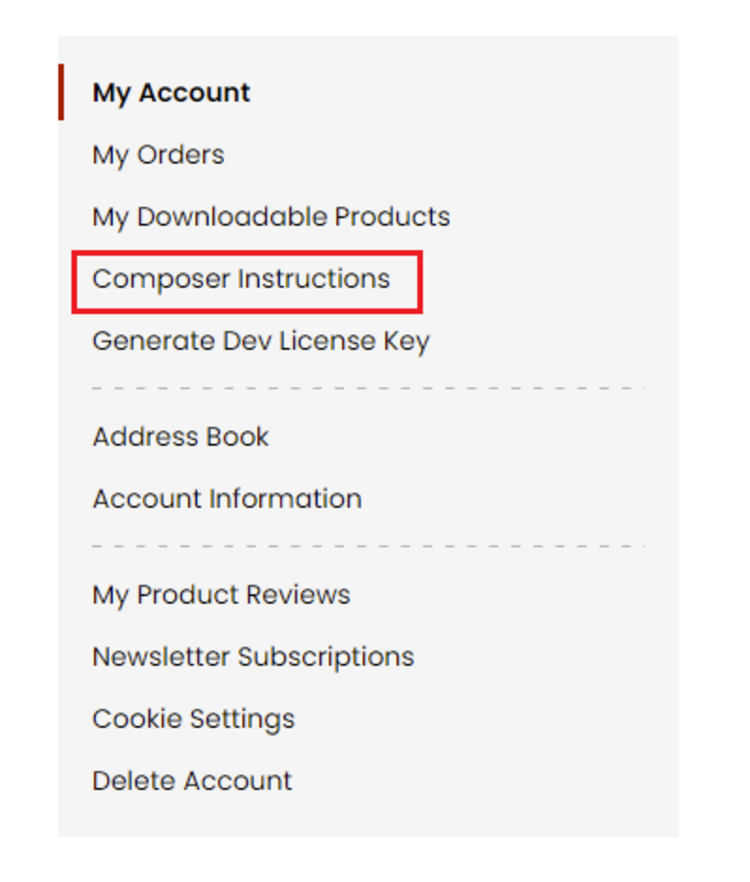 Step 2: Next, run the config commands shown on the top of the page then click on the extension that you want to install. A composer require command will be revealed in the dropdown menu. Run the command then clear caches to complete the installation.
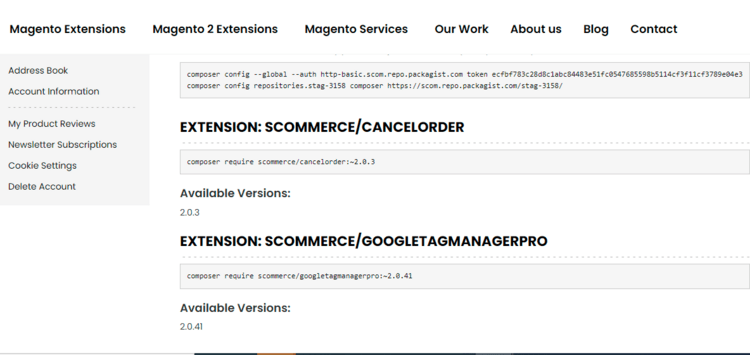
Step 2: Next, run the config commands shown on the top of the page then click on the extension that you want to install. A composer require command will be revealed in the dropdown menu. Run the command then clear caches to complete the installation.
Q. Do you support SPA (Single Page Application) / PWA (Progressive Web Application) / AMP ?
A. Unfortunately, we don’t support SPA or PWA or AMP but we may be supporting them in future depending upon the demand.
Change Log
Version 2.0.0
2026-05-20 07:39:32
Initial Release
Write A Review
Fields marked with * are required