Skype us at scommerce.mage or call +44(0)1483 487746

Loading...

Magento 2 Full Page Cache Warmer
Compatible with Magento 2 community and enterprise 2.3.3 - 2.4.x including cloud edition
Accelerate your site speed with our Magento 2 Full Page Cache Warmer. With this module, you can automate the process of cache warming and auto-update cache on page update. No manual action is needed whenever you make an update on site, it recreates cache automatically as soon as update happens.
- Automated cache warming process
- Auto-update cache after the changes
- Generate log
- Cache warmer grid to re-generate cache manually
- Compatible with HYVA Theme(NEW!)
- Compatible with Breeze Theme(NEW!)

Free Support
up to 60 days

Free Upgrades
up to 1 year

Fully open source
Product Description
Magento 2 Full Page Cache Warmer
Compatible with Magento 2 community and enterprise 2.3.3 - 2.4.x including cloud edition
What is caching?
Caching is the process of storing data in a cache. Magento 2 supports different types of caching and by default, pages get cached only when visitors open the pages of the website in the browser. Later when a page will be updated, most of the content is loaded from the cache much faster. If you clear cache or cache is expired, your store visitor will have to wait till the server processes all the requests from a browser and deliver the content.
Why pages of your site should always be cached?
The store cache is cleared frequently so it becomes essential that you timely cache all the necessary pages and keep your customers as well as search engine crawlers updated with the latest version of the page. If you ignore the process of website caching, store loading time increases and you may lose customers because of the slow speed of the website
As per the recent analysis for an uncached page, Time to First Byte can be about 5-10 sec and for a cached page, TTFB is 100-500ms, which is much less than for uncached pages. Therefore, to timely cache all necessary pages and provide customers with an ultimate shopping experience you need a tool which automatically warms the cache and ensures fast pages load.
How does Full Page Cache Warmer helps?
Our module emulates customers' behavior, crawls pages, and keeps the cache updated. It reduces time to first byte (TTFB) and timely warms up store cache so that your website visitors and Google will always get the content of your pages faster. As a result, your conversion rate will be increased, and you can get higher results in Google ranking.
BENEFITS OF FULL PAGE CACHE WARMER
- Smart performance efficiency
- Automatic cache generation
- Quick cache warming of recently updated pages
- Better performance in the backend
- Lower bounce rate
See How Much Gain in Performance Can be Achieved with Full Page Cache Warmer
Below are the main features of this module-:
- It allows you to limit max queue size
- Automatic cache generation in the background through cron
- You can regenerate the cache manually for a specific URL
- Compatible with HYVA Theme(NEW!)
- Compatible with Breeze Theme(NEW!)
- It allows you to regenerate/delete cache manually
- Cron execution will automatically generate the cache for all non-cached pages
- It auto regenerates cache on category/product/CMS pages update
- It caches product/category/CMS pages for all available store views and (New!)
- It shows processed time for cached pages in cache warmer grid (New!)
- It warms cache right after the flush
- It generates the log file
- Much faster pages loading
- Better search engine indexing
- Easy to set up and configure cached pages
- Response time of cached pages quickly
- Fast warming of most popular pages
- Better performance in the back-end
- It reduces response time from many seconds to 100ms
- It can be completely disabled if required from configurations
- It supports multi-store environment
- User friendly interface
- Easy to install and manage
We offer 60 days of free support and 12 months of free upgrade for any standard Magento site when you buy this extension. You can also get our installation service for a small fee. If you want more benefits, you can purchase our 12 months of free premium support and free lifetime upgrade package. Please contact us if you need any assistance or customization for this extension. We will reply to you within 48 hours. We may also offer you a special deal or a free solution if we like your idea.
** Please refer to our FAQ or T&C section for running our extensions on multiple domains or sub-domains
FAQ
Frequently Asked Questions
Q: Can I regenerate the cache manually for a specific URL?
A: Yes, you can regenerate manually from the back-end by enabling the "Can Regenerate Cache Manually" setting at Admin> Stores>Configuration>Scommerce Configuration>Cache Warmer>General>Can Regenerate Cache Manually - "Yes". This setting will add an option "Regenerate" under cache warmer grid action "Select".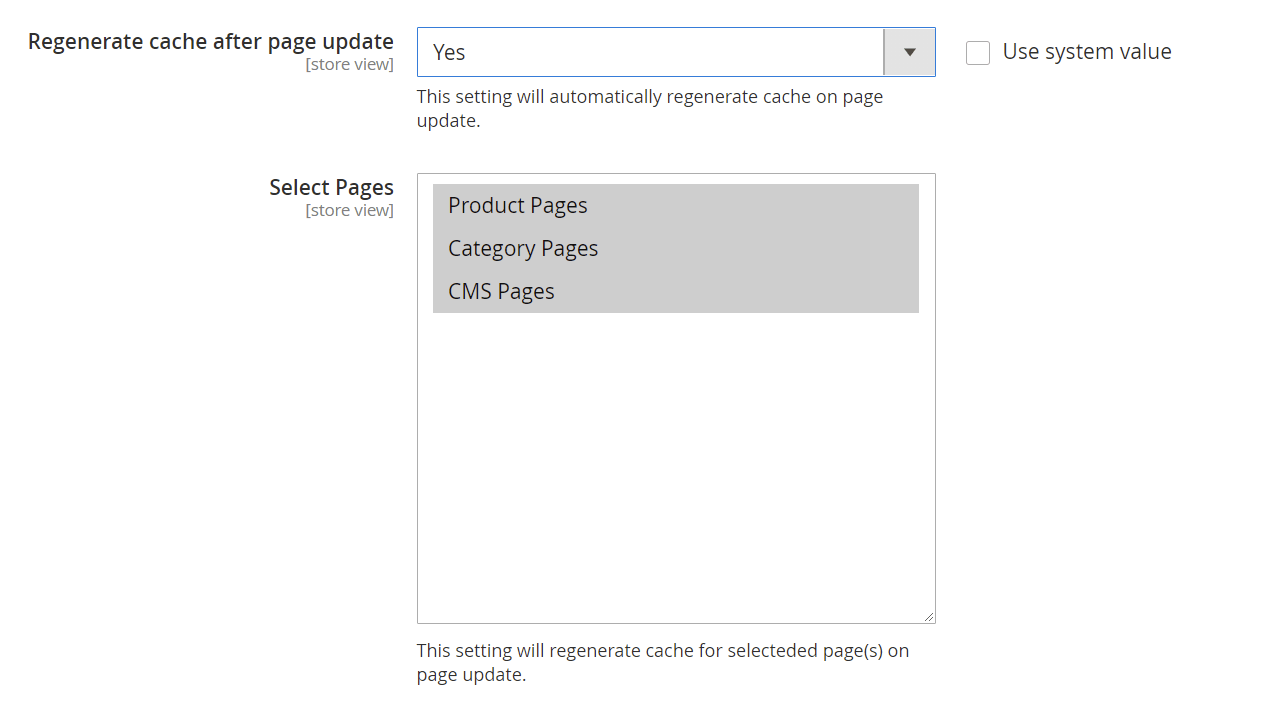
Q: Does it automatically regenerate the cache on Product/Category/CMS pages on page update?
A: Yes, it does. There is an option "Regenerate cache after page update" available in the configuration and wen you set it to "Yes" then it regenerates cache automatically after an update.
Q: Can I regenerate all the non-cached pages without executing the command?
A: Yes, by scheduling the cron job you can regenerate cache automatically without commands. By default cron runs at midnight. To set the cron schedule go to Admin>Stores>Configuration>Cache Warmer>Cron Setting and enter the values in “Cache Cron Schedule” as per your requirements.
Q. Is this module fully compatible with Hyva Theme?
A. Yes, the module is fully compatible with Hyva Theme.
Q. Is this module fully compatible with Breeze Theme?
A. Yes, the module is fully compatible with Breeze Theme.
Q: Can we configure the number of concurrent regeneration request?
A: Yes, you can configure it from the back-end, here is the path Admin>Configuration>Cache Warmer Settings and set the “Number of Concurrent Regeneration Request” - (By default - 1000) 
Q: Why is it necessary to always cache the pages on my site?
A: The store cache is cleared frequently so it becomes essential that you timely cache all the necessary pages and keep your customers as well as search engine crawlers updated with the latest version of the page. If you ignore the process of website caching, store loading time increases and you may lose customers because of the slow speed of the website.
Q: Does this extension make your website faster?
A: Yes, it does. It reduces time to first byte (TTFB) and timely warms up store cache, which speeds up page loading and improves conversions of the website.
Q. How can I get license key for my development website?
A. Please use the same license as live site provided with the order confirmation email on the staging site and ensure you have the latest version of scommerce/core installed i.e 2.0.9.
Once added go to Stores>Configuration>Scommerce Configuration>Core and click on verify. Once verified the license will start working on your staging site.
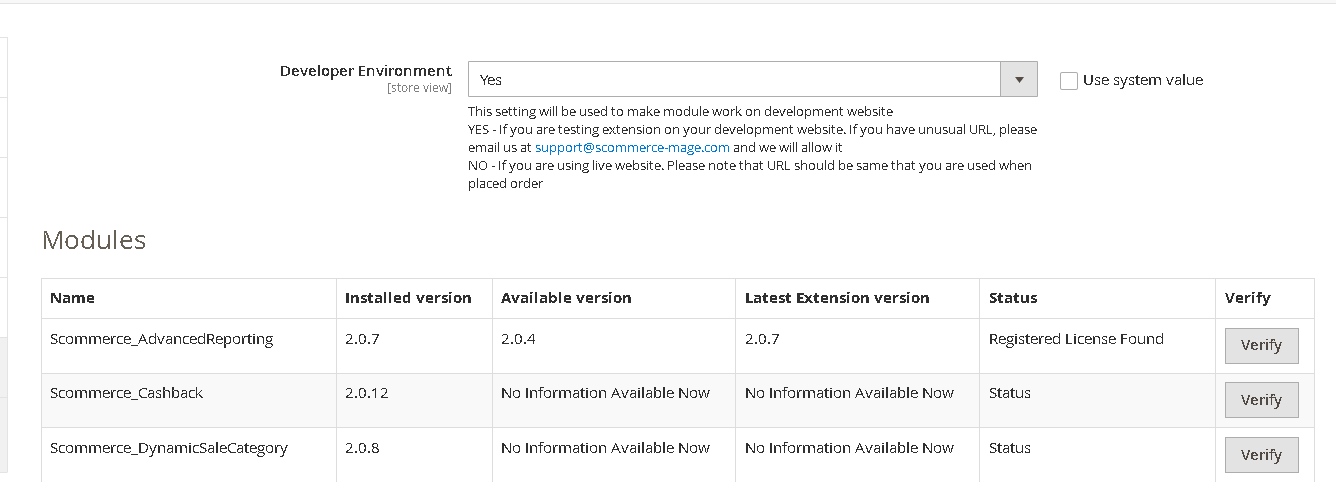
Once added go to Stores>Configuration>Scommerce Configuration>Core and click on verify. Once verified the license will start working on your staging site.
Q. Can I test the extension before buying?
A. Unfortunately we can't provide you extension for testing purposes but we have demo available for most of our extensions and happy to provide full refund if the extension doesn't work
Q. Can I request for customisation on your extensions?
A. Yes we do provide all sort of customisation for our clients at the reasonable rates. And if we believe the customisation will help our product then we also provide great discount on the customisation
Q. I have multiple websites/stores, each with a unique domain. Do I need a separate license key for each live domain?
A. Yes, each live domain requires its own license key. Our license keys are URL specific and each live domain, subdomain, subfolder requires a separate key. If you’re running multiple websites from the same Magento instance, we offer a 30% discount when purchasing license keys for two or more domains in a single order. To receive a coupon code, please contact us at support@scommerce-mage.com.
Q. How can I upgrade my extension to the latest version?
A. The upgrade process depends on your platform and how the extension was installed:
For Magento 2 (Installed via Composer)
If your extension is within the free upgrade period (12 months from the purchase date), you can update directly via the command line. Simply run the composer require command for the specific module to fetch and install the latest available version. If you are outside the free upgrade period, you will need to buy an upgrade using the link below.
For Magento 1 or Magento 2 (Installed manually via app/code)
If your extension is within the free upgrade period (12 months from the purchase date), you can simply download the latest available version by logging into our website and navigating to My Account > My Downloadable Products. If you are outside the free upgrade period, you will need to buy an upgrade using the link below.
Purchase an Upgrade:
https://www.scommerce-mage.com/magento-extension-installation-service.html
Important Note for Manual Upgrades: Before uploading the latest version, we highly recommend deleting all existing files and folders of our extension from your website. We may have deprecated or removed certain files in the update, and keeping the old ones could cause conflicts on your website.
Q.Where can I download the extension files?
A. Please login into your account on our website and go to the download link under my account section to download the extension package.
Q.Can you provide a key that works for our development (NOT PRODUCTION) environment which will work on a dynamic URL, for example, 12334.gitpod.com and 4567.gitpod.com?
A. Unfortunately it is not possible to generate license keys based on the dynamic URLs.
License keys need to be generated per domain or subdomain whether it is production or non-production.
Q. How can I manually uninstall your module?
A. Please follow the below steps -:
Step 1: Navigate to our store and login to your account. Then go to the My Account Section, on the left menu click on Composer Instructions.
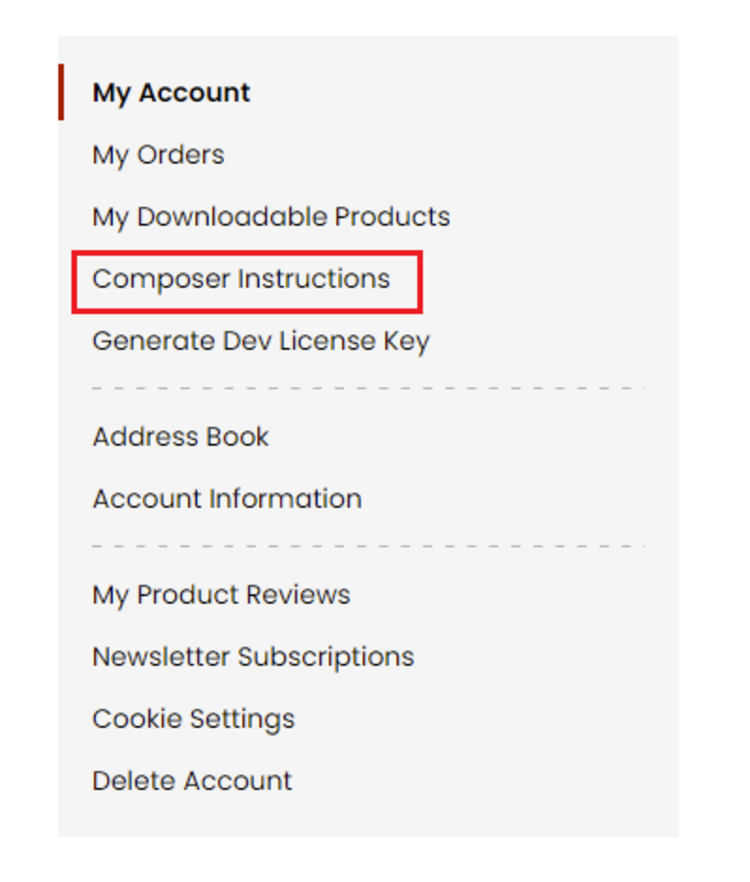 Step 2: Next, run the config commands shown on the top of the page then click on the extension that you want to install. A composer require command will be revealed in the dropdown menu. Run the command then clear caches to complete the installation.
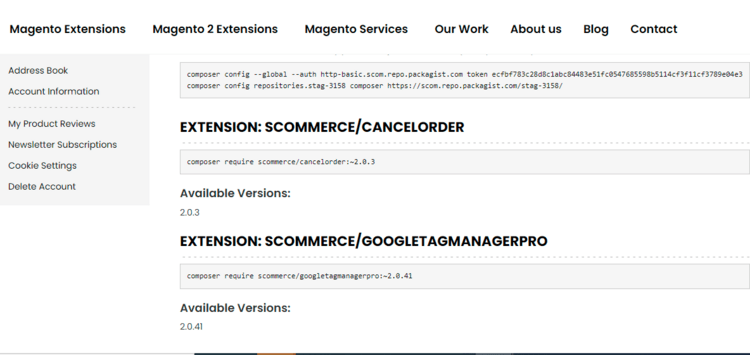
Step 2: Next, run the config commands shown on the top of the page then click on the extension that you want to install. A composer require command will be revealed in the dropdown menu. Run the command then clear caches to complete the installation.
Q. Do you support SPA (Single Page Application) / PWA (Progressive Web Application) / AMP ?
A. Unfortunately, we don’t support SPA or PWA or AMP but we may be supporting them in future depending upon the demand.
Change Log
Version 2.0.23
2025-06-11 12:00:27
Made it compatible with Adobe Commerce B2B version
Version 2.0.22
2025-06-02 06:30:17
- Improved license key validation functionality to make better experience when module provided as part of suite and separately
Version 2.0.21
2025-04-07 08:27:11
- Resolved row_id issue in the cloud edition.
- Addressed cache regeneration issue in the cloud edition when saving products and categories from the admin panel.
- Addressed cache regeneration issue in the cloud edition when saving products and categories from the admin panel.
Version 2.0.20
2024-02-19 09:34:20
Addressed a critical issue that prevented successfully installing the extension. We identified a typo in the database schema definition, which caused installation scripts to fail. This update rectifies the typo and ensures a smooth installation process
Version 2.0.19
2024-01-25 15:06:11
Updated installation scripts and code quality for Magento Marketplace. We replaced the installation scripts with dbschema.xml to comply with Magento standards. We also applied code sniffer fixes to improve the code quality and readability.
Version 2.0.18
2023-12-15 12:16:39
- Added a configuration option to disable generating caches for sorting options for category pages. This will help reduce the number of caches we need to generate especially when set has numerous sorting options.
- Fixed a bug that caused caching for websites that were inactive or disabled. This will prevent unnecessary cache generation and save time to generate caches for active or enabled websites.
- Fixed some compatibility issues with PHP 8.2 and ensured the cache works smoothly with the latest version of PHP.
- Added a feature to allow administrators to disable the cache warmer at the store level. This will give more control and flexibility to the administrators over the cache settings.
- Fixed a bug that caused caching for websites that were inactive or disabled. This will prevent unnecessary cache generation and save time to generate caches for active or enabled websites.
- Fixed some compatibility issues with PHP 8.2 and ensured the cache works smoothly with the latest version of PHP.
- Added a feature to allow administrators to disable the cache warmer at the store level. This will give more control and flexibility to the administrators over the cache settings.
Version 2.0.17
2023-02-13 10:18:14
Fixed minor issue with regenerating cache for category pages when there are no "sorters" used
Version 2.0.16
2022-11-11 11:13:10
Fixed minor issue with regenerating cache for individual pages when the data has been updated for those pages.
Version 2.0.15
2022-11-10 11:44:47
- Added prioritisation for category, product, CMS and websites to allow prioritisation to generate cache pages.
- For product, best sellers will be used for prioritisation whereas CMS, category and websites you can add number from 1 to 100 where 1 being top priority and 100 being least priority.
- Also fixed issue related to flush cache button as it wasn't re-generating cache pages.
- For product, best sellers will be used for prioritisation whereas CMS, category and websites you can add number from 1 to 100 where 1 being top priority and 100 being least priority.
- Also fixed issue related to flush cache button as it wasn't re-generating cache pages.
Version 2.0.14
2022-10-28 13:03:32
Added hot fix to resolve problem with PHP 7.4 version which was caused by last release. Last version works perfectly fine for PHP 8 but not lower PHP versions.
Version 2.0.13
2022-10-28 08:55:26
PHP 8 incompatibility fix
Version 2.0.12
2022-10-27 13:13:30
Added PHP 8 Support
Version 2.0.11
2021-11-18 10:47:25
Made it compatible with Magento version 2.4.3-p1
Version 2.0.10
2020-12-21 11:05:56
Added PHP 7.4 and SSL support to the module. Created database indexes for performance improvement
Version 2.0.9
2020-06-30 16:24:55
Changed cron job group from default to index as it wasn't creating entries in cron schedule table and when the entries were getting created then most of the time the status was "missed".
Version 2.0.8
2020-06-28 03:38:51
Optimise code for caching product pages by excluding products which are not visible or status is set to disabled.
Version 2.0.7
2020-06-15 12:42:06
Added PHP 7.3 Support
Version 2.0.6
2020-06-05 08:06:09
Issue fixed while creating a new category
Issue fixed while creating a new product
Issue fixed while creating a new product
Version 2.0.5
2020-04-22 15:55:33
- Now admin can create cache for products, categories, and cms-page for each store.
- Issue fixed to limit the no of requests at once based on the value entered in the configuration.
- Improved code and faster SQL queries to fetch the URLs to generate cache.
- Issue fixed to limit the no of requests at once based on the value entered in the configuration.
- Improved code and faster SQL queries to fetch the URLs to generate cache.
Version 2.0.4
2020-03-17 11:48:47
Fixed issue related to ddl transaction error because of truncate statement
Version 2.0.3
2020-03-16 13:17:37
#Changing version number with wildcard instead of hard coded value for future releases.
Version 2.0.2
2020-03-13 11:17:24
- Added code to clear cache warmer table when FPC cache gets cleared.
- Also change product collection to use url rewrite instead of product collection.
- Optimised curl call. Fixed cron job by renaming file name and further optimised product url cache code.
- Also setting current store to generate product and category pages.
- Also change product collection to use url rewrite instead of product collection.
- Optimised curl call. Fixed cron job by renaming file name and further optimised product url cache code.
- Also setting current store to generate product and category pages.
Version 2.0.1
2020-02-06 08:12:42
# Fixed license key issue
Show More
Show Less
Reviews
Amazing results!
We used this product on our Magento 2 community edition version 2.3.2 and results are amazing. Our catalog pages are loading in milliseconds now which were taking between 5-6 secs. This is must have p...
Write A Review
Fields marked with * are required