Skype us at scommerce.mage or call +44(0)1483 487746

Loading...
Magento 2 Sample Product Extension
Compatible with Magento 2 community and enterprise 2.3.3 - 2.4.x including cloud edition
Boost customer confidence and conversions with our Magento 2 Sample Product Extension. Let shoppers order free or paid product samples directly from eligible product pages, helping them make informed purchase decisions. Merchants gain complete control with per-product pricing, quantity limits, and admin visibility while customers enjoy seamless cart/checkout integration and clear "Sample" labeling throughout the entire order journey.
- Instant Sample Requests: One-click "Request Sample" button on eligible product pages with AJAX add-to-cart
- Smart Admin Controls: Global settings + per-product customization (price, limits, descriptions)
- Complete Order Integration: "Sample" labels in cart, checkout, emails, and admin order views
- Discount Protection: Samples excluded from promotions and reward programs automatically
- Stock Aware: Sample button hides when main product is out of stock
- Flexible Shipping: Free sample shipping or combined with full-size products

Free Support
up to 60 days

Free Upgrades
up to 1 year

Fully open source
Product Description
Magento 2 Sample Product Extension
Compatible with Magento 2 community and enterprise 2.3.3 - 2.4.x including cloud edition
Turn hesitant browsers into confident buyers with our Magento 2 Sample Products Extension. In industries like cosmetics, fragrances, fashion, and textiles where customers want to "try before they buy," this extension delivers the perfect solution. Add a simple "Request Sample" button to any product page and watch conversion rates climb as shoppers test your quality firsthand.
Merchants maintain complete control through intuitive admin settings. Set global defaults for sample pricing, quantity limits, and shipping rules, then override per-product as needed. Customers see clear pricing, short descriptions, and availability limits before adding samples to cart. The entire workflow - from product page to order confirmation - displays prominent "Sample" labeling so everyone understands exactly what they're ordering.
Technical excellence meets merchant-friendly design. AJAX-powered add-to-cart prevents page reloads while maintaining stock awareness (sample button disappears when products sell out). Cart and checkout handle samples intelligently - excluding them from discounts while calculating shipping correctly (free sample shipping or combined with full-size items). Every order email, admin view, and customer dashboard clearly identifies sample line items with correct pricing and quantities.
Built for enterprise-scale operations, the extension supports multi-store, multi-website setups with full REST and GraphQL API exposure. Developers can retrieve sample attributes, add samples via API, and integrate with headless/PWA storefronts seamlessly. Admin reporting includes sample-specific filtering so merchants can track sample-to-sale conversion rates and program effectiveness.
Perfect for:
- Cosmetics brands offering foundation shade matching
- Fragrance retailers providing scent samples
- Fashion merchants showcasing fabric quality
- Supplement companies proving product freshness
- Any brand where product experience drives purchase confidence
Your competitive advantage: Higher conversions. Lower returns. Better customer lifetime value. All from one simple button.
Key Features
- "Request Sample" button on product pages (AJAX add-to-cart, no page reload)
- Global configuration + per-product overrides (price, quantity limits, descriptions)
- Clear "Sample" labeling throughout cart, checkout, emails, and order management
- Automatic discount exclusion for sample products
- Stock-aware: Sample option hides when main product is out of stock
- Complete admin visibility with sample-specific order filtering
- Multi-store, multi-website, multi-currency ready
- Full i18n translation support
- Luma/Blank theme compatible
- Simple enable/disable from admin panel
We offer 60 days of free support and 12 months of free upgrade for any standard Magento site when you buy this extension. You can also get our installation service for a small fee. If you want more benefits, you can purchase our 12 months of free premium support and free lifetime upgrade package. Please contact us if you need any assistance or customization for this extension. We will reply to you within 48 hours. We may also offer you a special deal or a free solution if we like your idea.
** Please refer to our FAQ or T&C section for running our extensions on multiple domains or sub-domains
FAQ
Frequently Asked Questions
Q. How do customers request product samples?
A. Eligible products display a prominent "Request Sample" button showing price, description, and quantity limits. Customers click once and the sample adds to cart instantly via AJAX (no page reload). The button only appears for in-stock products with samples enabled.
Q. Can I set different sample prices per product?
A. Yes! Configure global default pricing in Stores > Configuration > Catalog > Sample Product Settings, then override per-product using the dedicated "Sample Product" attributes on the product edit page (sample_product_price, sample_product_max, sample_product_short_desc).
Q. Do sample products get discounts or promotions?
A. No. The extension automatically excludes all sample products from discount codes, cart rules, and reward programs, ensuring samples remain profitable regardless of your main product promotions.
Q. What happens when the main product is out of stock?
A. The sample button automatically disappears from the product page when the main product inventory reaches zero, preventing customers from ordering samples of unavailable products.
Q. Can customers order samples with full-size products?
A. Absolutely. Customers can add both full-size products and samples to the same cart. Shipping calculates normally - either free sample shipping (configurable) or combined shipping based on your carrier rules.
Q. How do I identify sample orders in admin?
A. Sample line items display clear "Sample" labels throughout admin order views, order grid (with filtering), and reports. All order emails to customers also include sample identification with correct pricing.
Q. Does it work with headless or PWA storefronts?
A. Yes. All sample product attributes and functionality expose through REST and GraphQL APIs. Developers can retrieve sample flags, pricing, and add samples to cart programmatically for custom storefronts.
Q. What are the quantity limits for samples?
A. Configurable per product. Set global maximum via configuration, override per-product using "sample_product_max" attribute. Customers see the limit displayed and cannot exceed it in cart/checkout.
Q. Can I offer completely free samples?
A. Yes. Set sample_product_price to 0. Configure "Allow sample shipping free" in global settings for completely free sample orders, or apply normal shipping rates as preferred.
Q. How can I get license key for my development website?
A. Please use the same license as live site provided with the order confirmation email on the staging site and ensure you have the latest version of scommerce/core installed i.e 2.0.9.
Once added go to Stores>Configuration>Scommerce Configuration>Core and click on verify. Once verified the license will start working on your staging site.
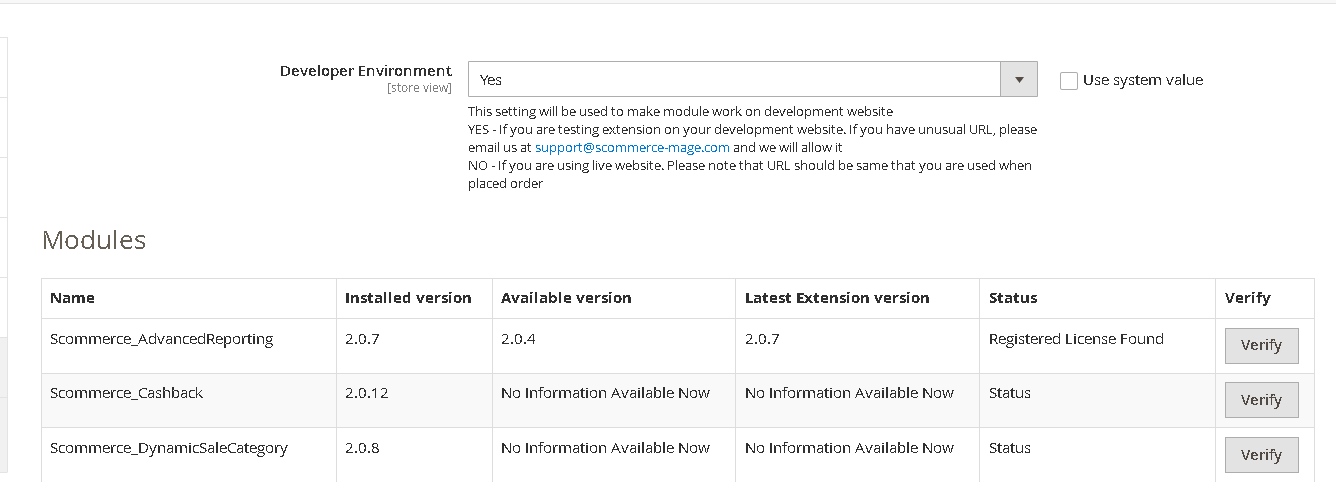
Once added go to Stores>Configuration>Scommerce Configuration>Core and click on verify. Once verified the license will start working on your staging site.
Q. Can I test the extension before buying?
A. Unfortunately we can't provide you extension for testing purposes but we have demo available for most of our extensions and happy to provide full refund if the extension doesn't work
Q. Can I request for customisation on your extensions?
A. Yes we do provide all sort of customisation for our clients at the reasonable rates. And if we believe the customisation will help our product then we also provide great discount on the customisation
Q. I have multiple websites/stores, each with a unique domain. Do I need a separate license key for each live domain?
A. Yes, each live domain requires its own license key. Our license keys are URL specific and each live domain, subdomain, subfolder requires a separate key. If you’re running multiple websites from the same Magento instance, we offer a 30% discount when purchasing license keys for two or more domains in a single order. To receive a coupon code, please contact us at support@scommerce-mage.com.
Q. How can I upgrade my extension to the latest version?
A. The upgrade process depends on your platform and how the extension was installed:
For Magento 2 (Installed via Composer)
If your extension is within the free upgrade period (12 months from the purchase date), you can update directly via the command line. Simply run the composer require command for the specific module to fetch and install the latest available version. If you are outside the free upgrade period, you will need to buy an upgrade using the link below.
For Magento 1 or Magento 2 (Installed manually via app/code)
If your extension is within the free upgrade period (12 months from the purchase date), you can simply download the latest available version by logging into our website and navigating to My Account > My Downloadable Products. If you are outside the free upgrade period, you will need to buy an upgrade using the link below.
Purchase an Upgrade:
https://www.scommerce-mage.com/magento-extension-installation-service.html
Important Note for Manual Upgrades: Before uploading the latest version, we highly recommend deleting all existing files and folders of our extension from your website. We may have deprecated or removed certain files in the update, and keeping the old ones could cause conflicts on your website.
Q.Where can I download the extension files?
A. Please login into your account on our website and go to the download link under my account section to download the extension package.
Q.Can you provide a key that works for our development (NOT PRODUCTION) environment which will work on a dynamic URL, for example, 12334.gitpod.com and 4567.gitpod.com?
A. Unfortunately it is not possible to generate license keys based on the dynamic URLs.
License keys need to be generated per domain or subdomain whether it is production or non-production.
Q. How can I manually uninstall your module?
A. Please follow the below steps -:
Step 1: Navigate to our store and login to your account. Then go to the My Account Section, on the left menu click on Composer Instructions.
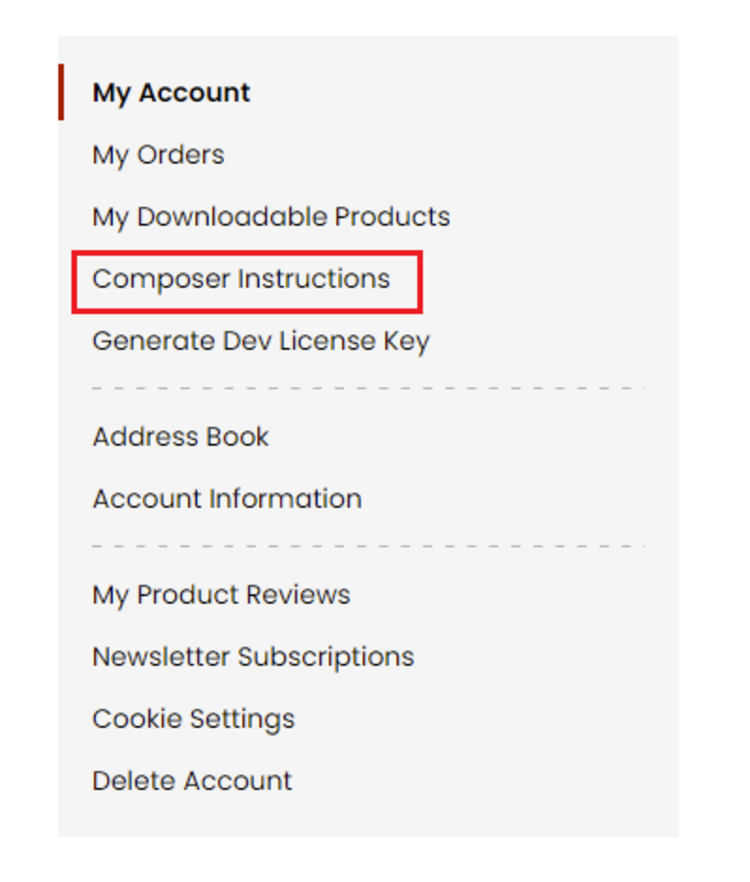 Step 2: Next, run the config commands shown on the top of the page then click on the extension that you want to install. A composer require command will be revealed in the dropdown menu. Run the command then clear caches to complete the installation.
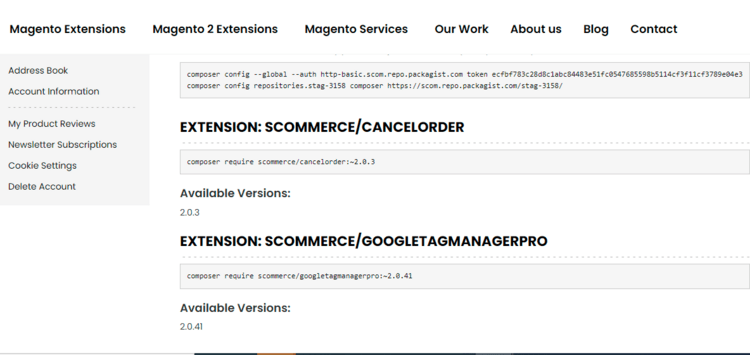
Step 2: Next, run the config commands shown on the top of the page then click on the extension that you want to install. A composer require command will be revealed in the dropdown menu. Run the command then clear caches to complete the installation.
Q. Do you support SPA (Single Page Application) / PWA (Progressive Web Application) / AMP ?
A. Unfortunately, we don’t support SPA or PWA or AMP but we may be supporting them in future depending upon the demand.
Change Log
Version 2.0.0
2026-01-16 10:01:20
Initial Release
Write A Review
Fields marked with * are required