
Skype us at scommerce.mage or call +44(0)1483 487746

Loading...

Magento 2 COPYandPAY Integration
Compatible with Magento 2 community and enterprise 2.3.3 - 2.4.x including cloud edition
Securely accept payments in Magento 2 with COPYandPAY, now with support for Visa, Mastercard, Ecocash, OneWallet, and Zimswitch in both USD and ZWG currencies. Our integration embeds a hosted payment widget to reduce your PCI compliance scope to SAQ-A, lowering your security burden. Benefit from a reliable 3-step flow (checkoutId & secure status retrieval), configurable sandbox/production modes, detailed debug logging, and auto-cancellation of stale orders.
-
Accept payments via Visa, Mastercard, Ecocash, OneWallet, and Zimswitch.
-
Process transactions seamlessly in both USD and ZWG currencies.
-
Lower compliance burden with a hosted payment widget for PCI SAQ-A alignment.
-
Utilize a secure 3-step flow: prepare checkout (
checkoutId), render widget, and get status. -
Full admin control with sandbox/production modes, debug logging, and brand display.
-
Automatically cancel pending orders after a configurable timeout.

Free Support
up to 60 days

Free Upgrades
up to 1 year

Fully open source
Product Description
Magento 2 COPYandPAY Integration
Compatible with Magento 2 community and enterprise 2.3.3 - 2.4.x including cloud edition
The Magento 2 COPYandPAY Integration provides a secure, seamless, and versatile payment solution for your eCommerce store. By embedding a hosted widget directly into your checkout, this extension allows you to accept payments from major international and regional providers including Visa, Mastercard, Ecocash, OneWallet, and Zimswitch in both USD and ZWG currencies.
It keeps sensitive card data away from your Magento server, dramatically reducing your PCI compliance scope to SAQ-A standards and shortening implementation time. The flow is intentionally simple: generate a checkoutId from the server, render the payment widget on the storefront, and retrieve the final payment status server-side to finalize the order.
Why COPYandPAY for Magento 2?
-
Localized Payment Options: Expand your reach by offering customers their preferred payment methods. Our integration supports international cards like Visa and Mastercard alongside essential regional services like Ecocash, OneWallet, and Zimswitch, with full support for USD and ZWG currencies.
-
Lower PCI Scope: The hosted widget handles all sensitive card entry and 3-D Secure steps, not your Magento server. This aligns with SAQ-A compliance requirements and significantly reduces security overhead.
-
Faster Go-Live: Simply embed a single script and a form to render one or more payment brand inputs. The widget reliably manages the user experience and complex authentication challenges for you.
-
Stable and Secure Buyer Experience: Multiple brand forms can be rendered to match promotional goals or separate card families, while a single, secure status retrieval path keeps the order flow consistent and reliable.
How It Works (Three Secure Steps)
-
Prepare the Checkout (Server-to-Server): Magento securely posts order details (amount, currency, order type) to the payment provider and receives a unique
checkoutId. This short-lived token is required to render the payment widget on the storefront. -
Render the Payment Widget (Storefront): The checkout page uses the
checkoutIdto display one or more payment forms. The hosted widget collects payment data, performs any required 3-D Secure steps, and handles the user interaction securely. -
Get the Payment Status (Server-to-Server): After the customer is redirected to your configured result URL with a
resourcePath, Magento performs an authenticated server-side GET request to retrieve the final payment status. The order is then moved to the correct state (e.g., Processing) and the transaction ID is recorded.
Frontend Buyer Journey
The customer's checkout experience is designed to be simple, secure, and intuitive.
-
At checkout, the customer selects COPYandPAY as their preferred payment method.
-
Upon proceeding, the Magento site securely generates a
checkoutIdand embeds the payment widget directly on the page, displaying options for Visa, Mastercard, Ecocash, OneWallet, or Zimswitch. -
The customer enters their payment details into the secure, hosted widget, completes any required 3-D Secure prompts, and submits the payment.
-
After submission, the customer is redirected to a confirmation page while Magento validates the payment status server-side, confirming a successful transaction and moving the order to the
Processingstate.
Security and Compliance
-
PCI SAQ‑A Friendly: The widget captures card data; Magento never stores raw card details. This lowers compliance scope and reduces risk.
-
3‑D Secure 2 Ready: Challenges are handled by the provider; Magento processes authenticated results reliably via server‑side status calls.
-
Safer Production Ops: Clear state transitions and audit‑friendly logs make payment investigations faster and more accurate.
Key Product Features:-
-
Accept payments via Visa, Mastercard, Ecocash, OneWallet, and Zimswitch.
-
Process transactions seamlessly in both USD and ZWG currencies.
-
Reduce PCI compliance scope to SAQ-A with a secure, embedded payment widget.
-
Natively supports 3-D Secure 2 challenges handled by the provider.
-
Utilizes a secure, three-step flow: prepare checkout, render widget, and get status.
-
Offers full admin control to display payment brands in single or multiple forms.
-
Includes sandbox and production modes for safe testing and deployment.
-
Features a debug mode toggle for comprehensive request and response logging.
-
Ensures security by masking sensitive card data in all logs.
-
Provides an audit trail for all payment-related actions for faster support.
-
Automatically cancels stale or abandoned orders via a configurable cron job.
-
Fully compatible with multi-store and multi-website Magento setups.
We offer 60 days of free support and 12 months of free upgrade for any standard Magento site when you buy this extension. You can also get our installation service for a small fee. If you want more benefits, you can purchase our 12 months of free premium support and free lifetime upgrade package. Please contact us if you need any assistance or customization for this extension. We will reply to you within 48 hours. We may also offer you a special deal or a free solution if we like your idea.
** Please refer to our FAQ or T&C section for running our extensions on multiple domains or sub-domains
FAQ
Frequently Asked Questions
Q. How can I get license key for my development website?
A. Please use the same license as live site provided with the order confirmation email on the staging site and ensure you have the latest version of scommerce/core installed i.e 2.0.9.
Once added go to Stores>Configuration>Scommerce Configuration>Core and click on verify. Once verified the license will start working on your staging site.
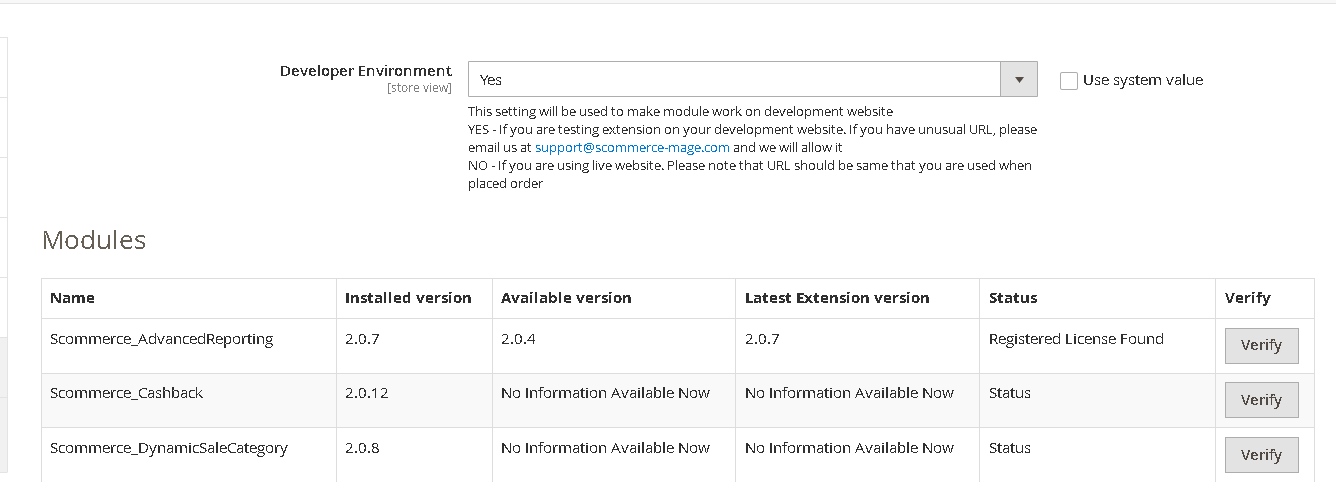
Once added go to Stores>Configuration>Scommerce Configuration>Core and click on verify. Once verified the license will start working on your staging site.
Q. Can I test the extension before buying?
A. Unfortunately we can't provide you extension for testing purposes but we have demo available for most of our extensions and happy to provide full refund if the extension doesn't work
Q. Can I request for customisation on your extensions?
A. Yes we do provide all sort of customisation for our clients at the reasonable rates. And if we believe the customisation will help our product then we also provide great discount on the customisation
Q. I have multiple websites/stores, each with a unique domain. Do I need a separate license key for each live domain?
A. Yes, each live domain requires its own license key. Our license keys are URL specific and each live domain, subdomain, subfolder requires a separate key. If you’re running multiple websites from the same Magento instance, we offer a 30% discount when purchasing license keys for two or more domains in a single order. To receive a coupon code, please contact us at support@scommerce-mage.com.
Q. How can I upgrade my extension to the latest version?
A. The upgrade process depends on your platform and how the extension was installed:
For Magento 2 (Installed via Composer)
If your extension is within the free upgrade period (12 months from the purchase date), you can update directly via the command line. Simply run the composer require command for the specific module to fetch and install the latest available version. If you are outside the free upgrade period, you will need to buy an upgrade using the link below.
For Magento 1 or Magento 2 (Installed manually via app/code)
If your extension is within the free upgrade period (12 months from the purchase date), you can simply download the latest available version by logging into our website and navigating to My Account > My Downloadable Products. If you are outside the free upgrade period, you will need to buy an upgrade using the link below.
Purchase an Upgrade:
https://www.scommerce-mage.com/magento-extension-installation-service.html
Important Note for Manual Upgrades: Before uploading the latest version, we highly recommend deleting all existing files and folders of our extension from your website. We may have deprecated or removed certain files in the update, and keeping the old ones could cause conflicts on your website.
Q.Where can I download the extension files?
A. Please login into your account on our website and go to the download link under my account section to download the extension package.
Q.Can you provide a key that works for our development (NOT PRODUCTION) environment which will work on a dynamic URL, for example, 12334.gitpod.com and 4567.gitpod.com?
A. Unfortunately it is not possible to generate license keys based on the dynamic URLs.
License keys need to be generated per domain or subdomain whether it is production or non-production.
Q. How can I manually uninstall your module?
A. Please follow the below steps -:
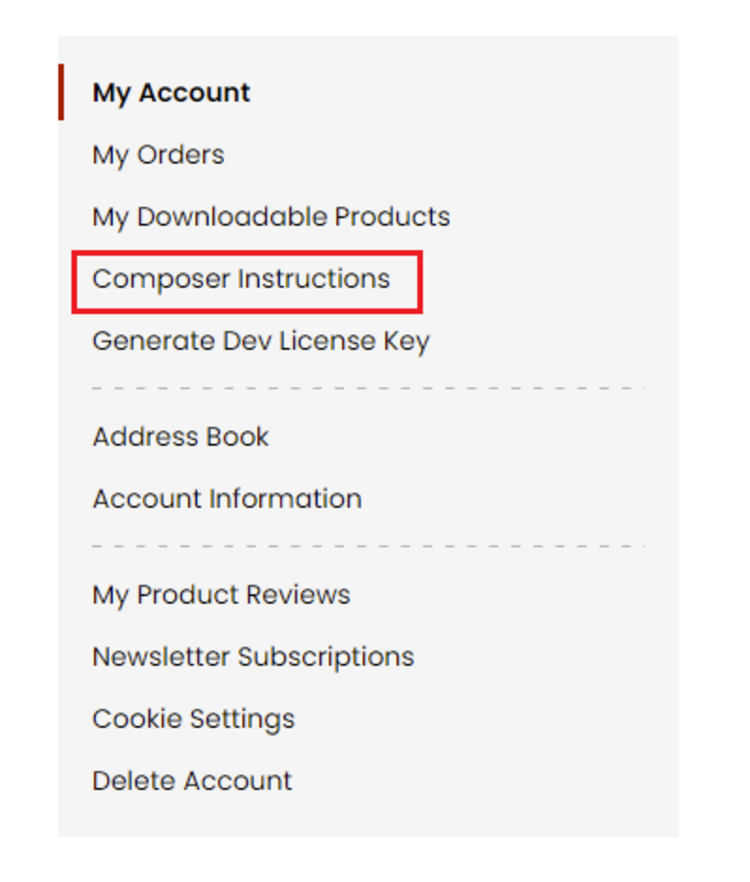
Step 1: Navigate to our store and login to your account. Then go to the My Account Section, on the left menu click on Composer Instructions.
 Step 2: Next, run the config commands shown on the top of the page then click on the extension that you want to install. A composer require command will be revealed in the dropdown menu. Run the command then clear caches to complete the installation.
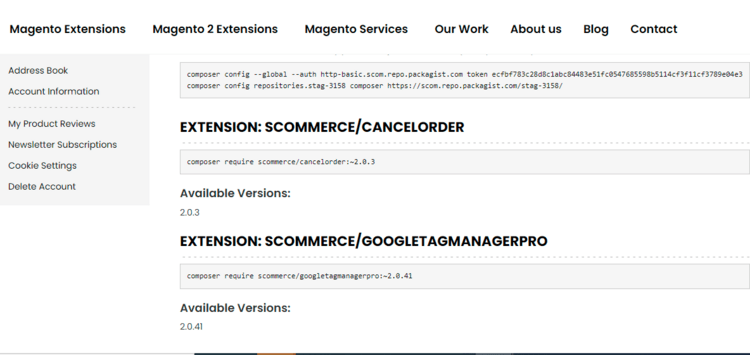
Step 2: Next, run the config commands shown on the top of the page then click on the extension that you want to install. A composer require command will be revealed in the dropdown menu. Run the command then clear caches to complete the installation.
Q. Do you support SPA (Single Page Application) / PWA (Progressive Web Application) / AMP ?
A. Unfortunately, we don’t support SPA or PWA or AMP but we may be supporting them in future depending upon the demand.
Change Log
Version 2.0.2
2026-04-21 09:17:32
Version 2.0.1
2026-02-04 10:37:34
- Add compatibility for PHP 7.x and Magento 2.3.x.
- Fixed issues with crons
- Improved the consistency of linking TTS orders with Magento orders
- Fixed issues related to shipment inventory source
- Fixed issues with crons
- Improved the consistency of linking TTS orders with Magento orders
- Fixed issues related to shipment inventory source
Version 2.0.0
2025-11-25 13:23:15
Initial Release
Show More
Show Less
Write A Review
Fields marked with * are required
- Added the ability to manually assign specific TikTok categories to products to prevent sync rejections. The system will use manual assignments first, falling back to automated recommendations only if unassigned
- Implemented an automatic check during the product save process. If product dimensions (height, width, etc.) are invalid for TikTok, a warning message is displayed immediately to the admin
- Added the functionality to test API credentials and refresh access tokens directly from the Configuration panel, removing the requirement for CLI commands
- Implemented support for partial refunds and upgraded the core logic for processing order cancellations and full refunds