
Skype us at scommerce.mage or call +44(0)1483 487746

Loading...

Magento 2 AI Content Generator
Compatible with Magento 2 community and enterprise 2.3.3 - 2.4.x including cloud edition
Revolutionise your content creation process with the Magento 2 AI Content Generator. This innovative module harnesses the power of industry-leading AI models, including ChatGPT 3.5, ChatGPT 4, GEMINI Flash and Pro, and now Groq, enabling you to effortlessly generate high-quality, SEO-friendly content for your e-commerce store. With improved multi-store reliability and enhanced performance, save time, enhance your online presence, and stay ahead of the competition with automated content creation.
- Leverage AI language models such as ChatGPT 3.5, ChatGPT 4, Gemini(Flash/Pro), and Groq.
- Customise and add custom content prompts for Meta Titles, Descriptions, Keywords, and Short Descriptions.
- Works on all products, categories, and CMS pages.
- Integrate seamlessly with Magento 2 page builder for enhanced editing capabilities.
- Enhanced Multi-store/Multi-website support for consistent, reliable content generation across all storefronts.
- Optimise SEO rankings with AI-generated, authentic, and engaging content.
- Fully integrated Groq API support. Choose from built-in versions like GPT OSS 20B and Llama 3.3-70b Versatile, or input a custom Groq model name to suit your exact needs.(NEW!)
- Compatible with HYVA Theme(NEW!)
- Compatible with Breeze Theme(NEW!)

Free Support
up to 60 days

Free Upgrades
up to 1 year

Fully open source
Product Description
Magento 2 AI Content Generator
Compatible with Magento 2 community and enterprise 2.3.3 - 2.4.x including cloud edition
Unlock the potential of artificial intelligence (AI) in content creation with our cutting-edge Magento 2 AI Content Generator extension. This innovative solution leverages leading AI language models such as ChatGPT, Gemini, and Groq, to redefine how you create, customise, and optimise content for your Magento 2 store.
As AI continues to revolutionise various industries, its role in content creation has become increasingly significant. With the rise of online shopping, the demand for engaging, SEO-friendly content has reached new heights. Traditional methods of content creation often prove to be time-consuming and inefficient, hindering businesses from maximising their potential.
Enhance Content Quality and Efficiency
Our AI Content Generator addresses these challenges head-on by automating the content creation process, enabling you to effortlessly generate high-quality, tailored content for your Magento 2 store. By harnessing the advanced natural language processing capabilities of ChatGPT, Gemini, and Groq, our extension empowers you to craft compelling product descriptions, captivating titles, and optimised meta tags in a fraction of the time.
- Utilise ChatGPT a leading AI language models known for their exceptional natural language processing capabilities, to generate high-quality content for your store effortlessly.
- With ChatGPT, benefit from its advanced conversational AI to craft engaging and authentic content that resonates with your audience. Its various versions such as ChatGPT 3.5 and ChatGPT 4 offer unparalleled text generation abilities, ensuring diverse and compelling content creation.
- Utilise Gemini from Google, one of the advanced AI language models. You can switch between Gemini Flash and Gemini Pro to tailor your content as per your needs.
- Utilise Groq, the latest addition to our AI suite, for lightning-fast content generation. Choose from high-performance models like Llama 3.3-70b Versatile and GPT OSS 20B, or define your own custom model to perfectly match your brand voice.
The significance of AI in content generation cannot be overstated. AI-powered solutions provide unmatched speed, accuracy, and scalability, allowing businesses to remain agile and competitive in today's dynamic marketplace. With our AI Content Generator powered by ChatGPT, Gemini, and Groq, you can leverage the latest advancements in natural language processing to create content that resonates with your target audience and drives conversions. Unlock the true potential of AI with Magento 2 AI Content Generator.

The main highlights of the module are-:
- Enable AI Content Generator with a single click from the backend.
- Choose from multiple AI language models, including ChatGPT 3.5, ChatGPT 4, Gemini (Flash/Pro), and Groq renowned for their advanced natural language processing capabilities.
- Advanced Groq model selection, choose from built-in versions like Llama 3.3-70b Versatile and GPT OSS 20B, or use the "Custom" setting to specify any exact model from your Groq admin. (NEW!)
- Customise and add custom content prompts for Meta Titles, Meta Descriptions, Keywords, Descriptions, and Short Descriptions to tailor the generated content to your specific needs.
- Most of the content fields on Product, Category and CMS pages can be populated with AI content using this module.
- Streamline content generation allowing you to efficiently populate your store with high-quality, AI-generated content.
- Integrate seamlessly with Magento 2 page builder for enhanced editing capabilities, ensuring a user-friendly experience while creating and modifying content.
- Stay ahead of the competition with SEO optimised content on your entire store without much effort.
- Optimise SEO rankings with AI-generated, SEO-friendly content crafted by leading AI models, leveraging their expertise in producing authentic and engaging text.
- Ensure authenticity and security with license key verification, guaranteeing the legitimacy of the AI-generated content produced.
- Leverage AI for mass action content generation across products, categories, and CMS pages, harnessing the power of advanced AI to efficiently create compelling content at scale.
- Enhanced Multi-store and Multi-website support, ensuring consistent and reliable content generation across all your store views.
- Compatible with HYVA Theme(NEW!)
- Compatible with Breeze Theme(NEW!)
- Easy to install and manage
- Flexible and user-friendly interface.
- Easy configuration
- It can be easily disabled from admin interface.
We offer 60 days of free support and 12 months of free upgrade for any standard Magento site when you buy this extension. You can also get our installation service for a small fee. If you want more benefits, you can purchase our 12 months of free premium support and free lifetime upgrade package. Please contact us if you need any assistance or customization for this extension. We will reply to you within 48 hours. We may also offer you a special deal or a free solution if we like your idea.
** Please refer to our FAQ or T&C section for running our extensions on multiple domains or sub-domains
FAQ
Frequently Asked Questions
Q. Does this module support both website and store views?
A. Yes, it offers full support for multi-store and multi-website configurations, ensuring stable and consistent content generation across all your store views.
Q. Can we define the default prompts for meta details (title/description/keywords), short description, and description for products?
A. Yes, the module's configuration section allows you to enter the default prompts for meta title, meta description, meta keywords, short description, and description fields for products, categories, and CMS pages.
Q. Can the default prompts be overwritten or a custom prompt be used for each field on individual products, categories, or CMS pages?
A. Yes, default prompts can be overwritten and both can be used at the store/website level.
Q. What languages does the extension support?
A. Currently, the extension supports multiple languages, allowing you to generate content in the language of your choice.
Q. Is the content generated by the extension SEO-friendly?
A. Yes, the extension is designed to produce SEO-friendly content by incorporating relevant keywords and maintaining optimised content structure, which can help improve your site's SEO ranking.
Q. How can I obtain the required API keys?
A.
- OpenAI (ChatGPT): Go to the OpenAI Platform website, create an account, and generate a key under "View API Keys".
- Google (Gemini): Visit the Google AI Studio to generate your API key for Gemini Flash or Pro.
- Groq: Log in to the Groq Cloud Console to create your API key for lightning-fast generation.
Q. Can I customise the AI-generated content?
A. Absolutely! While the AI provides a strong starting point, you have full control to edit and tailor the content to match your brand's voice and style using the "AI Content using Custom Prompt" button.
Q. Which AI models does the extension support?
A. Our extension supports ChatGPT 3.5, ChatGPT 4, Google Gemini (Flash/Pro), and Groq (including Llama 3.3 and GPT OSS models), ensuring that you have access to a range of capabilities and features offered by these advanced AI models.
Q. Does your module support Google’s recommended character limit for content?
A. Yes, it supports the character limits recommended by Google for different types of content; this includes meta details (Keywords, Title...), product descriptions, and more. It’s designed to ensure that the generated content is optimised for search engines.
Q. How does an AI Content Generator handle ambiguous content?
A. The AI Content Generator uses advanced algorithms and natural language processing via leading models like GPT-4 and Llama 3.3 to handle ambiguous content effectively.
Q. What is an AI Content Generator?
A. An AI Content Generator is a tool that uses artificial intelligence to generate content. It can create content for various types such as meta details (Title, Keywords), short descriptions, product descriptions, and CMS pages.
Q. Is this module fully compatible with Hyva Theme?
A. Yes, the module is fully compatible with Hyva Theme.
Q. Is this module fully compatible with Breeze Theme?
A. Yes, the module is fully compatible with Breeze Theme.
Q. How can I get license key for my development website?
A. Please use the same license as live site provided with the order confirmation email on the staging site and ensure you have the latest version of scommerce/core installed i.e 2.0.9.
Once added go to Stores>Configuration>Scommerce Configuration>Core and click on verify. Once verified the license will start working on your staging site.
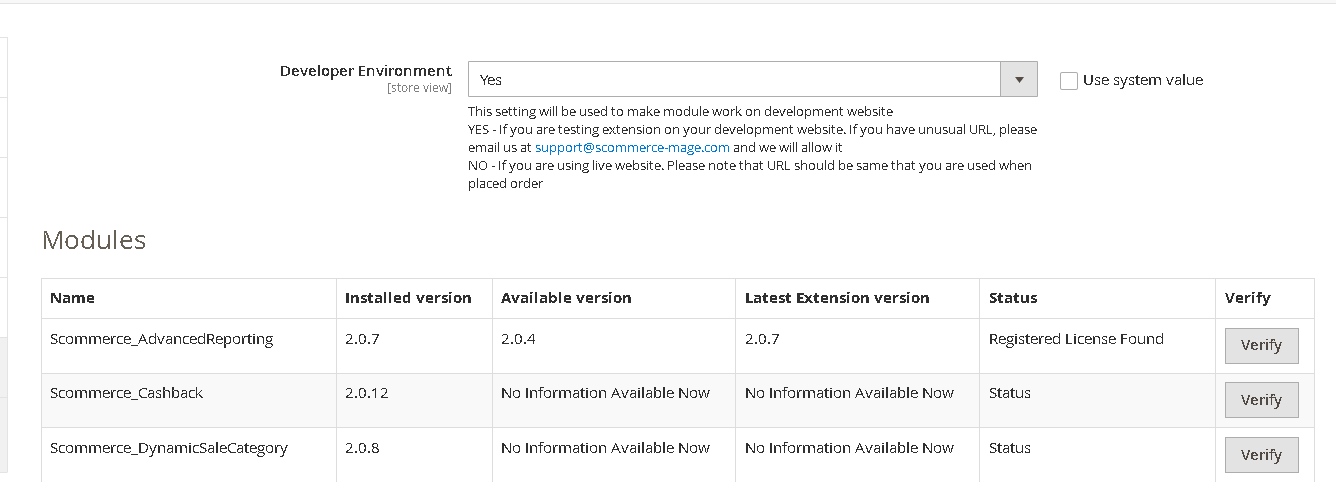
Once added go to Stores>Configuration>Scommerce Configuration>Core and click on verify. Once verified the license will start working on your staging site.
Q. Can I test the extension before buying?
A. Unfortunately we can't provide you extension for testing purposes but we have demo available for most of our extensions and happy to provide full refund if the extension doesn't work
Q. Can I request for customisation on your extensions?
A. Yes we do provide all sort of customisation for our clients at the reasonable rates. And if we believe the customisation will help our product then we also provide great discount on the customisation
Q. I have multiple websites/stores, each with a unique domain. Do I need a separate license key for each live domain?
A. Yes, each live domain requires its own license key. Our license keys are URL specific and each live domain, subdomain, subfolder requires a separate key. If you’re running multiple websites from the same Magento instance, we offer a 30% discount when purchasing license keys for two or more domains in a single order. To receive a coupon code, please contact us at support@scommerce-mage.com.
Q. How can I upgrade my extension to the latest version?
A. The upgrade process depends on your platform and how the extension was installed:
For Magento 2 (Installed via Composer)
If your extension is within the free upgrade period (12 months from the purchase date), you can update directly via the command line. Simply run the composer require command for the specific module to fetch and install the latest available version. If you are outside the free upgrade period, you will need to buy an upgrade using the link below.
For Magento 1 or Magento 2 (Installed manually via app/code)
If your extension is within the free upgrade period (12 months from the purchase date), you can simply download the latest available version by logging into our website and navigating to My Account > My Downloadable Products. If you are outside the free upgrade period, you will need to buy an upgrade using the link below.
Purchase an Upgrade:
https://www.scommerce-mage.com/magento-extension-installation-service.html
Important Note for Manual Upgrades: Before uploading the latest version, we highly recommend deleting all existing files and folders of our extension from your website. We may have deprecated or removed certain files in the update, and keeping the old ones could cause conflicts on your website.
Q.Where can I download the extension files?
A. Please login into your account on our website and go to the download link under my account section to download the extension package.
Q.Can you provide a key that works for our development (NOT PRODUCTION) environment which will work on a dynamic URL, for example, 12334.gitpod.com and 4567.gitpod.com?
A. Unfortunately it is not possible to generate license keys based on the dynamic URLs.
License keys need to be generated per domain or subdomain whether it is production or non-production.
Q. How can I manually uninstall your module?
A. Please follow the below steps -:
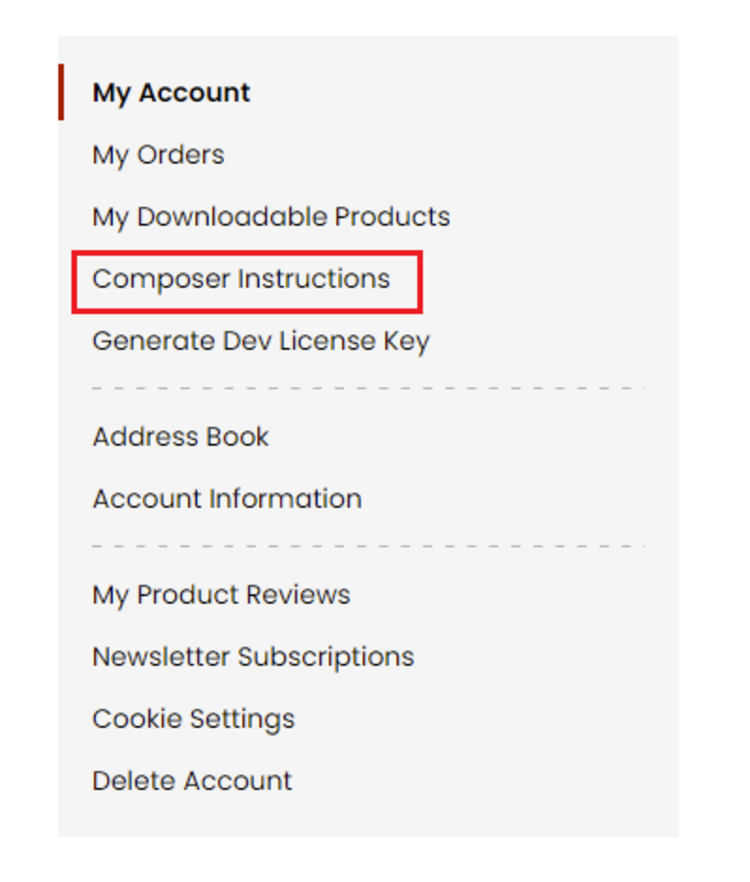
Step 1: Navigate to our store and login to your account. Then go to the My Account Section, on the left menu click on Composer Instructions.
 Step 2: Next, run the config commands shown on the top of the page then click on the extension that you want to install. A composer require command will be revealed in the dropdown menu. Run the command then clear caches to complete the installation.
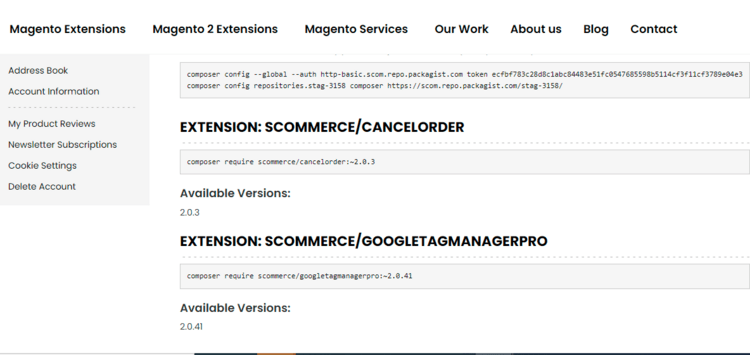
Step 2: Next, run the config commands shown on the top of the page then click on the extension that you want to install. A composer require command will be revealed in the dropdown menu. Run the command then clear caches to complete the installation.
Q. Do you support SPA (Single Page Application) / PWA (Progressive Web Application) / AMP ?
A. Unfortunately, we don’t support SPA or PWA or AMP but we may be supporting them in future depending upon the demand.
Change Log
Version 2.0.4
2026-03-02 11:14:41
Version 2.0.3
2025-11-14 12:05:59
The following changes have been implemented: -
- Replaced separate ChatGPT/Gemini boolean config flags with a single AI Service selector (ChatGPT / Gemini / Meta).
- Added a new Meta AI adapter and AIType option to generate content using Meta LLM
- Updated Gemini adapter to target Gemini 2.5 model names for both flash and pro.
- Refactored helper and service code to resolve adapters by the selected AI service.
- Replaced separate ChatGPT/Gemini boolean config flags with a single AI Service selector (ChatGPT / Gemini / Meta).
- Added a new Meta AI adapter and AIType option to generate content using Meta LLM
- Updated Gemini adapter to target Gemini 2.5 model names for both flash and pro.
- Refactored helper and service code to resolve adapters by the selected AI service.
Version 2.0.2
2024-10-29 13:05:36
The following changes have been implemented: -
- Fetching content is now available using Gemini flash & pro.
- Fetching content now creates logs for prompts and responses which can are viewable in the admin.
- The default prompts now return responses in the relevant formats.
- Fetching content is now available using Gemini flash & pro.
- Fetching content now creates logs for prompts and responses which can are viewable in the admin.
- The default prompts now return responses in the relevant formats.
Version 2.0.1
2024-05-10 08:57:19
The following changes have been implemented: -
- Resolved an issue where API keys were not being saved correctly. API keys are now fully secured and masked.
- Removed unfinished Gemini integration references from the store configuration to avoid confusion.
- Discontinued the ChatGPT3 support to promote more advanced models
- Resolved an issue where API keys were not being saved correctly. API keys are now fully secured and masked.
- Removed unfinished Gemini integration references from the store configuration to avoid confusion.
- Discontinued the ChatGPT3 support to promote more advanced models
Version 2.0.0
2024-04-19 14:43:19
Initial Release
Show More
Show Less
Write A Review
Fields marked with * are required
- Added support for Groq as a content generation provider, expanding the available AI options for generating content.
- The model field is now included in log entries, giving you full visibility into exactly which model was used for each content generation request.
- Resolved an issue where the provider field would appear empty when the system configuration value was used.
- Resolved an issue in multistore setups where the incorrect store ID was being passed when selecting a model, ensuring each store now correctly uses its own configuration.
- MetaAI has been removed as a supported content generation provider.