
Skype us at scommerce.mage or call +44(0)1483 487746

Loading...

Magento 1 / OpenMage Enhanced Order Grid
Compatible with community: 1.9.x and enterprise: 1.14.x
Magento Enhanced Admin Order Grid with Customer Attributes Module by Scommerce Mage Ltd.
Compatible with community: 1.9.x and enterprise: 1.14.x
Magento Enhanced Order Grid extension allows you to add customer and address attributes in Magento admin order grid. These attributes can be selected within the admin as multi-select options. You can also export those attributes with normal order export option above the order grid.
Free Support
up to 60 days

Free Upgrades
up to 1 year

Fully open source
Product Description
Magento Enhanced Admin Order Grid with Customer and Customer Address Attributes by Scommerce Mage Ltd.
Compatible with community: 1.9.x and enterprise: 1.14.x
This modules allows you to add customer and address attributes in Magento admin order grid. These attributes can be selected within admin as multiselect options. You can also export those attributes with normal order export option above the order grid.
Here are the main customer attributes you can add to the admin order grid-:
- Prefix
- First Name
- Middle Name
- Last Name
- Date of Birth
- Gender
- Tax / VAT number
Here are the main customer address attributes you can add to the admin order grid-:
- Street Address
- City
- Postal Code
- County/State/Province
- Telephone Number
- Country
- VAT Number
- VAT Number Validity
We offer 60 days of free support and 12 months of free upgrade for any standard Magento site when you buy this extension. You can also get our installation service for a small fee. If you want more benefits, you can purchase our 12 months of free premium support and free lifetime upgrade package. Please contact us if you need any assistance or customization for this extension. We will reply to you within 48 hours. We may also offer you a special deal or a free solution if we like your idea.
** Please refer to our FAQ or T&C section for running our extensions on multiple domains or sub-domains
FAQ
Q. How can I get license key for my development website?
A. Please use the same license as live site provided with the order confirmation email on the staging site and ensure you have the latest version of scommerce/core installed i.e 2.0.9.
Once added go to Stores>Configuration>Scommerce Configuration>Core and click on verify. Once verified the license will start working on your staging site.
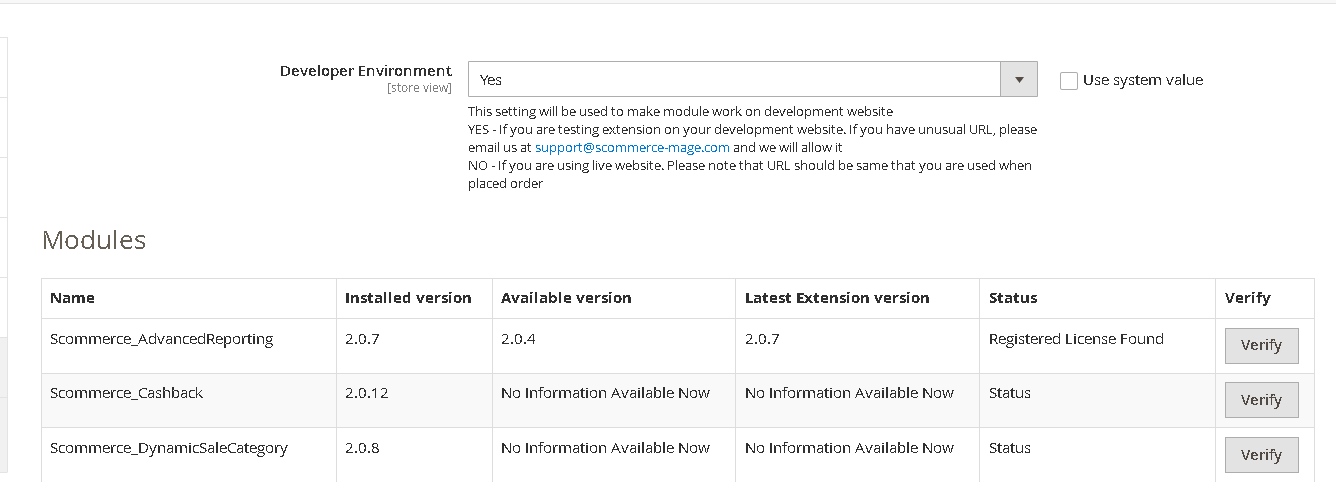
Once added go to Stores>Configuration>Scommerce Configuration>Core and click on verify. Once verified the license will start working on your staging site.
Q. Can I test the extension before buying?
A. Unfortunately we can't provide you extension for testing purposes but we have demo available for most of our extensions and happy to provide full refund if the extension doesn't work
Q. Can I request for customisation on your extensions?
A. Yes we do provide all sort of customisation for our clients at the reasonable rates. And if we believe the customisation will help our product then we also provide great discount on the customisation
Q. I have multiple websites/stores, each with a unique domain. Do I need a separate license key for each live domain?
A. Yes, each live domain requires its own license key. Our license keys are URL specific and each live domain, subdomain, subfolder requires a separate key. If you’re running multiple websites from the same Magento instance, we offer a 30% discount when purchasing license keys for two or more domains in a single order. To receive a coupon code, please contact us at support@scommerce-mage.com.
Q. How can I upgrade my extension to the latest version?
A. The upgrade process depends on your platform and how the extension was installed:
For Magento 2 (Installed via Composer)
If your extension is within the free upgrade period (12 months from the purchase date), you can update directly via the command line. Simply run the composer require command for the specific module to fetch and install the latest available version. If you are outside the free upgrade period, you will need to buy an upgrade using the link below.
For Magento 1 or Magento 2 (Installed manually via app/code)
If your extension is within the free upgrade period (12 months from the purchase date), you can simply download the latest available version by logging into our website and navigating to My Account > My Downloadable Products. If you are outside the free upgrade period, you will need to buy an upgrade using the link below.
Purchase an Upgrade:
https://www.scommerce-mage.com/magento-extension-installation-service.html
Important Note for Manual Upgrades: Before uploading the latest version, we highly recommend deleting all existing files and folders of our extension from your website. We may have deprecated or removed certain files in the update, and keeping the old ones could cause conflicts on your website.
Q.Where can I download the extension files?
A. Please login into your account on our website and go to the download link under my account section to download the extension package.
Q.Can you provide a key that works for our development (NOT PRODUCTION) environment which will work on a dynamic URL, for example, 12334.gitpod.com and 4567.gitpod.com?
A. Unfortunately it is not possible to generate license keys based on the dynamic URLs.
License keys need to be generated per domain or subdomain whether it is production or non-production.
Change Log
Write A Review
Fields marked with * are required