Skype us at scommerce.mage or call +44(0)1483 487746

Loading...
Magento 2 VAT Switcher
Compatible with Magento 2 community and enterprise 2.3.3 - 2.4.x including cloud edition
Streamline your B2B and B2C operations with the Magento 2 VAT Switcher, now featuring AJAX-based price switching for instant updates without annoying page reloads. This tool provides total pricing transparency by allowing shoppers to toggle between VAT-inclusive and VAT-exclusive views, now with automated customer group price mapping to assign default tax displays based on user roles. Fully compatible with Hyvä and Breeze, it ensures a fast, professional shopping experience tailored for the UK market.
- AJAX Price Toggling: Update prices site-wide instantly without a full page refresh or hard reload.
- Customer Group Mapping: Automatically set Inc./Ex. VAT defaults based on a user's specific customer group.
- Universal Update Scope: Dynamic price updates across the Home Page, PDP, PLP, Search, and Mini-cart.
- Advanced Admin Grid: Easily manage group-to-VAT preferences via a dynamic configuration UI.
- Configurable “Including” and “Excluding” price selection to display on the front end
- Persistent Sessions: Remembers customer tax preferences via cookies as they navigate the storefront.

Free Support
up to 60 days

Free Upgrades
up to 1 year

Fully open source
Product Description
Magento 2 VAT Switcher
Compatible with Magento 2 community and enterprise 2.3.3 - 2.4.x including cloud edition
Serving a mix of B2B trade customers and B2C retail shoppers in the UK presents a unique challenge: how do you display prices? Retail consumers expect to see final, VAT-inclusive prices, while business buyers need to see VAT-exclusive costs for their accounting. By default, Magento makes you choose one fixed display method, which can alienate half your audience. The Magento 2 VAT Switcher elegantly solves this problem by providing a dynamic, user-controlled pricing environment.
This extension places a simple, persistent switcher in your store header, giving customers total control over their pricing view. With a single click, all prices across the site, including the Home Page, Search Results, Mini-carts, Category pages, Product pages and Widgets, update instantly via AJAX-based switching. This ensures the browser never triggers a full page reload or hard refresh, creating a seamless and transparent user experience that builds trust and reduces friction at checkout. Whether a customer is browsing related products or viewing their basket, the pricing remains consistent and accurate to their preference.
The VAT Switcher is an intelligent tool that now features automated Customer Group Price Mapping. From the Magento Admin, you can use a dynamic configuration grid to map specific customer groups to their ideal VAT display preference. Upon login, the module identifies the user's group and automatically defaults the frontend to the correct format. While it automates the journey for trade accounts and retail shoppers, it still allows for a manual toggle override. This intelligent conflict resolution ensures that if a user manually changes the toggle, their choice takes priority for that session, with the preference persisted via cookies as they navigate the store.
Built for high-performance environments, the module integrates flawlessly with standard Luma-based themes and modern frontends like Hyvä and Breeze. For those running bespoke setups or custom themes, it includes configurable CSS selectors in the admin panel. This allows administrators to target specific price containers (such as .price-box) without modifying the core script, ensuring the AJAX updates work perfectly across any layout. All settings are managed within the Magento admin, providing a robust, conflict-free tax display strategy that scales with your business.
Core Capabilities
- AJAX-Driven Price Toggling: Switch between Inc. VAT and Ex. VAT pricing instantly across all price blocks without the interruption of a full page refresh or hard reload.
- Automated Customer Group Mapping: Define default VAT preferences for specific customer groups using a dynamic row UI component within the Magento Admin configuration.
- Universal Update Scope: Ensure pricing consistency everywhere; the switcher dynamically updates the Home Page, Category Listings (PLP), Product Detail Pages (PDP), Search results, and the Mini-cart.
- Advanced State Persistence: The user's selection is saved via session or cookie, ensuring their preferred tax view remains active as they navigate between pages or return for future visits.
- Configurable Selectors: Tailor the extension to custom themes by defining specific CSS price containers directly in the backend for seamless AJAX compatibility.
- Hyvä and Breeze Ready: Engineered to work with the latest high-performance Magento frontends, ensuring a fast, lightweight, and modern implementation.
- Manual Override Logic: Allows users to manually change their view even if a group default is set, providing total flexibility for the shopper.
Main Features
- Zero Page Refresh: Utilises modern AJAX technology to update all product prices site-wide for a smoother, faster browsing experience.
- Dynamic Admin Configuration Grid: Easily manage complex group-to-VAT rules with an intuitive grid that includes built-in validation to prevent duplicate entries.
- Comprehensive Widget Support: Prices within upsells, related products, and sidebar widgets remain synchronised with the primary VAT toggle.
- Strategic Header Placement: Designed for high visibility, the toggle is typically placed in the store header to ensure easy access on every page.
- Intelligent Login Logic: Automatically identifies the Customer Group ID upon login and adjusts the frontend price display to match the mapped configuration.
- UK Market Optimised: Built specifically to handle the dual-pricing requirements of British B2B and B2C e-commerce stores.
- Accurate Tax Calculation: Fully integrates with your existing Magento tax rules and zones to ensure VAT amounts are always calculated with 100% accuracy.
- Developer Friendly: Provides the flexibility to configure custom theme selectors and hooks, making it easy to adapt to complex, non-standard Magento installations.
Compatible with Magento 2 community and enterprise 2.3.3 - 2.4.x including cloud edition
We offer 60 days of free support and 12 months of free upgrade for any standard Magento site when you buy this extension. You can also get our installation service for a small fee. If you want more benefits, you can purchase our 12 months of free premium support and free lifetime upgrade package. Please contact us if you need any assistance or customization for this extension. We will reply to you within 48 hours. We may also offer you a special deal or a free solution if we like your idea.
** Please refer to our FAQ or T&C section for running our extensions on multiple domains or sub-domains
FAQ
Frequently Asked Questions
Q. Does switching the price display cause the page to reload?
A. No, provided the configuration is set correctly. The extension includes a ‘Use Frontend Switcher’ flag within the configuration settings. When this flag is enabled (Use Frontend Switcher - YES), the system utilises AJAX to update all price blocks instantly across the page, including the mini-cart and widgets,without requiring a full page reload or hard refresh.
Q. How do I map specific customer groups to a VAT preference?
A. The module includes a dynamic configuration grid in the Magento Admin panel. You can create rows to map specific customer groups to either "Show Price with VAT" or "Show Price without VAT." Upon login, the system automatically identifies the user's group and applies the correct display setting.
Q. What happens if a customer manually overrides their group default?
A. The extension features intelligent manual override logic. If a logged-in customer manually changes the toggle in the header, their selection will override the automated group mapping for that specific session, giving the user total control over their view.
Q. Where does the price update take effect?
A. The price updates are universal. The AJAX script dynamically targets and updates prices on the Home Page, Product Detail Pages (PDP), Category Listing Pages (PLP), Search Result Pages, Mini-carts, and all standard price widgets.
Q. Is the extension compatible with custom Magento themes?
A. Yes. While the extension targets standard Magento price containers like .price-box, you can easily configure custom CSS selectors directly in the Magento Admin. This ensures the AJAX updates work perfectly on bespoke themes, including Hyvä and Breeze.
Q. How does the switcher know the correct VAT rate to use?
A. The extension does not perform its own tax calculations. It leverages your existing, configured Magento tax rules, zones, and rates. It simply toggles the display of those correctly calculated taxes, ensuring accuracy and compliance.
Q. What do guest users see when they first visit the site?
A. For guest users or customers without a specific group mapping, the module falls back to your global default store setting. Guests can use the switcher to change the view, and their preference is saved via cookies so it persists as they navigate the site.
Q. Does this affect the final price in the shopping cart and checkout?
A. The switcher's primary function is to change the price display throughout the catalogue. The final, legally required tax calculation at checkout remains based on your store's core tax configuration and the customer's shipping address.
Q. How can I get license key for my development website?
A. Please use the same license as live site provided with the order confirmation email on the staging site and ensure you have the latest version of scommerce/core installed i.e 2.0.9.
Once added go to Stores>Configuration>Scommerce Configuration>Core and click on verify. Once verified the license will start working on your staging site.
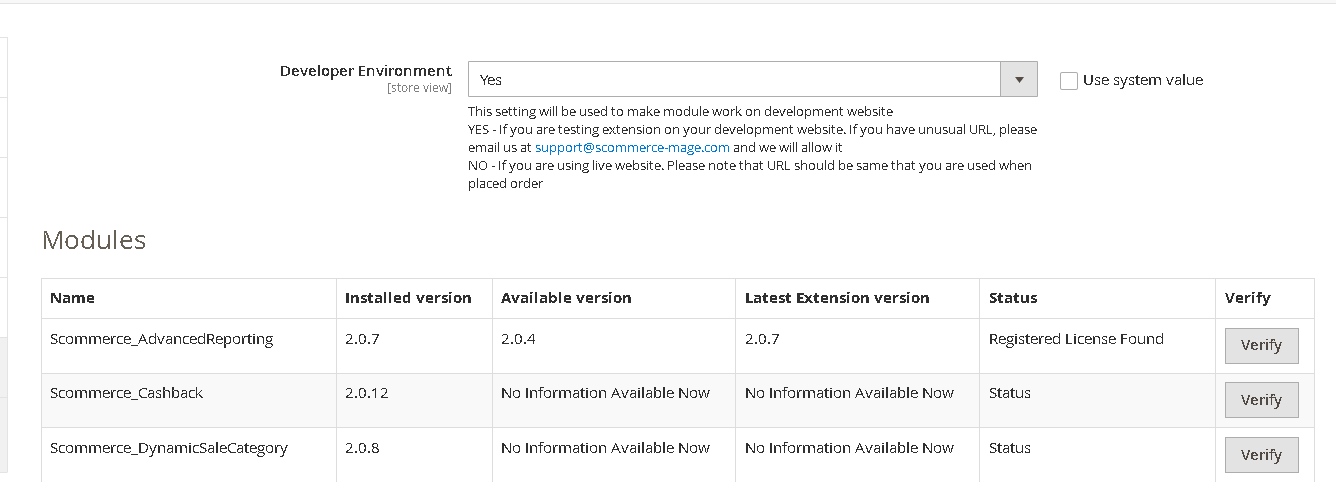
Once added go to Stores>Configuration>Scommerce Configuration>Core and click on verify. Once verified the license will start working on your staging site.
Q. Can I test the extension before buying?
A. Unfortunately we can't provide you extension for testing purposes but we have demo available for most of our extensions and happy to provide full refund if the extension doesn't work
Q. Can I request for customisation on your extensions?
A. Yes we do provide all sort of customisation for our clients at the reasonable rates. And if we believe the customisation will help our product then we also provide great discount on the customisation
Q. I have multiple websites/stores, each with a unique domain. Do I need a separate license key for each live domain?
A. Yes, each live domain requires its own license key. Our license keys are URL specific and each live domain, subdomain, subfolder requires a separate key. If you’re running multiple websites from the same Magento instance, we offer a 30% discount when purchasing license keys for two or more domains in a single order. To receive a coupon code, please contact us at support@scommerce-mage.com.
Q. How can I upgrade my extension to the latest version?
A. The upgrade process depends on your platform and how the extension was installed:
For Magento 2 (Installed via Composer)
If your extension is within the free upgrade period (12 months from the purchase date), you can update directly via the command line. Simply run the composer require command for the specific module to fetch and install the latest available version. If you are outside the free upgrade period, you will need to buy an upgrade using the link below.
For Magento 1 or Magento 2 (Installed manually via app/code)
If your extension is within the free upgrade period (12 months from the purchase date), you can simply download the latest available version by logging into our website and navigating to My Account > My Downloadable Products. If you are outside the free upgrade period, you will need to buy an upgrade using the link below.
Purchase an Upgrade:
https://www.scommerce-mage.com/magento-extension-installation-service.html
Important Note for Manual Upgrades: Before uploading the latest version, we highly recommend deleting all existing files and folders of our extension from your website. We may have deprecated or removed certain files in the update, and keeping the old ones could cause conflicts on your website.
Q.Where can I download the extension files?
A. Please login into your account on our website and go to the download link under my account section to download the extension package.
Q.Can you provide a key that works for our development (NOT PRODUCTION) environment which will work on a dynamic URL, for example, 12334.gitpod.com and 4567.gitpod.com?
A. Unfortunately it is not possible to generate license keys based on the dynamic URLs.
License keys need to be generated per domain or subdomain whether it is production or non-production.
Q. How can I manually uninstall your module?
A. Please follow the below steps -:
Step 1: Navigate to our store and login to your account. Then go to the My Account Section, on the left menu click on Composer Instructions.
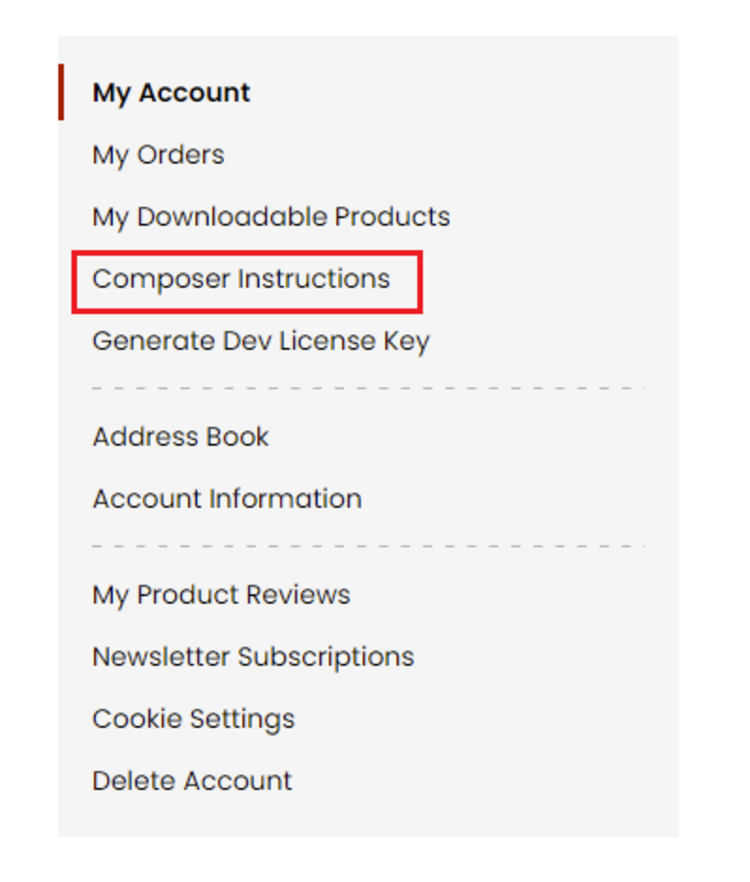 Step 2: Next, run the config commands shown on the top of the page then click on the extension that you want to install. A composer require command will be revealed in the dropdown menu. Run the command then clear caches to complete the installation.
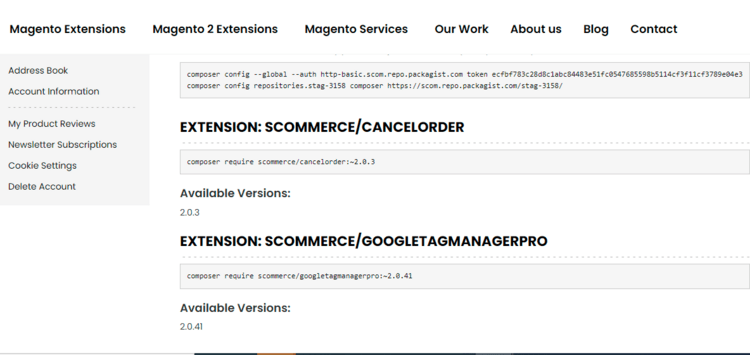
Step 2: Next, run the config commands shown on the top of the page then click on the extension that you want to install. A composer require command will be revealed in the dropdown menu. Run the command then clear caches to complete the installation.
Q. Do you support SPA (Single Page Application) / PWA (Progressive Web Application) / AMP ?
A. Unfortunately, we don’t support SPA or PWA or AMP but we may be supporting them in future depending upon the demand.
Change Log
Version 2.0.3
2026-06-02 12:13:25
This release fixes critical caching issues in the VAT Switcher module to ensure proper cache behavior with Varnish/FPC and correct cache isolation between customer groups
Version 2.0.2
2026-05-11 07:37:22
The following changes have been implemented
- Customers can now toggle between "With VAT" and "Without VAT" instantly. Prices across the Home page, Product pages, Listings, and Mini-cart update without a page refresh.
- Admins can now map specific customer groups to a default VAT view. For example, B2B groups can be set to see prices "Ex. VAT" automatically upon login.
- The VAT toggle now extends to the shopping basket and checkout totals, ensuring price consistency throughout the entire journey.
- Customers can now toggle between "With VAT" and "Without VAT" instantly. Prices across the Home page, Product pages, Listings, and Mini-cart update without a page refresh.
- Admins can now map specific customer groups to a default VAT view. For example, B2B groups can be set to see prices "Ex. VAT" automatically upon login.
- The VAT toggle now extends to the shopping basket and checkout totals, ensuring price consistency throughout the entire journey.
Version 2.0.1
2025-12-01 07:48:08
Refactored template code to comply with the latest Magento security standards by implementing proper usage of the escaper function across PHTML files
Version 2.0.0
2025-09-08 11:43:23
Initial Release
Show More
Show Less
Write A Review
Fields marked with * are required