Skype us at scommerce.mage or call +44(0)1483 487746

Loading...
Magento 2 Product Packs & Bulk Quantity Sync
£154.99
Compatible with Magento 2 community and enterprise 2.3.3 - 2.4.x including cloud edition
Streamline your inventory management with the Magento 2 Product Packs & Bulk Quantity Sync extension. Effortlessly create and sell bulk packs (e.g., Pack of 10, Pack of 50) while automatically keeping stock synchronised with your single items. This essential tool ensures real-time inventory accuracy by deducting and restoring quantities across all related SKUs instantly. Eliminate overselling, simplify stock tracking, and offer flexible purchasing options with a lightweight solution built for Magento 2 performance.
- Smart Pack Management: Create pack-based products linked directly to your main inventory with precise quantity rules.
- Real-Time Stock Synchronization: Automatically deducts stock from the main product when a pack is sold.
- Dynamic Stock Calculation: Instantly recalculates available pack quantities based on the main product’s live inventory.
- Seamless Refunds & Restocking: Automatically restores inventory to the main product when a pack order is cancelled or refunded.
- Centralised Inventory Control: Manage stock in one place, updates to the main product reflect across all pack sizes immediately.

Free Support
up to 60 days

Free Upgrades
up to 1 year

Fully open source
Product Description
Magento 2 Product Packs & Bulk Quantity Sync
Compatible with Magento 2 community and enterprise 2.3.3 - 2.4.x including cloud edition
For merchants selling products in both single units and bulk quantities, keeping inventory accurate is a constant challenge. Manual updates often lead to overselling, stock discrepancies, and frustrated customers. The Magento 2 Product Packs & Bulk Quantity Sync extension solves this by automating the relationship between your single products and their bulk pack variations.
Whether you are selling wholesale, B2B packs, or consumer multi-buys, this extension acts as a bridge, ensuring that every sale of a "Pack of 10" accurately reduces your main inventory by 10 units. Conversely, stock is automatically replenished if a pack is refunded. This "single source of truth" approach simplifies your operations, allowing you to focus on sales rather than spreadsheet management.
Why Inventory Sync for Product Packs is Critical
Selling in bulk is a proven strategy to increase Average Order Value (AOV), but without proper tools, it creates an inventory nightmare. Here is why this extension is essential for your store:
- Prevents Overselling: By linking pack quantities directly to the main product stock, you ensure you never sell a "Pack of 50" when you only have 40 units available. The system automatically disables packs that cannot be fulfilled.
- Eliminates Manual Updates: Forget updating five different SKUs every time you receive a shipment. Update your main product stock once, and all related pack sizes update automatically.
- Optimised for B2B & Wholesale: Easily offer tiered purchasing options like "Case of 12" or "Box of 100" without creating complex bundle products that clutter your backend.
- Accurate Reporting: Gain a clear view of your true inventory levels. Consumption is tracked at the unit level, providing better data for restocking and forecasting.
- Seamless Customer Experience: Customers always see accurate stock availability, building trust and reducing the likelihood of backorders or cancellations.
How It Works: Intelligent Stock Logic
The extension uses a smart logic engine to keep your catalogue in perfect sync. Here is the core functionality:
- Flexible Pack Configuration: Create simple products for your packs (e.g., "Pack of 5") and link them to the main SKU with a defined multiplier (e.g., 5).
- Dynamic Availability Calculation: The system continuously monitors the main product's stock. If you have 100 units, it calculates that you have 20 "Packs of 5" available. If you sell one single unit, the available pack stock instantly adjusts to 19 (since 99 units cannot make 20 packs).
- Two-Way Sync:
- On Sale: Selling a pack automatically deducts the equivalent unit count from the main product.
- On Refund/Cancellation: Returning a pack restores the correct number of units back to the main product inventory.
Designed for Performance & Scalability
We understand that speed is money. This extension is built with Magento best practices to ensure it remains lightweight, even for large catalogues.
- No Database Bloat: Uses efficient indexing and direct inventory transactions to minimise database load.
- Compatible with Multi-Store: Manage different pack configurations across different store views or websites seamlessly.
- API Ready: Fully supports Magento’s REST API for external integrations with ERPs or PIM systems.
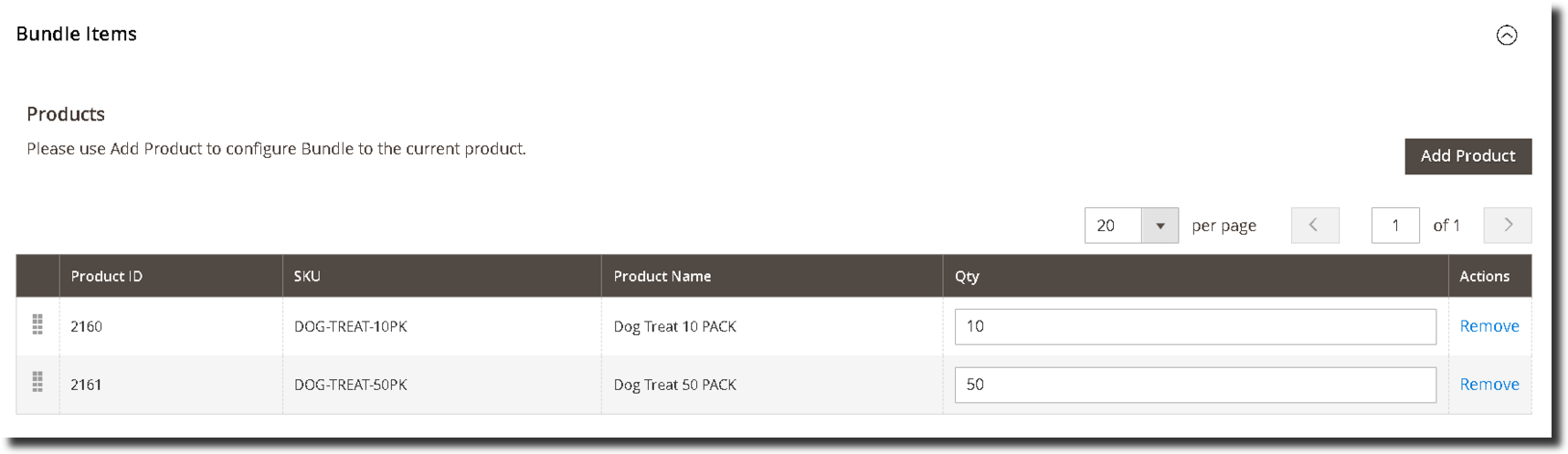
Scenario: Synchronised Inventory for Organic Dog Treats
Your store sells Organic Chicken Dog Treats as a single item and in bulk packs. You set up the following structure using the extension:
| Product Name | SKU | Qty Deducted from Main |
|---|---|---|
| Single Pack (Main Product) | DOG-TREAT-001 | 100 |
| Pack of 10 | DOG-TREAT-10PK | 10 |
| Pack of 50 | DOG-TREAT-50PK | 50 |
Inventory Deduction on Purchase
If a customer buys 2 x Pack of 10:
- The system calculates the total units: 2 packs × 10 units = 20 units.
- The Main Product (Single Pack) inventory is reduced by 20. So the main product Single Pack becomes 100- 20 = 80 units.
- The available stock for "Pack of 50" is automatically recalculated based on the remaining single units.
Inventory Restoration on Refund
If that order is cancelled:
- The system identifies the link and multiplier (10).
- It restores 20 units back to the Main Product inventory. So the main product becomes 80 + 20 = 100 units
- All pack sizes instantly reflect the restored availability.
This automation ensures that whether you sell a single unit or a bulk case, your inventory numbers are always 100% accurate.
Scenario: Automated Inventory Deduction for Hardware Components
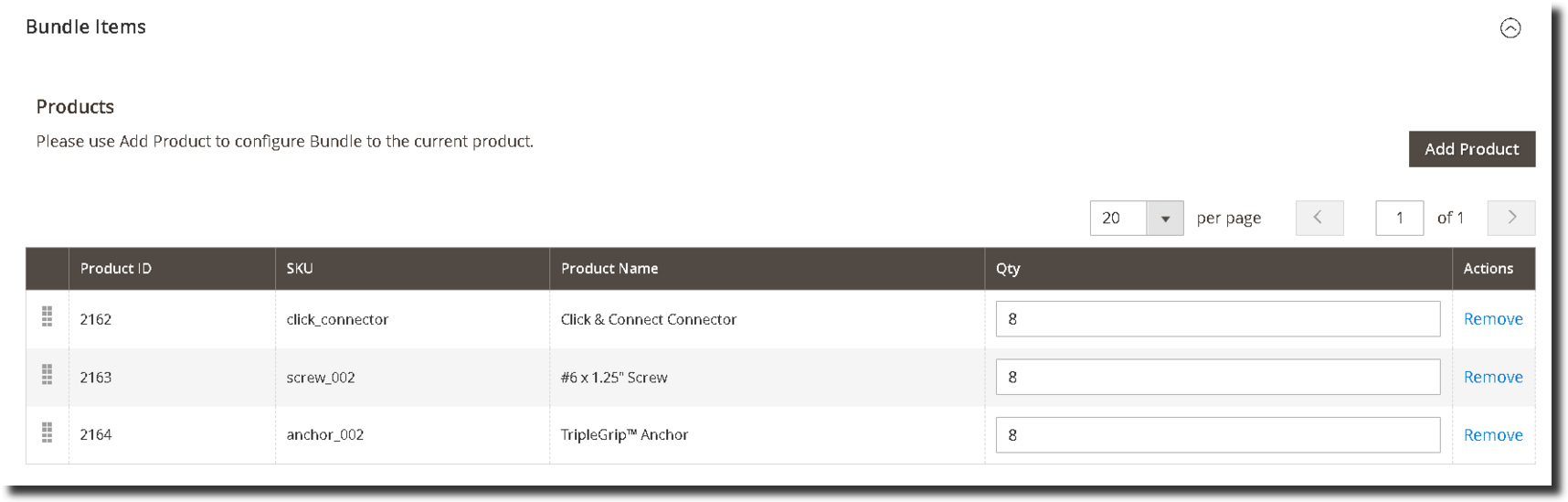
Your website sells Coloured Click Rail Tracks (e.g., Silver, Black, Warm White) as installation-ready units. Each track unit requires specific hardware components to be included. You set up the following structure using the extension:
| Component Name | Quantity per Track Unit |
|---|---|
| Click & Connect Connector | 8 |
| #6 x 1.25" Screw | 8 |
| TripleGrip™ Anchor | 8 |
Inventory Deduction on Purchase
If a customer buys 3 x Silver Click Rail Tracks:
- The main track product stock decreases by 3 units.
- The system automatically calculates and deducts the linked hardware components:
- 3 tracks × 8 connectors = 24 connectors deducted.
- 3 tracks × 8 screws = 24 screws deducted.
- 3 tracks × 8 anchors = 24 anchors deducted.
Inventory Restoration on Refund
If a refund is processed for 2 units of that order:
- The system restores 2 units of the main track inventory.
- Associated hardware components are restored proportionally back to stock:
- 2 tracks × 8 = 16 connectors restored.
- 2 tracks × 8 = 16 screws restored.
- 2 tracks × 8 = 16 anchors restored.
This automation manages associations per colour variant, keeping hardware stock accurate across your entire catalogue without manual adjustments.
Key Features of Magento 2 Product Packs & Bulk Quantity Sync
- Virtual Pack Creation: Link simple products as packs to a main inventory item.
- Precise Multipliers: Define exactly how many units constitute a pack (e.g., 6, 12, 24).
- Automated Stock Deduction: Sales of packs deduct the correct unit amount from the main SKU.
- Automated Restocking: Refunds replenish the main SKU inventory correctly.
- Dynamic Stock Calculation: Pack availability is always based on real-time main product stock.
- Centralised Management: Update stock in one place; syncs everywhere.
- Bulk Import/Export: Quickly set up pack relationships via CSV for large catalogues.
- Error-Free Logic: Validation prevents creating packs that exceed available inventory.
- Developer Friendly: Clean code following Magento standards for easy customisation.
- Easy Installation: Plug-and-play setup with user-friendly configuration.
Compatible with Magento 2 community and enterprise 2.3.3 - 2.4.x including cloud edition
We offer 60 days of free support and 12 months of free upgrade for any standard Magento site when you buy this extension. You can also get our installation service for a small fee. If you want more benefits, you can purchase our 12 months of free premium support and free lifetime upgrade package. Please contact us if you need any assistance or customization for this extension. We will reply to you within 48 hours. We may also offer you a special deal or a free solution if we like your idea.
** Please refer to our FAQ or T&C section for running our extensions on multiple domains or sub-domains
FAQ
Frequently Asked Questions
Q. How is this different from a standard Magento 2 Bundle Product?
A. A standard Magento Bundle Product allows the customer to choose options, creating a customisable product. Our extension is for creating pre-defined kits or "virtual bundles" where the components are fixed. The primary goal is backend inventory management, when the main product is sold, the stock of its hidden components is automatically deducted.
Q. Can I use the same component (e.g., a specific screw) in multiple different kits?
A. Absolutely. You can associate a single component product with multiple main products and define a different required quantity for each association.
Q. What happens to component stock if a customer buys 10 units of the main product?
A. The stock for each component will be deducted proportionally. For example, if your main product requires 2 units of Component A, a purchase of 10 main products will deduct 20 units of Component A from your inventory.
Q. Will my main product go out of stock if one of its components is out of stock?
A. By default, no. The extension is designed to keep your main product available for sale to prevent lost revenue, even if a component is temporarily unavailable. A configurable option for this behavior will be introduced in a future version.
Q. Is the inventory for components automatically restored if an order is refunded?
A. Yes. When a refund or credit memo is processed for an order, the stock for both the main product and all its associated components is automatically and proportionally added back to your inventory.
Q. Can I manage these component relationships in bulk for my entire catalog?
A. Yes. The extension includes a powerful import/export feature that allows you to create, update, and delete component associations using a CSV file, which is ideal for managing large catalogs.
Q. Can I display the list of components to the customer on the product page?
A. Yes. While the extension's core function is backend inventory control, it includes functionality to display the associated components and their quantities on the product detail page for customer transparency.
Q. What kind of products can be used as components?
A. Any "Simple Product" in your Magento 2 catalog can be assigned as a component to another product.
Q. How can I get license key for my development website?
A. Please use the same license as live site provided with the order confirmation email on the staging site and ensure you have the latest version of scommerce/core installed i.e 2.0.9.
Once added go to Stores>Configuration>Scommerce Configuration>Core and click on verify. Once verified the license will start working on your staging site.
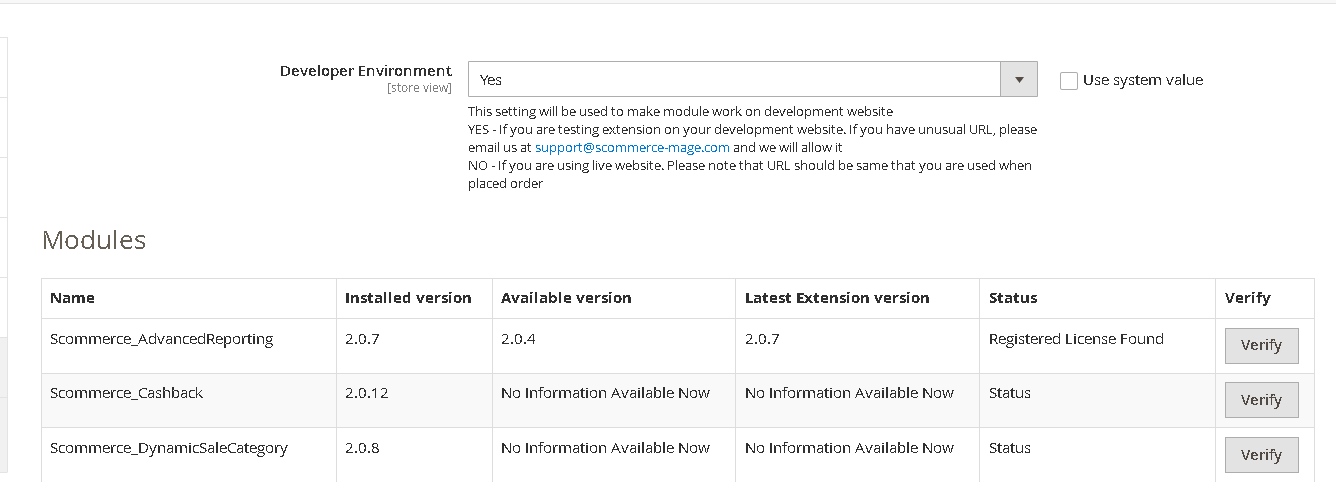
Once added go to Stores>Configuration>Scommerce Configuration>Core and click on verify. Once verified the license will start working on your staging site.
Q. Can I test the extension before buying?
A. Unfortunately we can't provide you extension for testing purposes but we have demo available for most of our extensions and happy to provide full refund if the extension doesn't work
Q. Can I request for customisation on your extensions?
A. Yes we do provide all sort of customisation for our clients at the reasonable rates. And if we believe the customisation will help our product then we also provide great discount on the customisation
Q. I have multiple websites/stores, each with a unique domain. Do I need a separate license key for each live domain?
A. Yes, each live domain requires its own license key. Our license keys are URL specific and each live domain, subdomain, subfolder requires a separate key. If you’re running multiple websites from the same Magento instance, we offer a 30% discount when purchasing license keys for two or more domains in a single order. To receive a coupon code, please contact us at support@scommerce-mage.com.
Q. How can I upgrade my extension to the latest version?
A. The upgrade process depends on your platform and how the extension was installed:
For Magento 2 (Installed via Composer)
If your extension is within the free upgrade period (12 months from the purchase date), you can update directly via the command line. Simply run the composer require command for the specific module to fetch and install the latest available version. If you are outside the free upgrade period, you will need to buy an upgrade using the link below.
For Magento 1 or Magento 2 (Installed manually via app/code)
If your extension is within the free upgrade period (12 months from the purchase date), you can simply download the latest available version by logging into our website and navigating to My Account > My Downloadable Products. If you are outside the free upgrade period, you will need to buy an upgrade using the link below.
Purchase an Upgrade:
https://www.scommerce-mage.com/magento-extension-installation-service.html
Important Note for Manual Upgrades: Before uploading the latest version, we highly recommend deleting all existing files and folders of our extension from your website. We may have deprecated or removed certain files in the update, and keeping the old ones could cause conflicts on your website.
Q.Where can I download the extension files?
A. Please login into your account on our website and go to the download link under my account section to download the extension package.
Q.Can you provide a key that works for our development (NOT PRODUCTION) environment which will work on a dynamic URL, for example, 12334.gitpod.com and 4567.gitpod.com?
A. Unfortunately it is not possible to generate license keys based on the dynamic URLs.
License keys need to be generated per domain or subdomain whether it is production or non-production.
Q. How can I manually uninstall your module?
A. Please follow the below steps -:
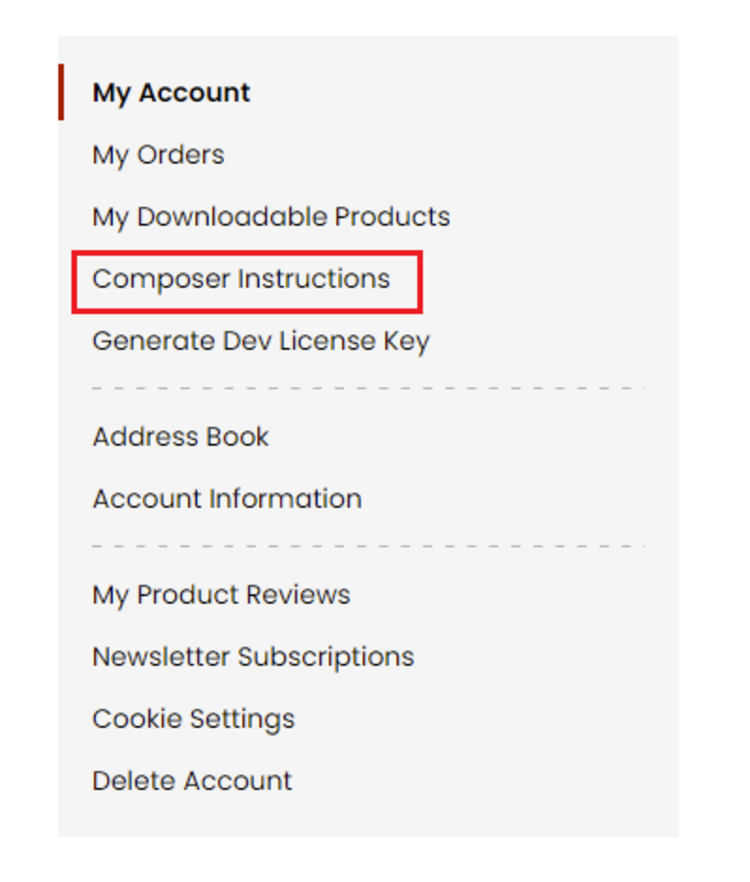
Step 1: Navigate to our store and login to your account. Then go to the My Account Section, on the left menu click on Composer Instructions.
 Step 2: Next, run the config commands shown on the top of the page then click on the extension that you want to install. A composer require command will be revealed in the dropdown menu. Run the command then clear caches to complete the installation.
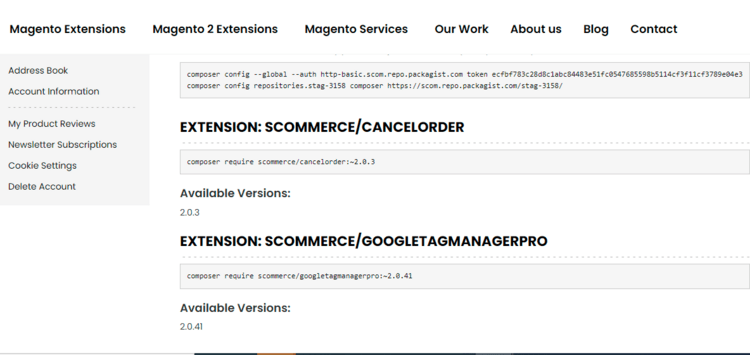
Step 2: Next, run the config commands shown on the top of the page then click on the extension that you want to install. A composer require command will be revealed in the dropdown menu. Run the command then clear caches to complete the installation.
Q. Do you support SPA (Single Page Application) / PWA (Progressive Web Application) / AMP ?
A. Unfortunately, we don’t support SPA or PWA or AMP but we may be supporting them in future depending upon the demand.
Change Log
Version 2.0.3
2026-07-15 15:10:16
Added more information in the comments about quantity sync related configurations to make it easier for users to understand
Version 2.0.2
2026-01-28 13:04:47
The following changes have been implemented -:
- Resolved an issue where clicking “Add product” in the Bundle Items section caused all products to load at once, resulting in long wait times. Pagination now works correctly, and the “20 per page” selector functions as expected.
- Made the extension compatible with Amasty Product Grid Extension
- Made the extension compatible with PHP 8.3
- Introduced a new configuration to the extension which when enabled, will dynamically adjust a main product’s quantity depending on the available quantity of the pack‑size products
- Resolved an issue where clicking “Add product” in the Bundle Items section caused all products to load at once, resulting in long wait times. Pagination now works correctly, and the “20 per page” selector functions as expected.
- Made the extension compatible with Amasty Product Grid Extension
- Made the extension compatible with PHP 8.3
- Introduced a new configuration to the extension which when enabled, will dynamically adjust a main product’s quantity depending on the available quantity of the pack‑size products
Version 2.0.1
2025-11-05 06:41:59
Fixed ACL resource ID issue
Version 2.0.0
2025-07-18 09:35:12
Initial Release
Show More
Show Less
Write A Review
Fields marked with * are required