Skype us at scommerce.mage or call +44(0)1483 487746

Loading...
Magento 2 Product 360 View
Compatible with Magento 2 community and enterprise 2.3.3 - 2.4.x including cloud edition
Magento 2 Product 360 view extension adds 360 view support for product images on your store. It allows you to add 360 view images directly under a product and comes packed with several useful controls for navigation.
- Adds 360view product image support
- Ability to zoom 360view images
- Comes with autoplay and reverse autoplay
- Dedicated navigation buttons such as fullscreen
- Ability to add custom 360 button image

Free Support
up to 60 days

Free Upgrades
up to 1 year

Fully open source
Product Description
Magento 2 Product 360 view
Compatible with Magento 2 community and enterprise 2.3.3 - 2.4.x including cloud edition
Magento 2 Product 360 view extension adds 360 view product image feature to your Magento 2 store. It allows admin easy access to quickly add 360 view product images for products directly from the product grid. Customers will now have an enhanced product interaction with the help of spinning images. The extension also adds several navigation controls with the images giving customers complete control over the experience. Navigation controls such as Magnifier(zoom), full screen mode, autoplay, reverse autoplay, etc.
Importance of 360 view Product Images
All of us in our ventures of internet exploration have encountered 360 view images at least once. They are quite intriguing and an amazing experience to go through. Having spinning images gives life to the product and catches the attention of the customers. Below are few of the highlight benefits of Magento 2 360 view images:-
- Increased Conversions:- Several studies have shown that having 360 view for product images have drastically improved conversion rates for ecommerce stores. Magento 2 360 view extension will help you achieve one of the highest conversion rates on your store yet.
- Decreased Returns:-Sometimes looking at a product image doesn't give the customer a complete idea of the product that leads to dissatisfaction and product returns. Customers often complain that the product that they saw in the image is not accurately the same as the product they received. Having 360 product images can help customers identify the product accurately and make a confident purchase. Such purchases see very few returns.
- Enhanced Product Engagement and Presentation:- Spinning images attract customers and increase user engagement with the product. Customers get to control the entire product image with various navigation controls. It is not only an entirely new experience but also an exciting way to shop. Making customers connect with the product leads them to purchase the product. For eg:- Suppose you sell chairs in your store, customers would like to look at the product from every angle and it is only possible via Magento 2 product 360 view extension.
- Improved User Experience:-Products with 360 view images are known to be one the most satisfying shopping experiences. Customers get to interact with the product which gives them a sense of control. It helps them confidently purchase a product leading to immense customer satisfaction.
Here are the main features of this module-:
- The extension adds 360 view image support for products.
- It gives you the ability to add high quality spinning product images.
- Add 360 view images directly under the product grid.
- Adds dedicated 360 view button for product images
- Navigation controls for ease of accessibility for customers.
- It has an added magnifier feature which can be controlled from the configuration. Customers can use the magnifier to zoom over the image.
- Autoplay and reverse autoplay feature to automatically spin the product image upon page load.
- Dedicated fullscreen button that expands the 360 view image to fullscreen
- Admin can control the drag speed and auto play speed directly from the configuration
- Ability to add custom Product 360 view button image and position
- Customizable width for the popup
- Support multi-store enviornment
- User- friendly admin interface
- Ability to enable/disable this module from the admin configuration
- Easy to install and manage
We offer 60 days of free support and 12 months of free upgrade for any standard Magento site when you buy this extension. You can also get our installation service for a small fee. If you want more benefits, you can purchase our 12 months of free premium support and free lifetime upgrade package. Please contact us if you need any assistance or customization for this extension. We will reply to you within 48 hours. We may also offer you a special deal or a free solution if we like your idea.
** Please refer to our FAQ or T&C section for running our extensions on multiple domains or sub-domains
FAQ
Frequently Asked Questions
Q: I want to change the 360 view button image. How can I do it in the extension?
A: Go to Stores>configuration>Scommerce Configuration>Product 360 view>360 view settings and upload the image in ‘custom button image’. That should change the button image. 
Q: Can I disable full screen mode for 360 view images?
A: Yes, you can disable full screen mode by going into Go to Stores>configuration>Scommerce Configuration>Product 360 view>360 view settings and set “Enable Fullscreen Button” to “No”.
Q: We will use very detailed product images. Can I change the magnifier strength to increase the zoom capacity for more visibility?
A: Yes, you can change the manginifier strength to upto 10 times. Go to Stores>configuration>Scommerce Configuration>Product 360 view>360 view settings and set the desired zoom strength in “Magnifier” dropdown.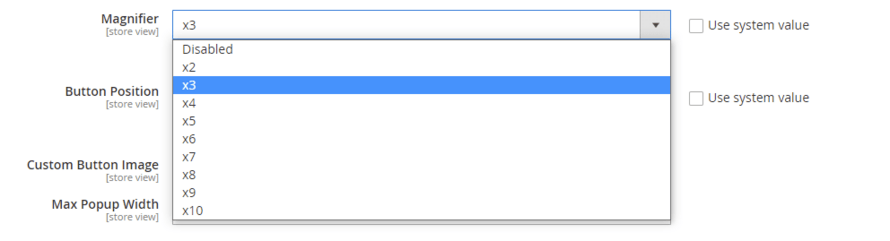
Q. How can I get license key for my development website?
A. Please use the same license as live site provided with the order confirmation email on the staging site and ensure you have the latest version of scommerce/core installed i.e 2.0.9.
Once added go to Stores>Configuration>Scommerce Configuration>Core and click on verify. Once verified the license will start working on your staging site.
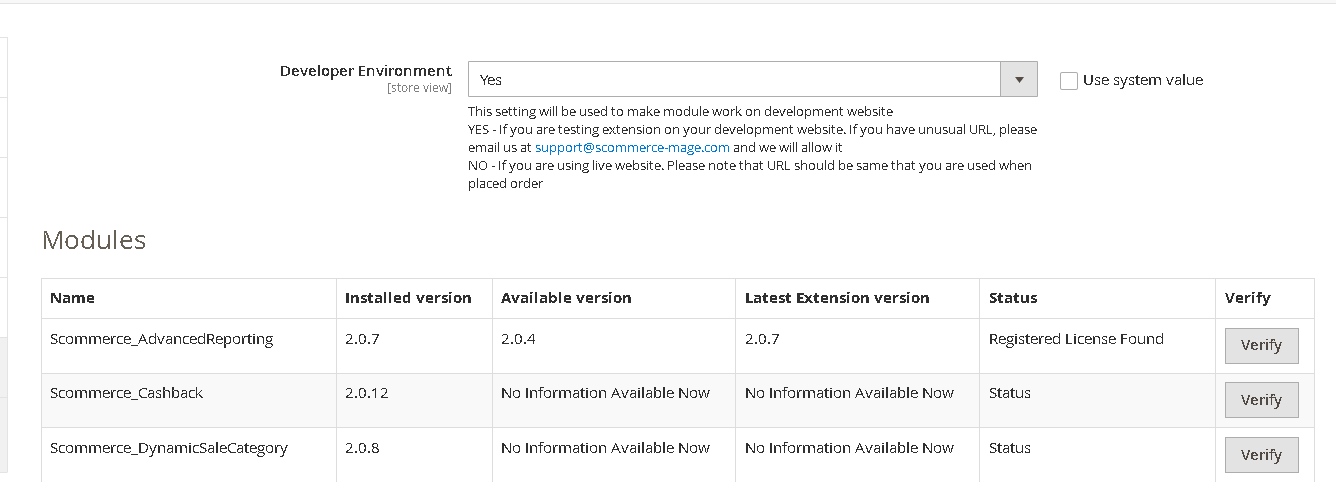
Once added go to Stores>Configuration>Scommerce Configuration>Core and click on verify. Once verified the license will start working on your staging site.
Q. Can I test the extension before buying?
A. Unfortunately we can't provide you extension for testing purposes but we have demo available for most of our extensions and happy to provide full refund if the extension doesn't work
Q. Can I request for customisation on your extensions?
A. Yes we do provide all sort of customisation for our clients at the reasonable rates. And if we believe the customisation will help our product then we also provide great discount on the customisation
Q. I have multiple websites/stores, each with a unique domain. Do I need a separate license key for each live domain?
A. Yes, each live domain requires its own license key. Our license keys are URL specific and each live domain, subdomain, subfolder requires a separate key. If you’re running multiple websites from the same Magento instance, we offer a 30% discount when purchasing license keys for two or more domains in a single order. To receive a coupon code, please contact us at support@scommerce-mage.com.
Q. How can I upgrade my extension to the latest version?
A. The upgrade process depends on your platform and how the extension was installed:
For Magento 2 (Installed via Composer)
If your extension is within the free upgrade period (12 months from the purchase date), you can update directly via the command line. Simply run the composer require command for the specific module to fetch and install the latest available version. If you are outside the free upgrade period, you will need to buy an upgrade using the link below.
For Magento 1 or Magento 2 (Installed manually via app/code)
If your extension is within the free upgrade period (12 months from the purchase date), you can simply download the latest available version by logging into our website and navigating to My Account > My Downloadable Products. If you are outside the free upgrade period, you will need to buy an upgrade using the link below.
Purchase an Upgrade:
https://www.scommerce-mage.com/magento-extension-installation-service.html
Important Note for Manual Upgrades: Before uploading the latest version, we highly recommend deleting all existing files and folders of our extension from your website. We may have deprecated or removed certain files in the update, and keeping the old ones could cause conflicts on your website.
Q.Where can I download the extension files?
A. Please login into your account on our website and go to the download link under my account section to download the extension package.
Q.Can you provide a key that works for our development (NOT PRODUCTION) environment which will work on a dynamic URL, for example, 12334.gitpod.com and 4567.gitpod.com?
A. Unfortunately it is not possible to generate license keys based on the dynamic URLs.
License keys need to be generated per domain or subdomain whether it is production or non-production.
Q. How can I manually uninstall your module?
A. Please follow the below steps -:
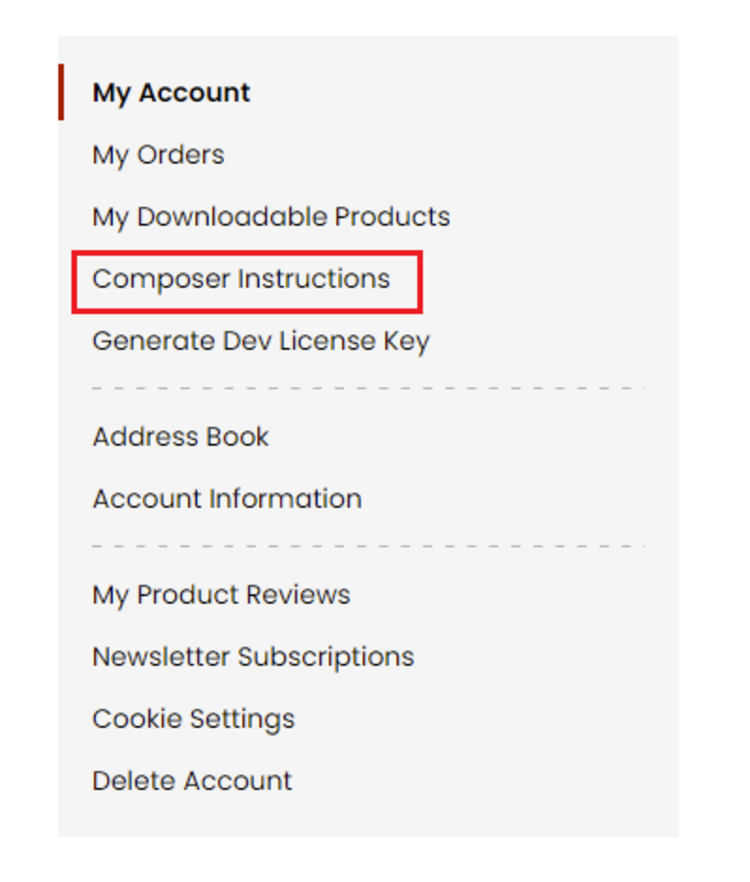
Step 1: Navigate to our store and login to your account. Then go to the My Account Section, on the left menu click on Composer Instructions.
 Step 2: Next, run the config commands shown on the top of the page then click on the extension that you want to install. A composer require command will be revealed in the dropdown menu. Run the command then clear caches to complete the installation.
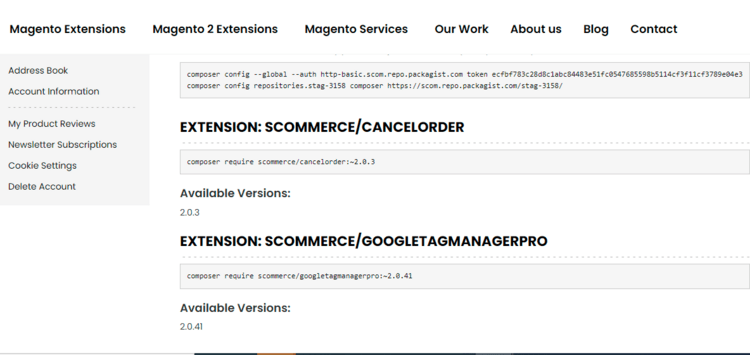
Step 2: Next, run the config commands shown on the top of the page then click on the extension that you want to install. A composer require command will be revealed in the dropdown menu. Run the command then clear caches to complete the installation.
Q. Do you support SPA (Single Page Application) / PWA (Progressive Web Application) / AMP ?
A. Unfortunately, we don’t support SPA or PWA or AMP but we may be supporting them in future depending upon the demand.
Change Log
Version 2.0.3
2026-04-30 14:19:47
Code quality improvements, security and compatibility updates to support latest Magento 2 version and follow best practices and standards
Version 2.0.2
2025-08-12 09:48:55
Made it compatible with PHP 8.3 and Magento 2.4.8 version
Version 2.0.1
2022-06-24 13:02:41
Console error has been fixed on home page which was causing issue with our diamond search extension.
Version 2.0.0
2022-05-11 13:47:23
Initial Release
Show More
Show Less
Write A Review
Fields marked with * are required