Skype us at scommerce.mage or call +44(0)1483 487746

Loading...
Magento 2 Barcode Scanner
£154.99
Compatible with Magento 2 community and enterprise 2.3.3 - 2.4.x including cloud edition
Achieve 100% fulfillment accuracy with the Magento 2 Barcode Scanner Extension. Eliminate costly shipping errors by enforcing mandatory barcode verification during both picking and packing. With real-time visual progress tracking and automated order status updates, your warehouse moves faster and with total precision.
- Mandatory Verification: Hard-blocks order completion until every SKU is correctly scanned.
- Automated Workflows: Automatically trigger status changes (e.g., to 'Picked') upon scan completion.
- Double-Layer Accuracy: Separate verification stages for picking and final packing audits.
- Real-Time Feedback: Colour-coded progress bars and instant mismatch alerts for warehouse staff.
- Accountability Logs: Full audit trail capturing Picker ID, exact timestamps, and scanned values.
- Hardware Flexible: Works out-of-the-box with any USB/Bluetooth scanner or mobile device.

Free Support
up to 60 days

Free Upgrades
up to 1 year

Fully open source
Product Description
Magento 2 Barcode Scanner Extension
Compatible with Magento 2 community and enterprise 2.3.3 - 2.4.x including cloud edition
In the world of high-velocity ecommerce, accuracy is the only metric that matters. A single picking error doesn't just cost a shipping fee; it costs a customer. The Magento 2 Barcode Scanner Extension turns your warehouse from a liability into a precision engine by enforcing mandatory barcode verification at every critical touchpoint of the fulfillment journey.
By replacing manual checklists with real-time digital validation, you eliminate human error, slash return rates, and provide your warehouse team with the professional tools they need to succeed. Whether you are a boutique brand or a multi-warehouse enterprise, this is how you guarantee that what’s in the box is exactly what the customer ordered.
Master Your Fulfillment Workflow
The Precision Picking Phase: Warehouse staff no longer guess. Upon entering an order ID in the Scan Orders dashboard, they are met with a dedicated verification interface. Every item must be scanned. Green success pulses confirm a match, while Red error alerts instantly flag an incorrect SKU. No order can progress until every item is verified.
The "Double-Check" Packing Phase: For those who demand 100% perfection, the packing phase acts as a final audit. Staff re-scan items as they are placed into the shipping carton. This ensures that even if a picking error occurred, it is intercepted before the package is sealed. You can even allow or restrict Partial Picking depending on your specific shipping workflows.
Seamless Automation: Efficiency is built-in. Use the "Change Status on Pick/Pack" feature to trigger automatic order state transitions. The moment the final scan is completed, Magento can automatically move the order to "Picked" or "Packed," triggering your next internal automation or customer notification without a single manual click.
Real-World Implementation Example
To see the system in action, consider a standard workflow for a high-demand product like a Messenger Bag (24-MB01):
- Setup: Assign a unique barcode (e.g.,
12345678) to the product in the admin panel. - Initiation: Open Sales > Scan Orders and enter the Order Number. The system displays Pending for Pick and Pack statuses.
- Execution: The picker scans the physical item. Upon entering
12345678, the Pick Status immediately flips to Complete. - Validation: The packer repeats the scan. Once the barcode is verified again, the Pack Status updates to Complete, and the order is ready for immediate invoicing and shipment.
Total Visibility & Performance Auditing
Management finally has a window into the warehouse floor. Every single scan—including failed attempts—creates a permanent record in the Barcode Scan Logs. Accessible directly from the Order View, these logs provide a timestamped audit trail of who scanned what, and when.
- Identify Bottlenecks: Monitor picker performance and accuracy rates.
- Conflict Resolution: Use success/fail logs to investigate shipping disputes with definitive data.
- Real-Time Progress: Watch dynamic, colour-customisable progress bars update across the admin as your team works through their shift.
Key Features
- Mandatory Dual-Stage Verification: Enforce 100% accuracy during both picking and packing phases.
- Automated Order Lifecycles: Automatically update order statuses (e.g., to 'Picked' or 'Ready to Ship') upon successful scan completion.
- Intelligent Visual Feedback: High-visibility progress bars with customisable colours for "In-Progress" and "Complete" states.
- Comprehensive Scan Logs: Detailed audit trails for every transaction, including timestamps and success/failure status.
- Hardware Agnostic: Seamlessly integrates with any USB or Bluetooth barcode scanner, as well as mobile and tablet devices.
- Custom Barcode Mapping: Link the scanner to any Magento attribute, SKU, EAN, UPC, or a custom barcode field.
- Enterprise-Ready: Fully compatible with Multi-Source Inventory (MSI) and multi-store environments.
- Zero Frontend Impact: Optimised for high-performance admin usage without affecting your site’s loading speed or SEO.
- Mobile-Optimized Interface: Designed specifically for use on the warehouse floor with tablets and mobile scanners.
Your transformation: From "fingers crossed" fulfillment to guaranteed, scalable accuracy. Every package. Every order. Every day.
We offer 60 days of free support and 12 months of free upgrade for any standard Magento site when you buy this extension. You can also get our installation service for a small fee. If you want more benefits, you can purchase our 12 months of free premium support and free lifetime upgrade package. Please contact us if you need any assistance or customization for this extension. We will reply to you within 48 hours. We may also offer you a special deal or a free solution if we like your idea.
** Please refer to our FAQ or T&C section for running our extensions on multiple domains or sub-domains
FAQ
Frequently Asked Questions
Q. Which barcode scanners are compatible with this extension?
A. Our extension is hardware-agnostic. It works with any USB or Bluetooth barcode scanner that operates in Keyboard Emulation (HID) mode. This includes industry-leading brands like Zebra, Honeywell, and Socket Mobile, as well as affordable generic scanners and tablet-based camera scanners.
Q. Can staff bypass the scanning process?
A. No. To ensure 100% fulfillment accuracy, the system enforces mandatory scanning. An order cannot transition to the next stage of your workflow (e.g., from Picking to Packing) until every single item has been successfully verified against its assigned barcode attribute.
Q. What happens if an incorrect item is scanned?
A. The system provides instant visual and textual feedback. A Red Error Alert will appear stating "Barcode mismatch," displaying exactly what was scanned versus what was expected. The item remains unverified, and the attempt is permanently recorded in the error logs for manager review.
Q. Can I automate order status changes after scanning?
A. Yes. One of the core features is the "Change Status on Pick/Pack" setting. You can configure the extension to automatically update the Magento order status (e.g., to 'Picked' or 'Ready to Ship') the moment the final item in an order is scanned, saving your team manual administrative time.
Q. Does the extension support partial picking?
A. Yes. Within the configuration settings, you have the flexibility to allow or disallow Partially Picked Items. This allows you to tailor the workflow based on whether your business permits partial shipments or requires a full order to be gathered before moving to the packing phase.
Q. Where are the scan logs stored and what do they show?
A. You can view comprehensive audit trails by navigating to Admin → Sales → Orders → [Order View] → Barcode Scan Logs. These logs provide a detailed history for every scan, including the exact timestamp, the scanned barcode value, the Picker ID, and whether the scan was a success or a failure.
Q. Can I customise the look of the progress tracking?
A. Absolutely. You can fully customise the Progress Bar colours (Background, Text, and Completion status) directly from the configuration panel to ensure they are easily readable for your staff on various warehouse devices and in different lighting conditions.
Q. Does this affect my website's frontend performance?
A. Not at all. The extension is built with technical excellence in mind, utilizing AJAX for lightning-fast scanning within the admin panel. Since it operates entirely on the backend, it has zero impact on your storefront's loading speed or the customer's checkout experience.
Q. How do I link the scanner to my specific product identifiers?
A. You can map the extension to any Magento product attribute. Whether you use the standard SKU, an EAN, a UPC, or a custom "Barcode" attribute, you simply select your preferred Barcode Attribute in the configuration settings, and the system handles the rest.
Q. How can I get license key for my development website?
A. Please use the same license as live site provided with the order confirmation email on the staging site and ensure you have the latest version of scommerce/core installed i.e 2.0.9.
Once added go to Stores>Configuration>Scommerce Configuration>Core and click on verify. Once verified the license will start working on your staging site.
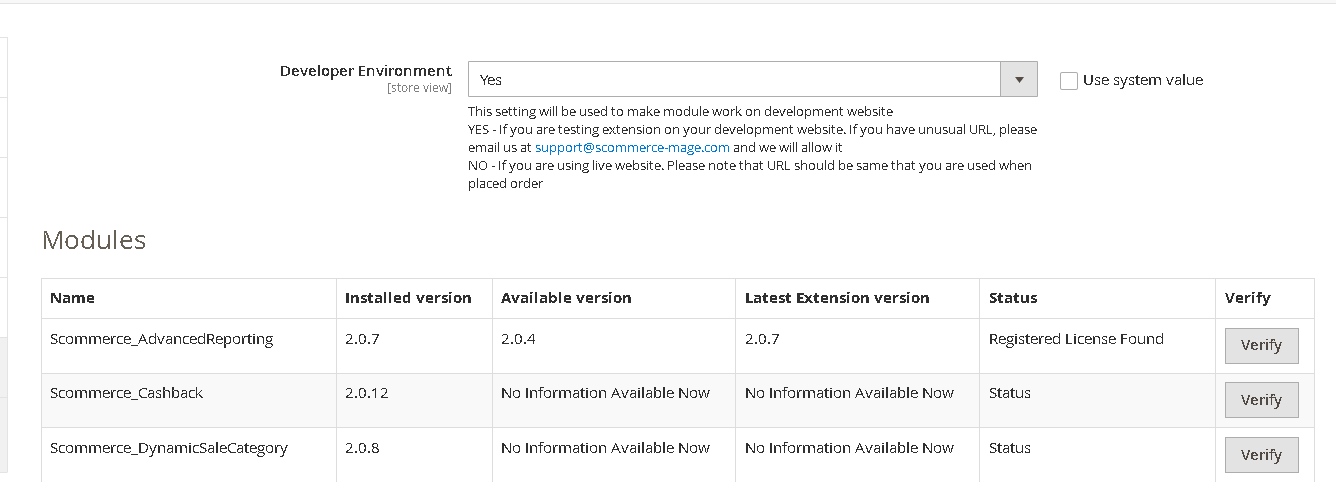
Once added go to Stores>Configuration>Scommerce Configuration>Core and click on verify. Once verified the license will start working on your staging site.
Q. Can I test the extension before buying?
A. Unfortunately we can't provide you extension for testing purposes but we have demo available for most of our extensions and happy to provide full refund if the extension doesn't work
Q. Can I request for customisation on your extensions?
A. Yes we do provide all sort of customisation for our clients at the reasonable rates. And if we believe the customisation will help our product then we also provide great discount on the customisation
Q. I have multiple websites/stores, each with a unique domain. Do I need a separate license key for each live domain?
A. Yes, each live domain requires its own license key. Our license keys are URL specific and each live domain, subdomain, subfolder requires a separate key. If you’re running multiple websites from the same Magento instance, we offer a 30% discount when purchasing license keys for two or more domains in a single order. To receive a coupon code, please contact us at support@scommerce-mage.com.
Q. How can I upgrade my extension to the latest version?
A. The upgrade process depends on your platform and how the extension was installed:
For Magento 2 (Installed via Composer)
If your extension is within the free upgrade period (12 months from the purchase date), you can update directly via the command line. Simply run the composer require command for the specific module to fetch and install the latest available version. If you are outside the free upgrade period, you will need to buy an upgrade using the link below.
For Magento 1 or Magento 2 (Installed manually via app/code)
If your extension is within the free upgrade period (12 months from the purchase date), you can simply download the latest available version by logging into our website and navigating to My Account > My Downloadable Products. If you are outside the free upgrade period, you will need to buy an upgrade using the link below.
Purchase an Upgrade:
https://www.scommerce-mage.com/magento-extension-installation-service.html
Important Note for Manual Upgrades: Before uploading the latest version, we highly recommend deleting all existing files and folders of our extension from your website. We may have deprecated or removed certain files in the update, and keeping the old ones could cause conflicts on your website.
Q.Where can I download the extension files?
A. Please login into your account on our website and go to the download link under my account section to download the extension package.
Q.Can you provide a key that works for our development (NOT PRODUCTION) environment which will work on a dynamic URL, for example, 12334.gitpod.com and 4567.gitpod.com?
A. Unfortunately it is not possible to generate license keys based on the dynamic URLs.
License keys need to be generated per domain or subdomain whether it is production or non-production.
Q. How can I manually uninstall your module?
A. Please follow the below steps -:
Step 1: Navigate to our store and login to your account. Then go to the My Account Section, on the left menu click on Composer Instructions.
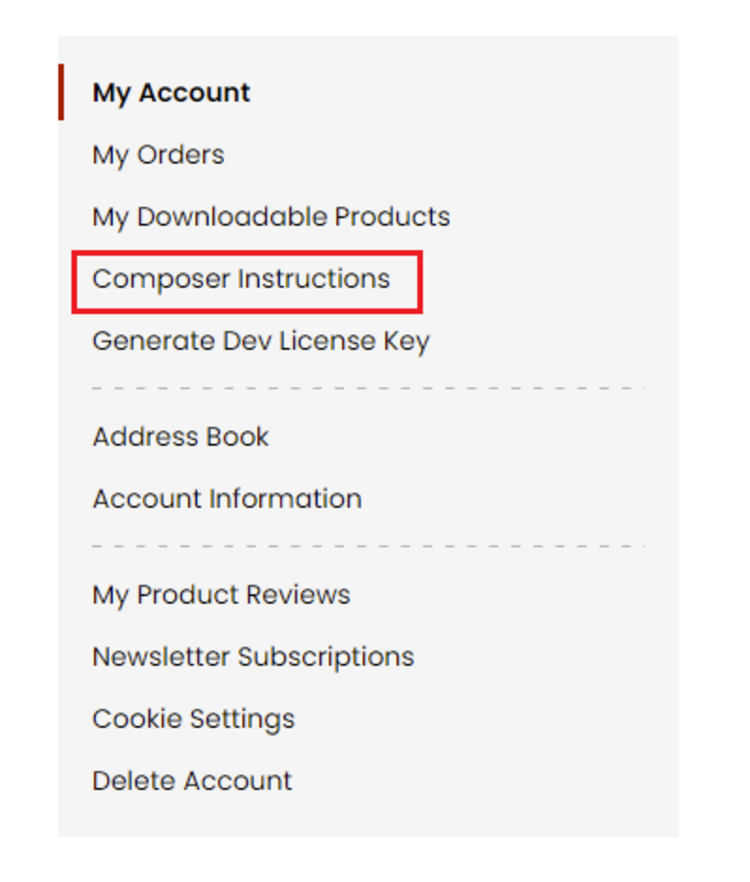 Step 2: Next, run the config commands shown on the top of the page then click on the extension that you want to install. A composer require command will be revealed in the dropdown menu. Run the command then clear caches to complete the installation.
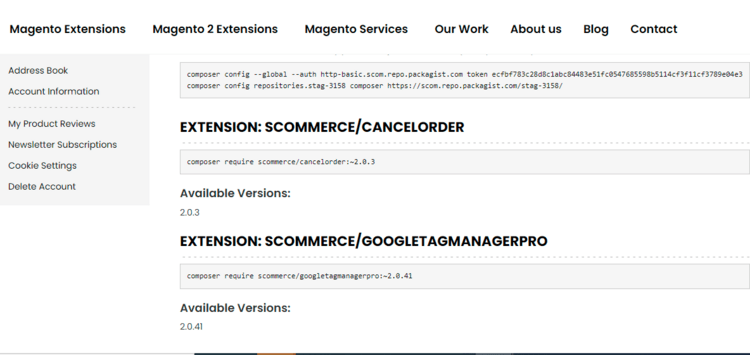
Step 2: Next, run the config commands shown on the top of the page then click on the extension that you want to install. A composer require command will be revealed in the dropdown menu. Run the command then clear caches to complete the installation.
Q. Do you support SPA (Single Page Application) / PWA (Progressive Web Application) / AMP ?
A. Unfortunately, we don’t support SPA or PWA or AMP but we may be supporting them in future depending upon the demand.
Change Log
Version 2.0.0
2026-01-22 14:45:26
Initial Release
Write A Review
Fields marked with * are required