
Skype us at scommerce.mage or call +44(0)1483 487746

Loading...

Magento 2 Antispam Catalog Search
Compatible with Magento 2 community and enterprise 2.3.3 - 2.4.x including cloud edition
Magento 2 Antispam Catalog Search Extension helps you protect your store against spam. It enhances the security of search on the store with the help of several features and adds prevention against search bots.
- Enhances search security
- Adds feature to blacklist certain keywords from search
- Search Rate limiter and IP block to prevent multiple searches in a time frame
- Adds ability to disallow URLs from search
- Completely customizable warning messages
- Adds ability to disallow special characters and numbers from search
- Compatible with HYVA Theme(NEW!)
- Compatible with Breeze Theme(NEW!)

Free Support
up to 60 days

Free Upgrades
up to 1 year

Fully open source
Product Description
Magento 2 Antispam Catalog Search
Compatible with Magento 2 community and enterprise 2.3.3 - 2.4.x including cloud edition
What is Search Spam?
Search spam refers to the malicious or repetitive and meaningless use of catalog search. Certain users try to exploit the search feature with the help of different techniques. For eg:- A malicious entity can use bots to repetitively use the catalog search on your store. Increased number of searches in a short span can increase the load on your store and sometimes even break it. There are various other types of spam attacks as well such as use of foreign languages, URLs etc. Having an unprotected catalog search also makes your store vulnerable to cyber attacks such as script kiddies, SQL injection. Search is one of the most highlighted features of any ecommerce store. Hence it becomes imperative that the catalog search on your store is protected from all kinds of spam.
Why is it necessary to have Antispam in the Catalog Search?
It is crucial for any ecommerce store to have an efficient and reliable catalog search so that users can access the products easily. Antispam refers to the use of a software or certain methods by which you protect the store against spam. Our Magento 2 Antispam Catalog Search extension integrates several features that will go above and beyond to protect the search on your store against spammers. It adds the following features for prevention:-
- Allow/Disallow URLs
- Allow/Disallow numbers
- Black list keywords
- Allow/Disallow Special Characters
- Allow/Disallow Foreign Keywords
- IP block
Here are the main features of this module-:
- Improve search security drastically.
- Gives you complete control over what users can search on your store
- Compatible with HYVA Theme(NEW!)
- Compatible with Breeze Theme(NEW!)
- It provides the ability to blacklist certain keywords from being searched.
- It enables admins to allow or disallow URLs from search so no one can search with URLs on the store.
- Admins can choose to allow or disallow foreign keywords from being searched on the store.
- Admins can choose to allow or disallow numbers from being searched in the catalog search
- Admins can choose to allow or disallow special characters from being searched in the catalog search
- It adds the feature to disallow repeated characters in the catalog search. Users won't be able to search with the certain number of repeated characters as defined by admin.
- It adds a search rate limiter to limit the number of searches by a user in the defined time frame. If exceeded their IP will be blocked for a certain period of time.
- Warning messages are completely customizable from the configuration
- Support multi-store environment
- User- friendly admin interface
- Ability to enable/disable this module from the admin configuration
- Easy to install and manage
We offer 60 days of free support and 12 months of free upgrade for any standard Magento site when you buy this extension. You can also get our installation service for a small fee. If you want more benefits, you can purchase our 12 months of free premium support and free lifetime upgrade package. Please contact us if you need any assistance or customization for this extension. We will reply to you within 48 hours. We may also offer you a special deal or a free solution if we like your idea.
** Please refer to our FAQ or T&C section for running our extensions on multiple domains or sub-domains
FAQ
Frequently Asked Questions
Q: I want to block users from searching with repeated characters in my store. Is there a way I can restrict it using your extension?
A: Yes, we have provided a configuration using which you can disallow users from searching with repeated characters. Go to Admin>Stores>configuration>Scommerce Configuration> Antispam Catalog Search select “Disallow Repeated Characters” to ‘yes” and this should disallow users from searching with repeated characters. You can also the number of repeated characters allowed by changing the setting “Number of repeated characters”. 
Q: How can I customize the message displayed on invalid search?
A: To customize the message displayed on an invalid search go to Admin>Stores>configuration>Scommerce Configuration> Antispam Catalog Search and enter the customized message in “Message for Invalid Searches”. 
Q. Is this module fully compatible with Hyva Theme?
A. Yes, the module is fully compatible with Hyva Theme.
Q. Is this module fully compatible with Breeze Theme?
A. Yes, the module is fully compatible with Breeze Theme.
Q: As per the product description the extension contains an option to block IPs of users that make multiple searches in a given time frame. Can I customize for how long the IP will be blocked?
A: Yes, you can customize the block time for users that make continuous searches in a limited time. To do that go to Admin>Stores>configuration>Scommerce Configuration> Antispam Catalog Search> Rate Limiter and enter the number in “Minutes to block IP”. 
Q: Does the extension maintains a record of users whose IP has been blocked due to continuous searches?
A: Yes, the extension maintains a log file with all the details regarding blocked IPs for eg:- the time that IP was blocked as well as the time when it was unblocked. To access the log file go to your Magento root directory then go to the path /var/log/antispamcatalogsearch.log.
Q. How can I get license key for my development website?
A. Please use the same license as live site provided with the order confirmation email on the staging site and ensure you have the latest version of scommerce/core installed i.e 2.0.9.
Once added go to Stores>Configuration>Scommerce Configuration>Core and click on verify. Once verified the license will start working on your staging site.
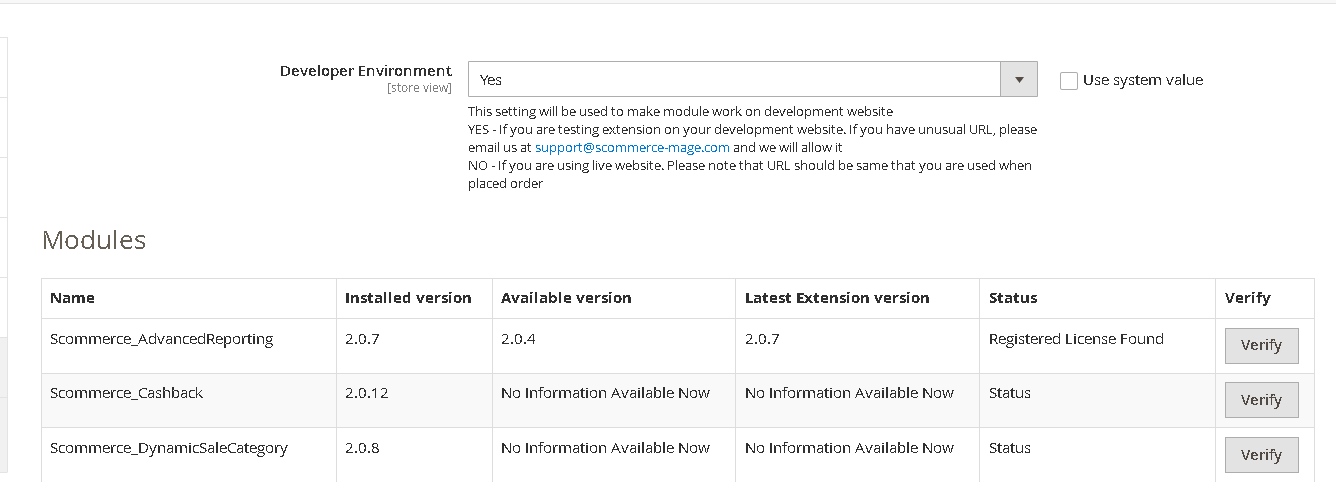
Once added go to Stores>Configuration>Scommerce Configuration>Core and click on verify. Once verified the license will start working on your staging site.
Q. Can I test the extension before buying?
A. Unfortunately we can't provide you extension for testing purposes but we have demo available for most of our extensions and happy to provide full refund if the extension doesn't work
Q. Can I request for customisation on your extensions?
A. Yes we do provide all sort of customisation for our clients at the reasonable rates. And if we believe the customisation will help our product then we also provide great discount on the customisation
Q. I have multiple websites/stores, each with a unique domain. Do I need a separate license key for each live domain?
A. Yes, each live domain requires its own license key. Our license keys are URL specific and each live domain, subdomain, subfolder requires a separate key. If you’re running multiple websites from the same Magento instance, we offer a 30% discount when purchasing license keys for two or more domains in a single order. To receive a coupon code, please contact us at support@scommerce-mage.com.
Q. How can I upgrade my extension to the latest version?
A. The upgrade process depends on your platform and how the extension was installed:
For Magento 2 (Installed via Composer)
If your extension is within the free upgrade period (12 months from the purchase date), you can update directly via the command line. Simply run the composer require command for the specific module to fetch and install the latest available version. If you are outside the free upgrade period, you will need to buy an upgrade using the link below.
For Magento 1 or Magento 2 (Installed manually via app/code)
If your extension is within the free upgrade period (12 months from the purchase date), you can simply download the latest available version by logging into our website and navigating to My Account > My Downloadable Products. If you are outside the free upgrade period, you will need to buy an upgrade using the link below.
Purchase an Upgrade:
https://www.scommerce-mage.com/magento-extension-installation-service.html
Important Note for Manual Upgrades: Before uploading the latest version, we highly recommend deleting all existing files and folders of our extension from your website. We may have deprecated or removed certain files in the update, and keeping the old ones could cause conflicts on your website.
Q.Where can I download the extension files?
A. Please login into your account on our website and go to the download link under my account section to download the extension package.
Q.Can you provide a key that works for our development (NOT PRODUCTION) environment which will work on a dynamic URL, for example, 12334.gitpod.com and 4567.gitpod.com?
A. Unfortunately it is not possible to generate license keys based on the dynamic URLs.
License keys need to be generated per domain or subdomain whether it is production or non-production.
Q. How can I manually uninstall your module?
A. Please follow the below steps -:
Step 1: Navigate to our store and login to your account. Then go to the My Account Section, on the left menu click on Composer Instructions.
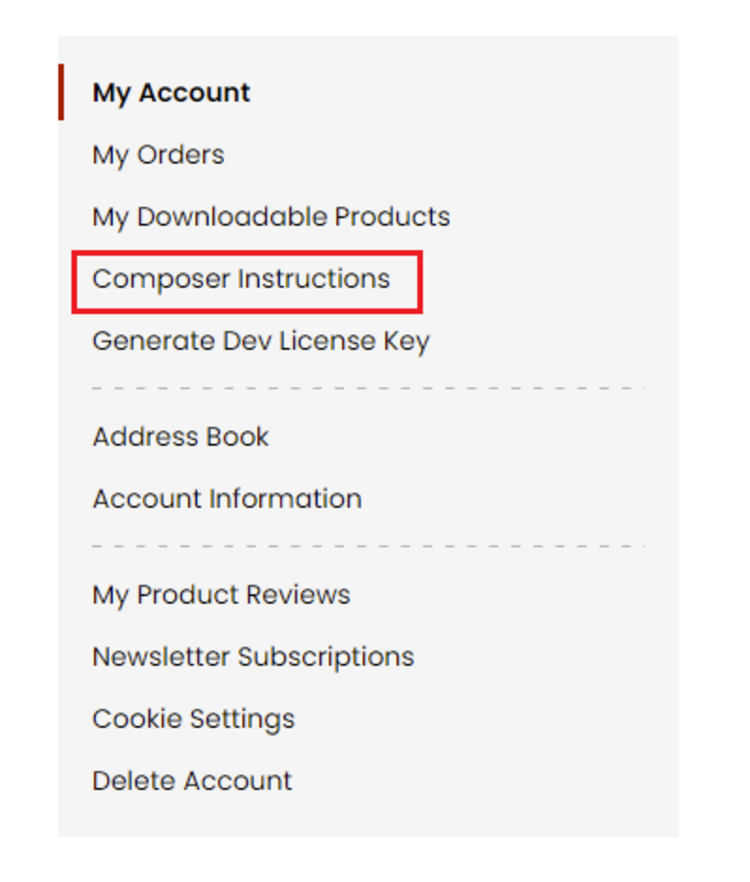 Step 2: Next, run the config commands shown on the top of the page then click on the extension that you want to install. A composer require command will be revealed in the dropdown menu. Run the command then clear caches to complete the installation.
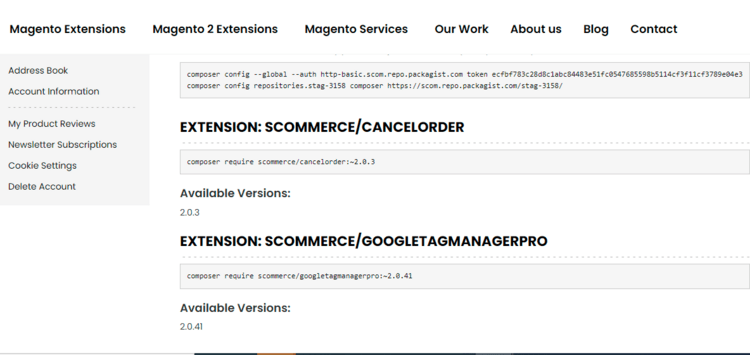
Step 2: Next, run the config commands shown on the top of the page then click on the extension that you want to install. A composer require command will be revealed in the dropdown menu. Run the command then clear caches to complete the installation.
Q. Do you support SPA (Single Page Application) / PWA (Progressive Web Application) / AMP ?
A. Unfortunately, we don’t support SPA or PWA or AMP but we may be supporting them in future depending upon the demand.
Change Log
Version 2.0.11
2025-08-11 08:56:43
Made module compatible with latest Magento 2.4.8 and PHP 8.3
Version 2.0.10
2025-05-28 13:18:04
Fixed an issue where Layered Navigation was not showing on Category pages
Version 2.0.9
2025-05-27 09:44:34
Improved functionality so blocked search queries are not added to Magento search terms
Version 2.0.8
2025-02-21 10:19:53
Improved work of blacklist functionality
Version 2.0.7
2024-10-17 16:31:36
Made it compatible with PHP 8.3
Version 2.0.6
2024-04-24 16:27:28
Made it compatible with MagePlaza LayeredNavigation and AjaxLayer modules. Also changed warning messages to display our own custom messaging.
Version 2.0.5
2024-01-31 11:13:10
Fixed bug when slash was treated as a foreign character
Version 2.0.4
2024-01-24 15:25:49
Increased performance with Varnish cache enabled
Version 2.0.3
2023-12-29 09:44:40
Fixed issue with search counter
Blacklist terms are not getting added to search terms and popularity of these terms is not increased
PHP8.1 compatibility fixes
Blacklist terms are not getting added to search terms and popularity of these terms is not increased
PHP8.1 compatibility fixes
Version 2.0.2
2023-06-16 11:07:09
Changed type of id column in db_schema.xml
Version 2.0.1
2023-03-30 12:08:41
Fixed issue related to showing error message on category pages. Also limit message wasn't going away even after specified time period is passed
Version 2.0.0
2022-05-13 14:27:57
Initial Release
Show More
Show Less
Reviews
Excellent Support
The support provided by the Scommerce was outstanding. They promptly addressed my issue and provided expert guidance to resolve it efficiently. I am extremely satisfied with their professionalism and ...
Write A Review
Fields marked with * are required