Skype us at scommerce.mage or call +44(0)1483 487746

Loading...
Magento 2 Advanced Store Locator
Compatible with Magento 2 community and enterprise 2.3.3 - 2.4.x including cloud edition
Transform your online store into a powerful bridge to your physical locations with the Magento 2 Advanced Store Locator Extension. Empower customers to effortlessly find your nearest branches using intuitive region-based filtering and interactive Google Maps. This comprehensive solution streamlines store and region management in your admin panel, boosting foot traffic, enhancing customer satisfaction, and providing detailed store information from opening hours to contact details. Elevate your local SEO and connect your digital storefront with real-world sales opportunities.
- Effortless Region & Store Management: Streamline creation and organisation of your physical locations.
- Intuitive Region-Based Store Filtering: Allow customers to quickly find stores within specific areas.
- Interactive Google Maps Integration: Display precise store locations with built-in mapping.
- Comprehensive Store Detail Pages: Offer full information from hours to contact details.
- Optimised for SEO & Customer Experience: Drive foot traffic and enhance online-to-offline connection.
- Import regions and stores
- Mass action to Activate/Deactivate/Delete Stores and Regions

Free Support
up to 60 days

Free Upgrades
up to 1 year

Fully open source
Product Description
Magento 2 Store Locator
Compatible with Magento 2 community and enterprise 2.3.3 - 2.4.x including cloud edition
In today's omnichannel retail landscape, seamlessly connecting your online presence with your physical stores is paramount. The Magento 2 Advanced Store Locator Extension is engineered to bridge this gap, providing your customers with an intuitive, dynamic, and comprehensive way to discover your brick-and-mortar locations. From effortless backend management to an engaging front-end user experience, this extension is your all-in-one solution for driving foot traffic, enhancing customer satisfaction, and solidifying your brand's presence both online and offline.
Gone are the days of customers struggling to find your stores. With interactive maps, detailed store profiles, and smart region-based filtering, your customers can quickly locate the information they need, fostering trust and encouraging in-store visits. For store owners, the intuitive backend interface ensures that managing your growing network of locations is as simple as managing your products.
Why is a Store Locator Essential for an Ecommerce Business like Magento 2?
For any e-commerce business with physical outlets, a robust store locator is not just a feature; it's a strategic imperative. In a world where consumers increasingly blend their online research with offline purchasing, providing a seamless path to your physical locations is critical for conversion and brand loyalty.
- Drives Foot Traffic and In-Store Sales: The most direct benefit. By making it easy for customers to find your stores, you directly encourage visits, leading to increased impulse purchases, a higher average order value, and the opportunity for personalised customer service that online alone cannot offer.
- Enhances Customer Experience and Trust: Frustration-free navigation builds positive brand associations. When customers can quickly locate your stores, view opening hours, and get directions, it demonstrates a commitment to their convenience, fostering trust and repeat business.
- Boosts Local SEO & Visibility: Search engines prioritise local results for location-based queries. A well-indexed store locator with rich location data (addresses, phone numbers, opening hours) significantly improves your local search engine ranking, making you more discoverable to nearby potential customers.
- Omnichannel Synergy: It integrates your digital and physical presence, creating a unified brand experience. Customers researching products online can easily find the nearest store to see items in person, pick up online orders, or access in-store services.
- Competitive Advantage: In a crowded market, providing superior convenience can set you apart. Many businesses still have rudimentary store locators, offering an opportunity to outshine competitors with a feature-rich, user-friendly solution.
- Streamlined Information Management: Centralizing store information in Magento 2 ensures consistency and accuracy across all customer touchpoints, reducing errors and improving operational efficiency.
The Magento 2 Advanced Store Locator Extension addresses these critical needs by providing a powerful, flexible, and easy-to-manage system that turns casual browsers into loyal in-store customers.
Intuitive Backend Administration: Total Control Over Your Store Network
Our extension puts the power of complete store and region management directly into your Magento 2 admin panel. Designed for efficiency, it simplifies the complex task of maintaining numerous physical locations.
- Effortless Region Management:
- Structured Organisation: Create and manage distinct regions (e.g., "North America," "Europe," "City A," "District B") to categorise your stores logically.
- Rich Region Details: Define each region with a unique name (required), a descriptive text (optional), and even an accompanying image (optional) for enhanced visual appeal on the frontend.
- Clear Overview: A dedicated grid provides a quick glance at all created regions, displaying names and offering quick actions for editing, viewing, or deleting.
- Smart Deletion Logic: Delete regions with confidence, knowing the system prevents deletion if stores are still assigned, preventing data integrity issues. Once deleted, regions are instantly removed from the frontend.
- Comprehensive Store Management:
- Detailed Store Profiles: For each store, capture essential information:
- Store Name (required)
- Full Address (required, for map integration)
- Telephone Number (optional)
- Email Address (optional)
- Opening & Closing Hours (optional, e.g., "Mon-Fri: 9 AM - 6 PM, Sat: 10 AM - 4 PM")
- Days Open (optional, e.g., "Monday-Saturday")
- Additional Store Details (optional, for unique notes, amenities, or special services)
- Seamless Region Association: Easily link each store to its relevant region via a simple dropdown selection, ensuring accurate categorisation for customers.
- Centralised Store Grid: A dynamic grid displays all your stores, including their names, associated regions, addresses, and telephone numbers, with quick edit/view/delete actions.
- Independent Store Deletion: Safely remove stores from your system; their deletion instantly removes them from the frontend and does not impact other stores within the same region.
- Detailed Store Profiles: For each store, capture essential information:
Dynamic Frontend Discovery: Engaging Your Customers
The frontend experience is designed for optimal customer satisfaction, making it incredibly easy for users to find the perfect store.
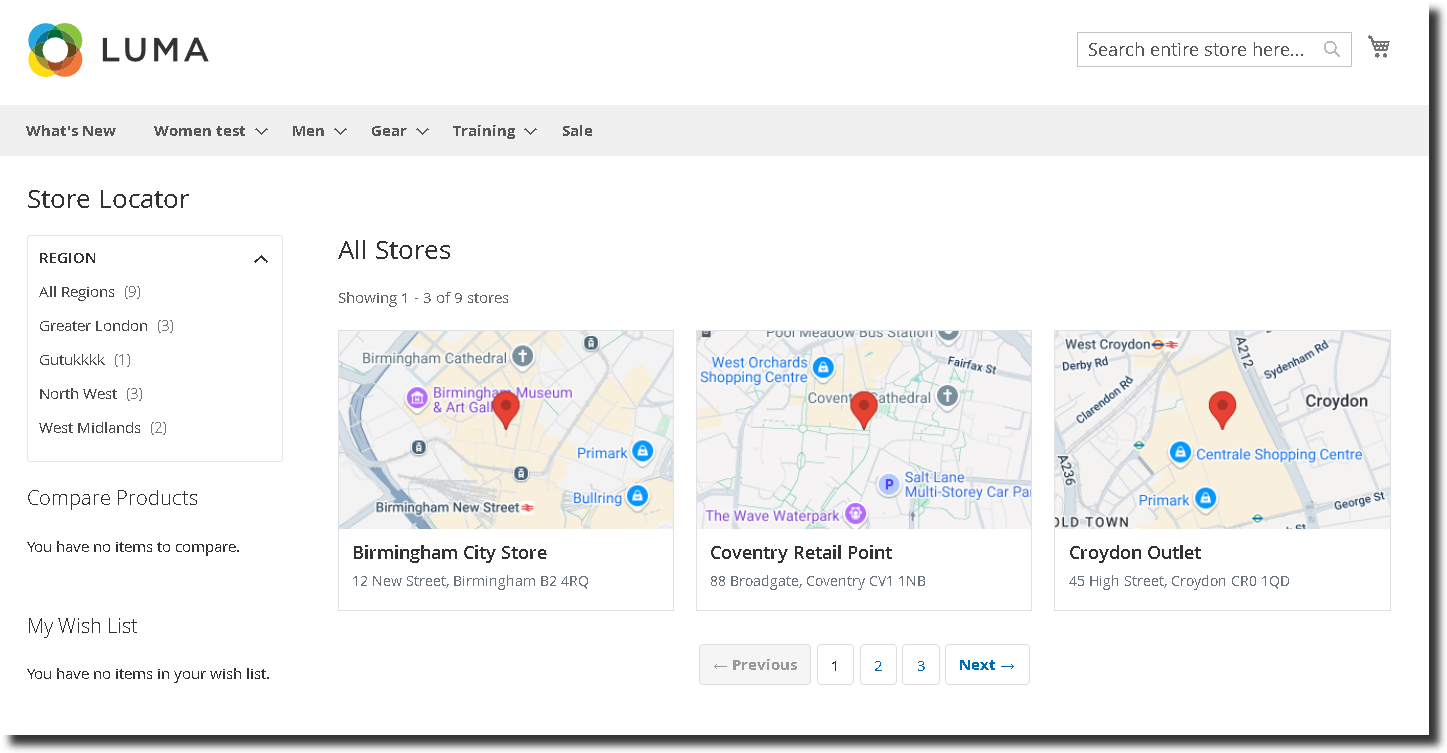
- Intelligent Store List Display:
- Region-Filtered Views: When a user selects a region from the intuitive left-hand navigation, only stores within that specific region are instantly displayed.
- Interactive Maps: Each store entry on the list features a small, integrated Google Map snippet, providing an immediate visual context of its location based on the provided address.
- Essential Information at a Glance: Alongside the map, the store name and address are clearly displayed for quick reference.
- Alphabetical Organisation & Pagination: Stores are always sorted alphabetically for easy scanning, and a configurable pagination threshold ensures smooth browsing for businesses with many locations.
- Clear User Feedback: If a region has no stores, a helpful message informs the user: "There are currently no stores available in this region. Please check back later or select another region from the list."
- Flexible "All Stores" Display:
- Unified View: When a user clicks a dedicated "Store Link" (e.g., in the header or footer), all stores are displayed, providing a comprehensive overview.
- Adaptive Layout: The layout intelligently adapts: if no stores are linked to a region, the display automatically becomes full-width. If at least one store is linked to a region, the regions will appear in the left-hand navigation.
- Consistent Experience: Just like region-filtered views, each store entry includes a small Google Map, name, and address, with alphabetical sorting and configurable pagination.
- No Stores Message: If no stores are available at all, a clear message is shown: "There are currently no stores available. Please check back later."
Comprehensive Store Detail Pages: All Information in One Place
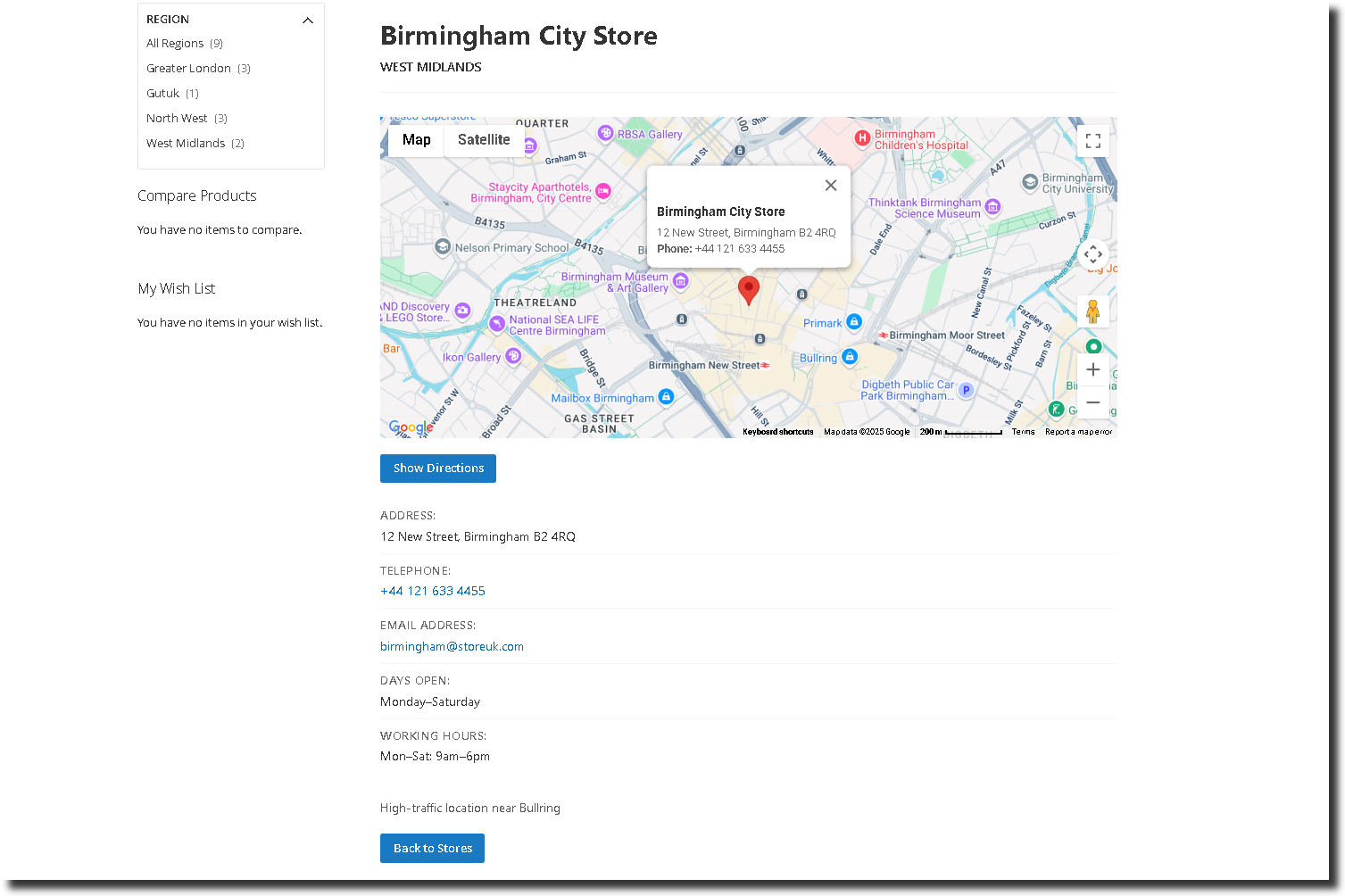
Provide your customers with everything they need to know about a specific store on a dedicated detail page, ensuring they have all the necessary information before their visit.
- Immersive Location View: A prominent, large Google Map clearly shows the exact store location, allowing customers to easily plan their route.
- Complete Store Profile:
- Store Name and Full Address: Clearly presented for quick identification.
- Direct Contact: Telephone number and email address are prominently displayed for easy communication.
- Operating Hours: Open and close times, along with days open, provide crucial information for planning visits.
- Supplemental Details: Any "Additional store details" configured in the backend are displayed here, offering unique insights into the store's offerings or amenities.
- Associated Region: The region to which the store belongs is also displayed, providing helpful context.
- Configurable Region List Display: Based on your admin configuration, the region list can be shown on the left-hand navigation of the store detail page, allowing users to easily navigate to other regions without returning to the main list.
- Smart Layout Adaptability: The store detail page layout dynamically adjusts: it goes full-width if no stores are associated with regions, or displays the region list on the left if at least one store is regionalised (and configured to show).
- Seamless Navigation Back: A clear "Back to Store List" link or button ensures users can effortlessly return to the main store listing and region selection, enhancing usability.
Advanced Features for Unparalleled Performance
Beyond core functionality, our Store Locator Extension is built with the robust, flexible, and user-friendly design expected of a premium Magento 2 solution:
- Google Maps Integration: Leverage the power and accuracy of Google Maps for precise location display and navigation.
- Optimised Performance: Built with Magento 2 best practices for speed and efficiency, ensuring a smooth user experience even with many stores.
- Full Responsive Design: Your store locator will look and function flawlessly on any device, from desktop to mobile.
- Easy Installation & Configuration: Our module is designed for straightforward installation and intuitive setup from the Magento admin panel.
- Multi-Store Support: Seamlessly manage store locations across multiple Magento 2 store views or websites.
- User-Friendly Interface: Both the backend administration and frontend customer experience are designed for maximum ease of use.
- Pagination Threshold Configuration: Gain granular control over frontend store list pagination from the admin panel, tailoring the display to your preferences.
Here are the main features of this module-:
- Comprehensive Backend Management: Create, edit, and delete regions and stores directly from the Magento 2 admin panel.
- Detailed Region Configuration: Set region name (required), description (optional), and image (optional).
- Granular Store Information: Define store name (required), address (required), telephone, email, opening/closing hours, days open, and additional details (all optional).
- It includes a feature to import regions/stores.
- Mass action to activate/deactivate/delete stores and regions.
- Smart Region-Store Association: Link stores to regions via a simple dropdown selection.
- Backend Grids for Easy Overview: View lists of regions and stores with essential details and quick action links (Edit, View, Delete).
- Intelligent Deletion Logic: Prevent region deletion if stores are assigned; independent store deletion.
- Dynamic Frontend Store Listing: Display stores based on selected regions or show all stores.
- Integrated Google Maps: Small Google Map snippets on store list pages and a large map on detail pages.
- Alphabetical Sorting: Stores are always displayed in alphabetical order on listing pages.
- Configurable Pagination: Set a pagination threshold for store listings from the admin panel.
- Clear "No Stores" Messages: Informative messages displayed when no stores are found in a region or overall.
- Dedicated Store Detail Pages: Provide full store information including maps, contact details, hours, and additional information.
- Flexible Layouts: Automatically switch between full-width or side-navigation layouts based on region association and configuration.
- Return Navigation: "Back to store list" link on detail pages for seamless user experience.
- Configurable Region List on Detail Page: Option to show/hide region navigation on store detail pages.
- Full Multi-Store Support: Manage locations across all your Magento store views.
- User-Friendly Interface: Intuitive design for both administrators and customers.
- Easy to Install and Manage: Designed for straightforward setup and ongoing maintenance.
Compatible with Magento 2 community and enterprise 2.3.3 - 2.4.x including cloud edition
We offer 60 days of free support and 12 months of free upgrade for any standard Magento site when you buy this extension. You can also get our installation service for a small fee. If you want more benefits, you can purchase our 12 months of free premium support and free lifetime upgrade package. Please contact us if you need any assistance or customization for this extension. We will reply to you within 48 hours. We may also offer you a special deal or a free solution if we like your idea.
** Please refer to our FAQ or T&C section for running our extensions on multiple domains or sub-domains
FAQ
Frequently Asked Questions
Q. Can I create regions without assigning any stores to them?
A. Yes, you can create regions independently without assigning stores initially. These regions will not appear on the frontend until at least one store is associated with them.
Q. What happens if I delete a region with stores assigned to it?
A. You will not be able to delete a region that has stores assigned. To delete it, all associated stores must first be reassigned or removed.
Q. Can I display stores on the frontend without grouping them under a region?
A. Yes, stores can be displayed without assigning them to any region. In such cases, the store listing page automatically switches to a full-width layout without the region sidebar.
Q. Is Google Maps integration included out-of-the-box?
A. Yes, each store on the listing and detail page includes a Google Map preview based on the store’s address. A valid Google Maps API key is required.
Q. Can I configure how many stores appear per page on the frontend?
A. Absolutely. In the admin configuration, there is a setting to define the pagination threshold — the number of stores shown per page.
Q. Is the store list sorted alphabetically?
A. Yes, stores are automatically sorted alphabetically by name in the frontend listing.
Q. What happens if no stores exist in a particular region?
A. If a region has no associated stores, a message will be displayed to users: “There are currently no stores available in this region. Please check back later or select another region from the list.”
Q. Can I hide the region list from the store detail page?
A. Yes, there is a configuration setting to show or hide the region sidebar on store detail pages.
Q. Can I add additional meta information like opening hours, email, and phone number to each store?
A. Yes, the extension supports multiple optional fields including email, telephone, days open, and opening/closing hours, providing customers with all essential store contact details.
Q. How can I get license key for my development website?
A. Please use the same license as live site provided with the order confirmation email on the staging site and ensure you have the latest version of scommerce/core installed i.e 2.0.9.
Once added go to Stores>Configuration>Scommerce Configuration>Core and click on verify. Once verified the license will start working on your staging site.
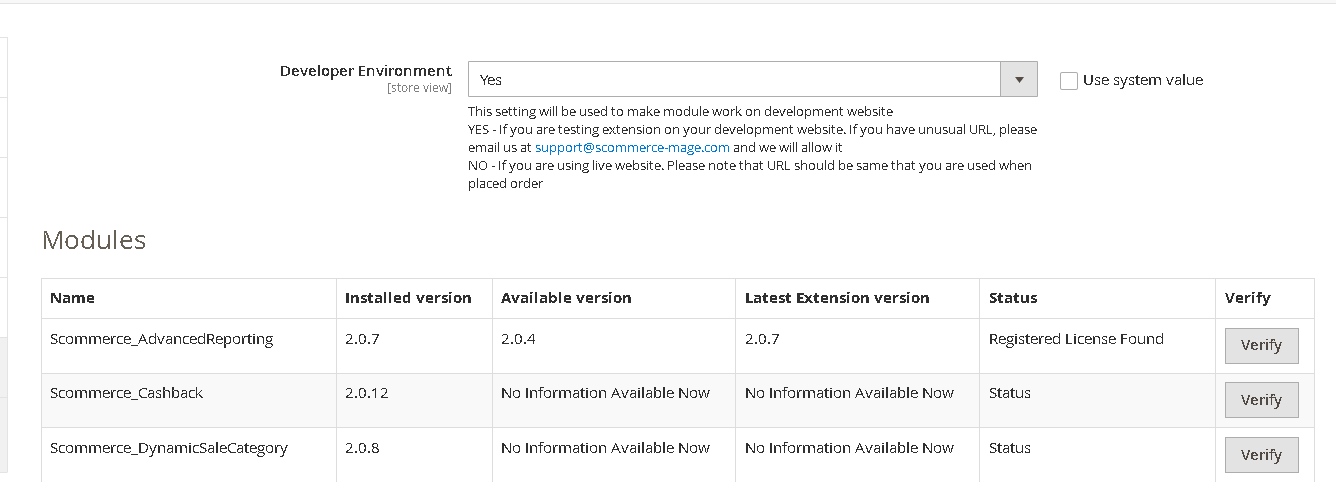
Once added go to Stores>Configuration>Scommerce Configuration>Core and click on verify. Once verified the license will start working on your staging site.
Q. Can I test the extension before buying?
A. Unfortunately we can't provide you extension for testing purposes but we have demo available for most of our extensions and happy to provide full refund if the extension doesn't work
Q. Can I request for customisation on your extensions?
A. Yes we do provide all sort of customisation for our clients at the reasonable rates. And if we believe the customisation will help our product then we also provide great discount on the customisation
Q. I have multiple websites/stores, each with a unique domain. Do I need a separate license key for each live domain?
A. Yes, each live domain requires its own license key. Our license keys are URL specific and each live domain, subdomain, subfolder requires a separate key. If you’re running multiple websites from the same Magento instance, we offer a 30% discount when purchasing license keys for two or more domains in a single order. To receive a coupon code, please contact us at support@scommerce-mage.com.
Q. How can I upgrade my extension to the latest version?
A. The upgrade process depends on your platform and how the extension was installed:
For Magento 2 (Installed via Composer)
If your extension is within the free upgrade period (12 months from the purchase date), you can update directly via the command line. Simply run the composer require command for the specific module to fetch and install the latest available version. If you are outside the free upgrade period, you will need to buy an upgrade using the link below.
For Magento 1 or Magento 2 (Installed manually via app/code)
If your extension is within the free upgrade period (12 months from the purchase date), you can simply download the latest available version by logging into our website and navigating to My Account > My Downloadable Products. If you are outside the free upgrade period, you will need to buy an upgrade using the link below.
Purchase an Upgrade:
https://www.scommerce-mage.com/magento-extension-installation-service.html
Important Note for Manual Upgrades: Before uploading the latest version, we highly recommend deleting all existing files and folders of our extension from your website. We may have deprecated or removed certain files in the update, and keeping the old ones could cause conflicts on your website.
Q.Where can I download the extension files?
A. Please login into your account on our website and go to the download link under my account section to download the extension package.
Q.Can you provide a key that works for our development (NOT PRODUCTION) environment which will work on a dynamic URL, for example, 12334.gitpod.com and 4567.gitpod.com?
A. Unfortunately it is not possible to generate license keys based on the dynamic URLs.
License keys need to be generated per domain or subdomain whether it is production or non-production.
Q. How can I manually uninstall your module?
A. Please follow the below steps -:
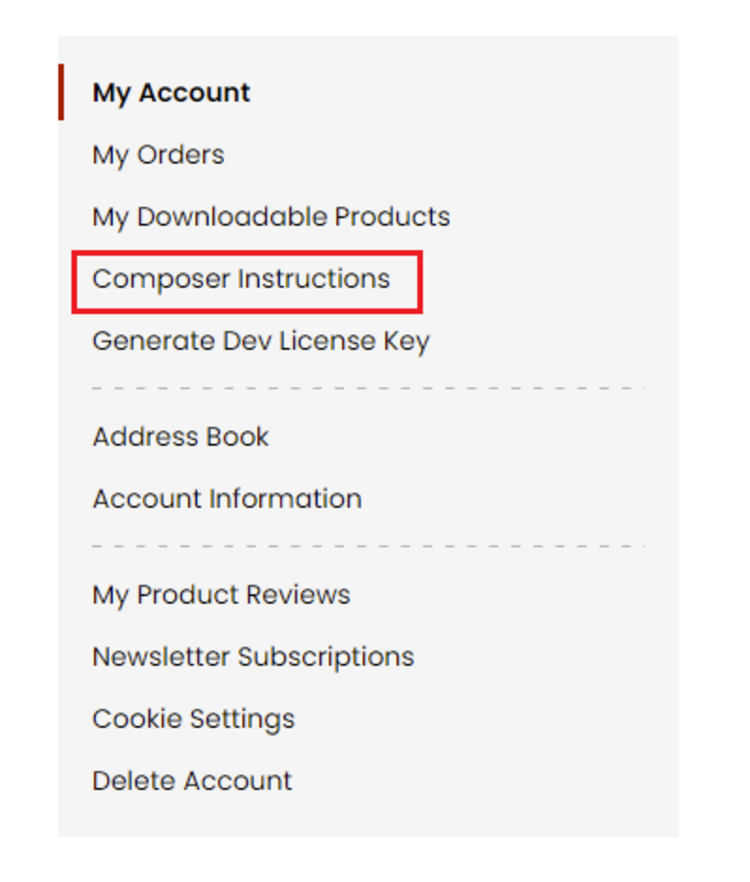
Step 1: Navigate to our store and login to your account. Then go to the My Account Section, on the left menu click on Composer Instructions.
 Step 2: Next, run the config commands shown on the top of the page then click on the extension that you want to install. A composer require command will be revealed in the dropdown menu. Run the command then clear caches to complete the installation.
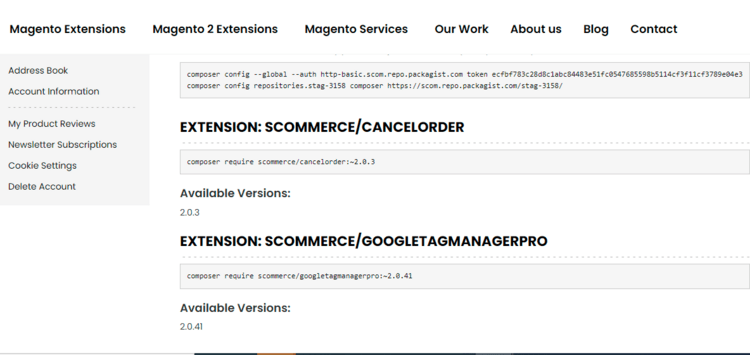
Step 2: Next, run the config commands shown on the top of the page then click on the extension that you want to install. A composer require command will be revealed in the dropdown menu. Run the command then clear caches to complete the installation.
Q. Do you support SPA (Single Page Application) / PWA (Progressive Web Application) / AMP ?
A. Unfortunately, we don’t support SPA or PWA or AMP but we may be supporting them in future depending upon the demand.
Change Log
Version 2.0.3
2025-09-25 14:40:01
We’ve removed some redundant functions that generated unique URL keys for stores and regions. This change helps simplify the code without affecting the ability to create or manage store locations.
Version 2.0.2
2025-08-06 13:54:33
New Features:
- Custom URLs: You can now create custom URLs for both Stores and Regions, improving flexibility and SEO.
- SEO Metafields: Added new metafields to both Store and Region entities:
Meta Title
Meta Description
Meta Keywords
Improvements:
- Bulk Actions in Admin: Introduced mass Activate/Deactivate actions for streamlined management in the admin panel.
- General Enhancements: Various other fixes and performance improvements to enhance overall stability and usability.
- Custom URLs: You can now create custom URLs for both Stores and Regions, improving flexibility and SEO.
- SEO Metafields: Added new metafields to both Store and Region entities:
Meta Title
Meta Description
Meta Keywords
Improvements:
- Bulk Actions in Admin: Introduced mass Activate/Deactivate actions for streamlined management in the admin panel.
- General Enhancements: Various other fixes and performance improvements to enhance overall stability and usability.
Version 2.0.1
2025-07-16 10:43:08
Made module compatible with Breeze and Hyva themes
Version 2.0.0
2025-06-24 10:04:27
Initial Release
Show More
Show Less
Write A Review
Fields marked with * are required