Skype us at scommerce.mage or call +44(0)1483 487746

Loading...

Magento 2 Admin Message Manager
Compatible with Magento 2 community and enterprise 2.3.3 - 2.4.x including cloud edition
Tired of sending generic alerts or struggling to communicate critical updates to your Magento admin team? Our Magento 2 Admin Custom Message Manager extension lets you create and manage role-specific admin messages directly within the Magento backend. Display custom HTML-enabled notices, warnings, success messages, or alerts targeted to specific admin roles—ensuring the right message reaches the right people at the right time.
- Role-Based Notifications: Target specific user roles with customized messages.
- Severity-Based Display: Use visual cues with Notice, Success, Warning, or Error messages.
- Full Admin Control: Easily manage messages with add/edit/delete functionality.
- Secure & Sanitized HTML: Supports safe HTML tags for styling and links.
- Sticky Banners in Admin Panel: Showcase active messages prominently for better visibility.

Free Support
up to 60 days

Free Upgrades
up to 1 year

Fully open source
Product Description
Magento 2 Admin Message Manager
Compatible with Magento 2 community and enterprise 2.3.3 - 2.4.x including cloud edition
Managing a Magento 2 store involves constant communication with your admin team—especially when deploying new features, announcing maintenance, or addressing urgent issues. But how do you ensure the right admins see the right messages at the right time?
Deliver Role-Based Admin Notifications with Ease
This powerful yet lightweight extension enables Magento store owners to create personalized backend messages targeted to specific admin roles. Messages appear as sticky banners in the admin panel and are color-coded based on severity—so users can’t miss them.
It’s perfect for internal communication, real-time alerts, onboarding tips, or even directing staff to internal documentation. With full HTML support and secure role-based targeting, you stay in control of what gets shared, when, and with whom.
Efficient Admin Message Management
Admins with the proper permissions can access a dedicated message grid in the backend to view, add, edit, or delete messages. The grid displays all important message attributes and allows filtering, sorting, and mass actions for better control.
Need to update a message or remove outdated ones? It’s just a few clicks away. You can even perform bulk deletions or set messages to inactive for temporary hiding.
Create Rich, Targeted Messages with Full Control
Using a simple form, you can create messages with a WYSIWYG editor that supports safe HTML tags like <a>, <strong>, and <em>. Choose a severity level, target specific admin roles, and toggle the message status between active or inactive. Messages are displayed only to users matching the selected roles, ensuring precise delivery.
Display Messages Where They Matter Most
Once activated, messages are displayed as sticky notifications at the top of every backend page for users with matching roles. This ensures high visibility without disrupting the user experience. Whether it’s a quick notice or a critical system alert, your message won’t go unnoticed.
The main highlights of the module are-:.
- Allows creation of custom admin messages from the backend
- Role-based targeting using Magento admin user roles
- Severity levels supported: Notice, Warning, Success, Error
- Displays sticky banner messages on admin dashboard pages
- WYSIWYG editor with safe HTML support (e.g., links, bold, italic)
- Grid view to manage all messages with sorting and filtering options
- Supports pagination (20/50/100 per page) for message grid
- “Add New Message” button for quick creation
- Edit and delete options per message
- Mass delete functionality for bulk message removal
- Toggle message status (Active/Inactive)
- Secure access control via “Manage Custom Messages” permission
- Confirmation prompts for delete actions
- Success messages on save, update, or delete
- Seamless integration with Magento admin UI
- Lightweight, fast, and easy to configure
- Easy to install and manage via the admin interface
- Built with Magento coding standards for maximum compatibility
- It can be easily disabled from admin interface.
We offer 60 days of free support and 12 months of free upgrade for any standard Magento site when you buy this extension. You can also get our installation service for a small fee. If you want more benefits, you can purchase our 12 months of free premium support and free lifetime upgrade package. Please contact us if you need any assistance or customization for this extension. We will reply to you within 48 hours. We may also offer you a special deal or a free solution if we like your idea.
** Please refer to our FAQ or T&C section for running our extensions on multiple domains or sub-domains
FAQ
Frequently Asked Questions
Q. What is the Magento 2 Admin Custom Message Manager used for?
A. This extension allows Magento store owners and authorized admins to create and display custom admin messages targeted to specific roles. These messages appear as sticky banners at the top of the admin panel and are ideal for internal updates, announcements, system alerts, and more.
Q. Can I target specific admin roles with each message?
A. Yes, the extension allows you to select one or more Magento admin roles when creating a message. Only users with those roles will be able to see the message in the admin panel.
Q. What types of severity levels are supported in messages?
A. The extension supports four severity levels: Notice, Success, Warning, and Error. Each type is styled using Magento’s native alert colors, making them easy to visually distinguish.
Q. Where are messages displayed within the Magento admin panel?
A. Messages are displayed as sticky banners at the top of every page in the Magento backend for users whose roles match the targeted roles. This ensures high visibility without interrupting admin workflows.
Q. Does the message text support HTML formatting?
A. Yes, the message text field includes a WYSIWYG editor and supports safe HTML tags such as <a>, <strong>, and <em>. This allows you to include clickable links, bold or italic text, and other basic formatting.
Q. Who can access and manage the messages?
A. Only admin users with the "Manage Custom Messages" permission can access the message grid, create new messages, and edit or delete existing ones. This permission can be assigned via Magento’s admin role settings.
Q. Can I delete multiple messages at once?
A. Yes, the message grid includes a mass action feature that allows you to select multiple messages and delete them in bulk using the dropdown menu. A confirmation prompt ensures safe removal.
Q. What happens when I deactivate a message?
A. When a message is set to inactive, it will no longer appear in the admin panel for any user but will remain listed in the admin message grid. You can reactivate or edit it at any time.
Q. Will this extension impact my store’s performance?
A. No, the extension is lightweight and optimized for performance. It only affects the backend and has no impact on the frontend or overall site speed.
A. The upgrade process depends on your platform and how the extension was installed: For Magento 2 (Installed via Composer) For Magento 1 or Magento 2 (Installed manually via app/code) Purchase an Upgrade: Important Note for Manual Upgrades: Before uploading the latest version, we highly recommend deleting all existing files and folders of our extension from your website. We may have deprecated or removed certain files in the update, and keeping the old ones could cause conflicts on your website.Q. How can I get license key for my development website?
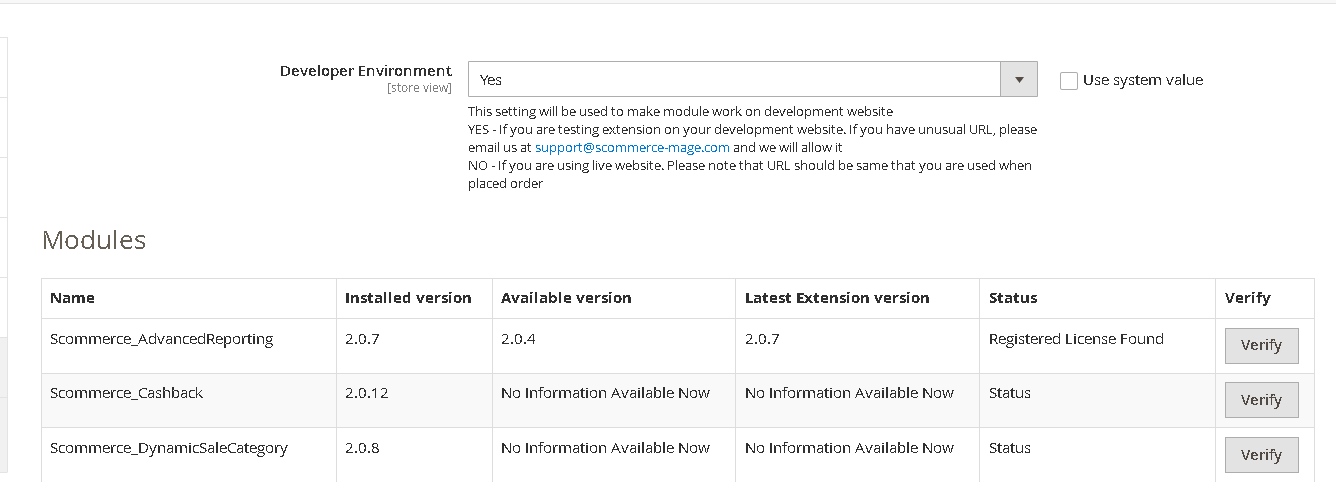
A. Please use the same license as live site provided with the order confirmation email on the staging site and ensure you have the latest version of scommerce/core installed i.e 2.0.9.
Once added go to Stores>Configuration>Scommerce Configuration>Core and click on verify. Once verified the license will start working on your staging site.
 Q. Can I test the extension before buying?
A. Unfortunately we can't provide you extension for testing purposes but we have demo available for most of our extensions and happy to provide full refund if the extension doesn't work
Q. Can I request for customisation on your extensions?
A. Yes we do provide all sort of customisation for our clients at the reasonable rates. And if we believe the customisation will help our product then we also provide great discount on the customisation
Q. I have multiple websites/stores, each with a unique domain. Do I need a separate license key for each live domain?
A. Yes, each live domain requires its own license key. Our license keys are URL specific and each live domain, subdomain, subfolder requires a separate key. If you’re running multiple websites from the same Magento instance, we offer a 30% discount when purchasing license keys for two or more domains in a single order. To receive a coupon code, please contact us at support@scommerce-mage.com.
Q. How can I upgrade my extension to the latest version?
Q. Can I test the extension before buying?
A. Unfortunately we can't provide you extension for testing purposes but we have demo available for most of our extensions and happy to provide full refund if the extension doesn't work
Q. Can I request for customisation on your extensions?
A. Yes we do provide all sort of customisation for our clients at the reasonable rates. And if we believe the customisation will help our product then we also provide great discount on the customisation
Q. I have multiple websites/stores, each with a unique domain. Do I need a separate license key for each live domain?
A. Yes, each live domain requires its own license key. Our license keys are URL specific and each live domain, subdomain, subfolder requires a separate key. If you’re running multiple websites from the same Magento instance, we offer a 30% discount when purchasing license keys for two or more domains in a single order. To receive a coupon code, please contact us at support@scommerce-mage.com.
Q. How can I upgrade my extension to the latest version?
If your extension is within the free upgrade period (12 months from the purchase date), you can update directly via the command line. Simply run the composer require command for the specific module to fetch and install the latest available version. If you are outside the free upgrade period, you will need to buy an upgrade using the link below.
If your extension is within the free upgrade period (12 months from the purchase date), you can simply download the latest available version by logging into our website and navigating to My Account > My Downloadable Products. If you are outside the free upgrade period, you will need to buy an upgrade using the link below.
https://www.scommerce-mage.com/magento-extension-installation-service.htmlQ.Where can I download the extension files?
A. Please login into your account on our website and go to the download link under my account section to download the extension package.
Q.Can you provide a key that works for our development (NOT PRODUCTION) environment which will work on a dynamic URL, for example, 12334.gitpod.com and 4567.gitpod.com?
A. Unfortunately it is not possible to generate license keys based on the dynamic URLs.
License keys need to be generated per domain or subdomain whether it is production or non-production.
Q. How can I manually uninstall your module?
A. Please follow the below steps -:
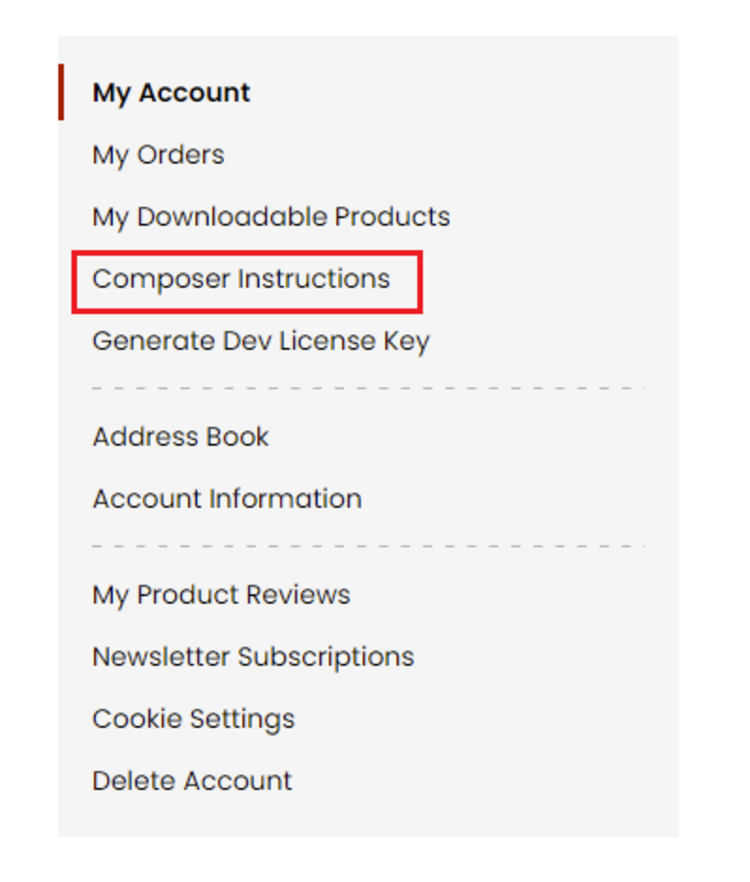
Step 1: Navigate to our store and login to your account. Then go to the My Account Section, on the left menu click on Composer Instructions.
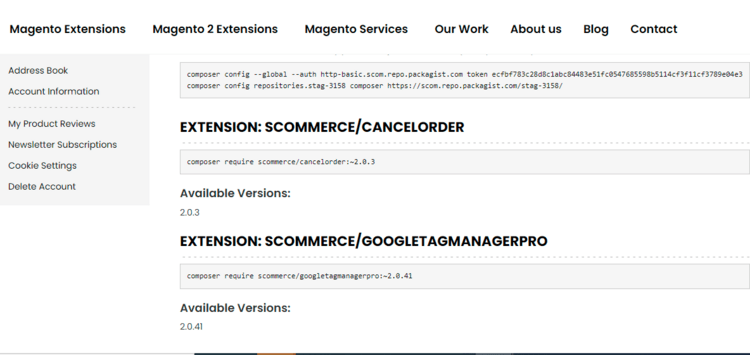
 Step 2: Next, run the config commands shown on the top of the page then click on the extension that you want to install. A composer require command will be revealed in the dropdown menu. Run the command then clear caches to complete the installation.
 Q. Do you support SPA (Single Page Application) / PWA (Progressive Web Application) / AMP ?
A. Unfortunately, we don’t support SPA or PWA or AMP but we may be supporting them in future depending upon the demand.
Q. Do you support SPA (Single Page Application) / PWA (Progressive Web Application) / AMP ?
A. Unfortunately, we don’t support SPA or PWA or AMP but we may be supporting them in future depending upon the demand.
Change Log
Version 2.0.4
2025-10-06 12:08:05
Resolved an issue where admin messages containing HTML content (such as images) were not rendered correctly in the admin panel. Messages now fully support HTML rendering, improving display of rich content for administrators.
Version 2.0.3
2025-07-22 08:12:35
Introduce the ability to add custom messages at the top of pages in the admin panel. These messages are customized using WYSIWYG editor and can be configured to show for specified user roles and on specified dates.
Version 2.0.2
2025-06-10 12:38:09
Include active from & to the admin grid columns and filter
Version 2.0.1
2025-06-05 13:07:17
Added active to and from date fields in the message form which determines when the message should show
Version 2.0.0
2025-05-06 09:50:14
Initial Release
Show More
Show Less
Write A Review
Fields marked with * are required