Boost sales, enhance customer satisfaction, and elevate your brand’s reputation with targeted discounts. When it comes to eCommerce, precision is key. This is especially true for online stores built on Magento 2, where strategically offering Magento 2 Custom Options Discounts can significantly impact your bottom line. But how effective are Magento’s default discount features in achieving this, and what custom options are available to tailor discounts specifically to your unique product configurations? In this article, we’ll delve into the capabilities and limitations of Magento’s native discount functionality and, more importantly, explore the Magento 2 Custom Options Discount solutions that can help you offer personalized, compelling promotions to your customers.
Discounts in Magento 2
Magento 2 being one of the most popular eCommerce platforms worldwide provides a flawless discount feature by default. To create discounts go to Admin>Marketing>Promotions. Here, you can create discounts in two different ways:-
- Catalog Price Rules:- Catalog price rules allow you to create custom discount rules with various conditions. It doesn’t involve creating coupons as the discounts created from this rule is directly displayed on the store before a product is added to the cart. Mix and match with the conditions to create your desired discounts. Learn more about Catalog Price Rules in Magento 2.
- Cart Price Rules:- With Cart price rules you can create two different types of discounts. The key thing is that cart price rules only trigger when products are added to the cart and the necessary conditions are met. You can either create discounts that trigger when products are added matching the specified discount criteria or a specific discount coupon code is applied in the cart. Learn more about Cart Price Rules in Magento 2.
What are Custom Options?
As the name suggests custom options are somewhat of an extra service offered with products at a certain price. For instance, some stores offer the custom option “Gift Wrap” with products. It adds extra value to products and increases the chances of conversion. Similarly depending upon the niche of your store several custom options can be offered with products. Some other examples can be personalization, engraving, etc.
Discounts on Magento 2 Custom Options
As of yet the default discount feature of Magento 2 only extends to the total value of the cart. Even if you want to provide discounts on certain custom options only, it won’t be possible without adding a certain piece of code or a third-party extension. So even if you were to create a promotion rule for a certain product with a custom option the discount will only apply to the final price and not that custom option specifically. For instance, suppose a promotion rule offering a 10% discount is created for Duffle bag with a price of 50euros and a custom option “Gift wrap” with a price of 10euros. Now Magento 2 by default will apply a 10% discount on total cart value i.e 50+10=60 euros. Whereas we want the 10%discount on 10euros i.e our custom option.
Benefits of Providing Discounts on Custom Options
Festive seasons and other important occasions are a high time for your marketing team to put in that extra bit of effort and bring in more conversions. Providing suitable offers and discounts are one way to go. Sometimes people are looking to purchase a product but are not sure about the decision so if they see some type of discount being offered psychologically they are more inclined to purchase that product. For instance, during festive seasons such as Christmas when people are lining up to purchase gifts for their loved ones, offering a free gift wrap custom option can surely increase your sales.
Solution
After a thorough investigation, we have come to the conclusion that the only two solutions, for the time being, is to either hard code this feature by yourself or go for a third-party extension such as Magento 2 custom options discount by Scommerce Mage. It is very simple to use and allows you to create discounts on custom options quickly.
Magento 2 Custom Options Discount – Step By Step Guide
Step 1:- Go to Admin>Catalog>Products and select the product for which you want to create custom options. Now from the Action column click “Edit”.

Step 2:- Scroll down until you find the Customizable Options dropdown. Click on it and select Add Option to create a new custom option for this product. Provide the “Option title”, and choose from several options in “Option type” to create your desired custom option. Also, provide SKU for each custom option as we will use it to create our discount rules. For instance, we have created the gift wrap custom option in the below image:-

Step 3:- Now go to Admin>Marketing>Cart Price Rules. Create a new discount rule as you would normally create for your default Magento. In order for this discount to be applied on the custom option, we will have to toggle “yes” for Only for selected Custom Option? in the Action dropdown. Finally, in the condition, we can select our custom option using two different methods either by using Custom Option title or Custom Option SKU. As in the example below, we have used the Custom Option title for our Gift Wrap custom option that we created in the previous step. Lastly, save and the discount will be available for the custom option.

Discounts Only on Base Price when Specific Custom Options are Selected
In the above setup we applied discounts to the final price of the product, which includes the base price and the price of any selected custom options. Unfortunately, this approach does not allow for discounts to apply exclusively to the base price, leaving the prices of custom options unaffected.
For example:
- A product has a base price of €50, and a custom option (e.g., gift wrapping) costs €10.
- A 10% discount is applied via a promotion rule.
- Default Magento behavior: The discount applies to the total price (€50 + €10 = €60), resulting in a €6 discount.
- Desired behavior: The discount applies only to the base price (€50), resulting in a €5 discount, leaving the custom option price untouched.
Our Magento 2 Custom Options Discount extension solves this problem by giving you full control over how discounts are applied. You can now:
- Apply discounts exclusively to the base price of the product, regardless of selected custom options.
- Keep custom option prices at their original values, ensuring your upsell strategies remain intact.
How It Works
Here’s a step-by-step guide to creating discounts that apply only to the base price:
Step 1: Add Custom Options to Your Product
- Go to Admin > Catalog > Products, and select the product you want to edit.
- Under the Customizable Options section, click Add Option to create a new custom option.
- Enter the option title, type, and price, and assign a unique SKU to the custom option.
Step 2: Create a Discount Rule
- Navigate to Admin > Marketing > Cart Price Rules, and create a new discount rule.
- Configure the rule as usual, but toggle “Yes” for the setting ““ in the Actions section.
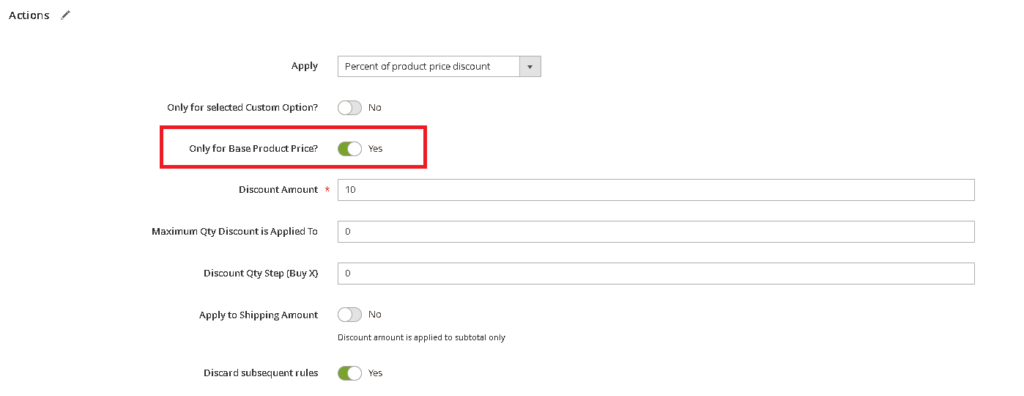
- Use the Custom Option Title or Custom Option SKU to specify which product or custom option the discount applies to.
Step 3: Save and Test
- Save the rule, and test it on your storefront to ensure the discount applies exclusively to the base price of the product.
Conclusion
In conclusion, unlocking the full potential of discounts on bespoke product configurations hinges on integrating Magento 2 Custom Options Discounts capabilities into your eCommerce strategy. To seamlessly offer these tailored promotions, you’re presented with two primary pathways: developing the feature in-house through custom coding or leveraging the efficiency of a specialized Magento 2 Custom Options Discount extension. For a swift, hassle-free implementation that minimizes developmental overhead, incorporating a reputable third-party extension emerges as the most viable solution, empowering your Magento 2 store to deliver personalized discounts and elevate the shopping experience for your discerning customers.